Solved
Still using deasktop for financials, but using another system to process payroll. Anyine have auggestions for tracking payroll in quickbooks? Journal entries or is there another way?
Original commenter did not share additional details


Hi there, @ghnh. Let me share more information about tracking your third-party payroll in QuickBooks Desktop.
You can create a journal entry to input your employees' third-party payroll information. First, we create the necessary expense accounts to track your payroll expenses. Here's how:
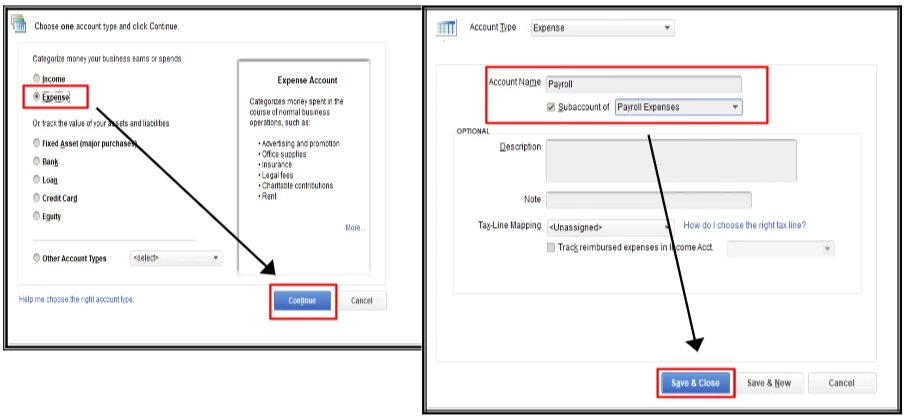
You can follow the same steps to set up all the required accounts for each payroll income, deduction, contribution, and liabilities. Once completed, you can make a journal entry to record your employee's deductions, contributions, and liabilities. Follow these steps:
Please note that JE will not reflect on any payroll forms. You can also consult your accountant for assistance in recording the Journal Entry.
However, we can also utilize the manual payroll to track. But before we continue, I recommend enabling your payroll inside QuickBooks settings. I've added the article for you to check out: Set up manual payroll without a subscription in QuickBooks Desktop.
Don't hesitate to leave a reply if you still have questions about your payroll. Have a great day ahead, and take care.
Enter your E-mail address. We'll send you an e-mail with instructions to reset your password.