January 10, 2024
Solved

Text File w2 on Desktop

  • January 10, 2024
  • 3 replies
  • 0 views

How do I create the w2report text file for Missouri in Quickbooks Desktop. I can't find this anywhere.


Best answer by BigRedConsulting

Has anyone figured this out yet? We are also needing a txt file for MO.  I tried customer service twice yesterday.  The first rep put me on hold then hung up after disconnecting our screen share.  The second just wanted me to save the excel file as "W2REPORT" which obviously is not helpful.  I attempted to save the excel file as TXT but I can't imagine the result I got will be accepted by MoDOR.


It would be great if QB could post how to do this or at least inform their customer service department since I can't imagine MO is the only one who has this requirement AND MoDOR specifically says in their filing instructions to call support in order to create this file.


The second just wanted me to save the excel file as "W2REPORT" which obviously is not helpful.


To create the required W-2 file using the State W-2 report/file feature, you will first pull data from QuickBooks (a process that starts automatically when you launch the feature), which creates a worksheet like the one below, and you'll start an interview process that creates the required file for the state from that worksheet.


Once you've reviewed the data, then start the process to create an EFW2 file from the worksheet:

Pick Start Interview from the QuickBooks Payroll State W-2 menu that appears on the Add-ins tab:
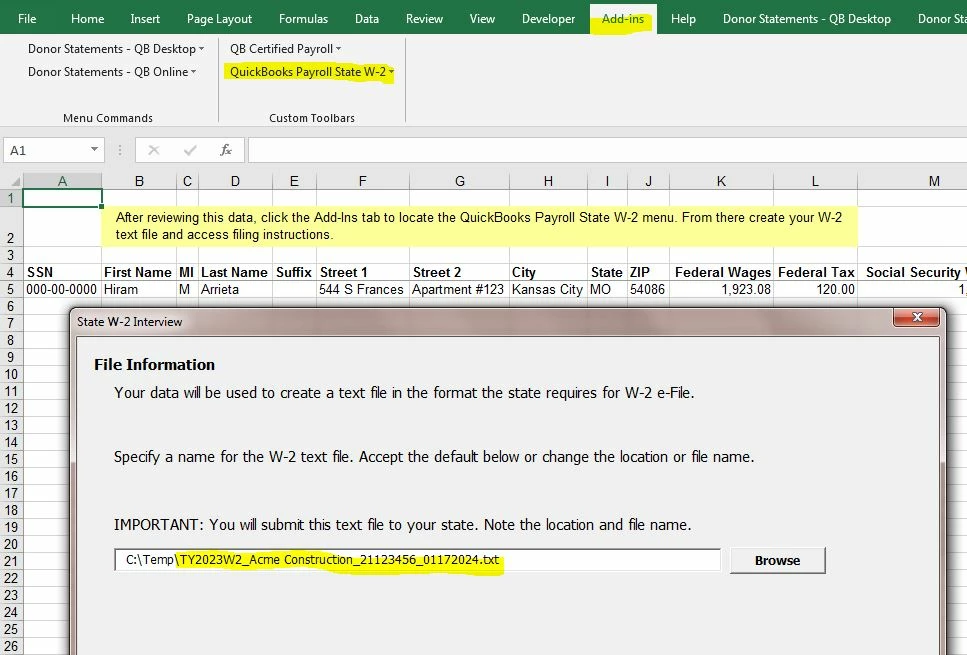
 

The feature behaves differently for different states. When I tried it for MO, it came up with a very specific file name, which I expect is because that is what MO wants.


It's that .txt file that should then be submitted to the state.  It is a W2REPORT file, also known as an EFW2 file.

3 replies

Nicole_N
January 11, 2024

I can help you create a W2 for Missouri State in QuickBooks Desktop (QBDT) Payroll, @DB Coop


You can choose either to create your W2s or file them electronically with QBDT Payroll. It depends on your state. In your case, we can manually create a W2 file you'll send to the state. Here's how:


  1. Go to the Employees menu, click Payroll Tax Forms & W-2s, and create State W-2 E-file.
  2. Tap Continue twice.
  3. Choose your state from the dropdown, then Get QuickBooks Data.
  4. Press OK. If you need to, fix any errors or add missing info.
  5. Select the Add-Ins tab to locate the QuickBooks Payroll State W-2 dropdown and choose Start Interview.
  6. Check the box I understand that I must review my data and answer the following questions. Then click Next.
  7. Note the file name and location. Select Next.
  8. Answer the questions in the interview and review any auto-populated info.
  9. Select Next until you reach the End of Interview.
  10. Choose Create W-2 File, then select OK.
  11. Select Yes to save the Excel workbook for your records.


For more information, see this link: File your state W-2s with Quickbooks Desktop Payroll Enhanced. 


I've also added this link if you need to set up a Federal e-file and e-pay in QuickBooks Desktop Payroll Enhanced.


Let me know in the comments below if you have other concerns about W-2s. I'll be here if you need me. 

January 11, 2024

Missouri has a specific file requirement.  The Missouri website states that EXCEL and PDF files generated from QuickBooks are not acceptable formats and cannot be uploaded.  A "W2REPORT" text file must be created and QuickBooks support must be contacted for instructions.  The instructions posted to the original question leads to an EXCEL file which cannot be uploaded.


BigRedConsulting
January 12, 2024

RE:  A "W2REPORT" text file must be created and QuickBooks support must be contacted for instructions. The instructions posted to the original question leads to an EXCEL file which cannot be uploaded.


The instructions in @Nicole_N 's answer will create a standard EFW2 file, a "W2REPORT" file, from the Excel worksheet you'll see, which you can use to review the data about to be added to the file.

January 29, 2024

When saving the file to a location you'll be able to find later when uploading to Missouri, just be sure to type .txt at the end of the file name.  Took me several hours to figure that out but was finally able to upload to MO after saving with that extension.

May 16, 2024

Wanting to chime in here because I fought with this for 4 days trying to scramble to get this to upload. I dont want anyone else to go through this lol..

GOAL: Submit STATE W2 .TXT FILE ONLINE


1. Make sure your QB is updated if your on Desktop go to Help>Update all on QBDT

2. Payroll center > File Forms at the top > then at the bottom E-File State w-2

3.It should export a file to excel and read the prompts itll advise you to start a interview on "add-ons" after you've exported everything over and it should prompt you to save your w2report.txt to upload to the state.