
Solved
The Payroll Tax Center is not offering me the option to "Pay Taxes" for the 941, which we pay on the semiweekly basis. Does show liability in the report.
Original commenter did not share additional details

Thanks for letting us know you're using QuickBooks Online Payroll (QBOP), @coopersr11. I'm here to route you to the right support to help resolve this issue.
You're on the right track in performing the steps provided by my peer above. Since these didn't work, I'd suggest contacting our Customer Care Team. From there, one of our representatives will securely access your account. They can check why the "Pay Taxes" option isn't showing in the To Do list or the Payroll Tax Center. They can also restore the missing option so you'll be able to pay your 941 semiweekly taxes to the IRS. Also, they can help confirm if it's good to pay them through EFTPS without messing up your accounting records. You'll first have to review our support hours to ensure we can assist you on time. I'll guide you how.
Once resolved, I recommend checking your 941 e-payment status. Just go back to the Payroll Tax Center and click View tax payments you have made. View the screenshot below for your visual reference. For more details, see the Check e-payment status section through this article: Review E-Filing Or E-Payment Status.
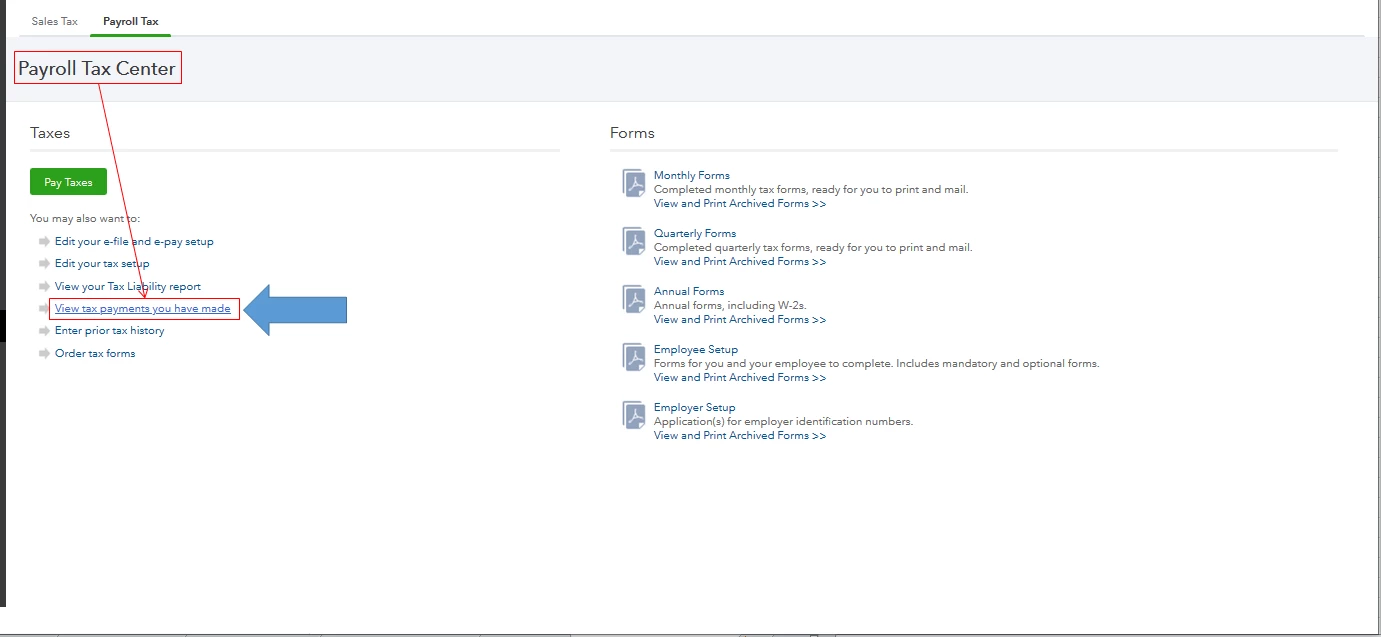
We always want to make sure we're compliant with the federal rules and regulations. With this, you can visit this website: Internal Revenue Service Payroll Tax Compliance. Just go to the 941 Payment section under Tax Forms. It also has in-depth details about the tax forms, withholdings, unemployment, other taxes, e-file, pay information, and the agency details.
Please know that I'm here anytime you need anything else. Keep safe always, @coopersr11.
Enter your E-mail address. We'll send you an e-mail with instructions to reset your password.