January 4, 2021
Solved

tracking paid time off

  • January 4, 2021
  • 1 reply
  • 0 views

I need help with tracking time off.  The employee has 90 hours of paid time off.

What do I need to do to track the time she takes off?

Is it done in her paychecks?  I read all sorts of comments but none explains what I need to do in QB payroll to note when the employee takes a day off.

I believe I set it up correctly, I just don't know how to track the time used...

Best answer by BigRedConsulting

QuickBooks actually handles sick and vacation for salaried employees quite well.

For salaried employees, when set up and use sick and/or vacation salary type items (not Hourly), QuickBooks will automatically split the employee's salary for you. And, then when you record the paycheck it will automatically update the vacation and sick balances, and print them on the pay stub.

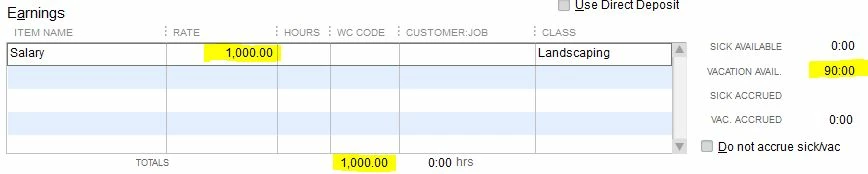
For example, if you have a salaried employee who is paid $1000 every week, then by default the paycheck earnings table will look like this:


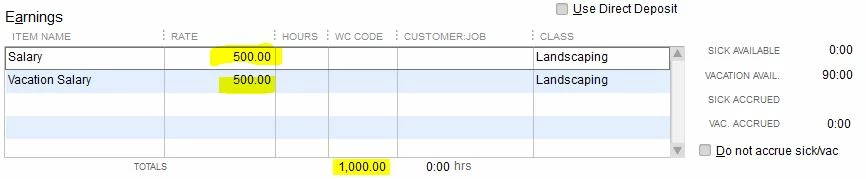
Then add the Vacation Salary item to the check. QuickBooks will split the salary in half so the total salary is the same, $1000:
 

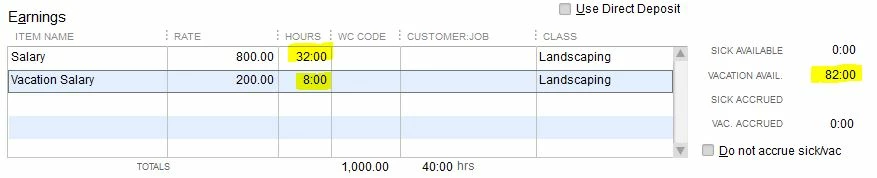
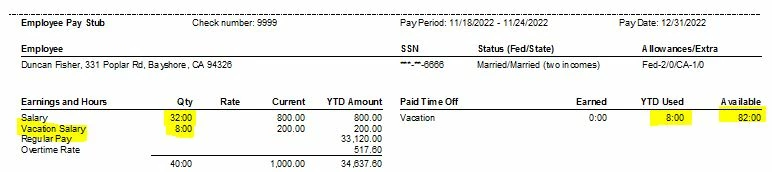
Next, based on the assumption that the salaried employee works a standard 8 hours per day (or, at least, that is how much vacation they use per day when they take it), enter the hours for each salary item, based on the number of vacation days. QuickBooks will recalculate the pro-ration based on these hours, and will reduce the Vacation available, in this case from 90 to 82 hours, and that will be printed on the paycheck stub:
1 reply

BigRedConsulting
January 4, 2021

To track sick and vacation pay and balances,

First, set up the balances and the accrual methods on the employee records.

Then, set up and use sick and vacation pay items (as you set up an hourly or salary item you can pick the type of item it is, whether regular pay or sick or vacation.)


If you have only one category of paid time off, PTO, then usually this is tracked as vacation and you can change the label that is used on pay stubs to PTO or similar in payroll preferences.

Chmm53Author
January 5, 2021

Thank you for answering.  I have never had to use sick and paid time off before and am really confused...  The employee has 90 hours of vacation time.  She gets a salary, not paid by the hour.  So, if she takes a day off, she gets paid anyway.  If I set up a payroll item for Vacation time, I would have to give it a Dollar amount per hour... and it would add it to her paycheck.... I just need to track how may hours out of the 90 she has used... Any idea? Thanks.

BigRedConsulting
January 5, 2021

QuickBooks actually handles sick and vacation for salaried employees quite well.

For salaried employees, when set up and use sick and/or vacation salary type items (not Hourly), QuickBooks will automatically split the employee's salary for you. And, then when you record the paycheck it will automatically update the vacation and sick balances, and print them on the pay stub.

For example, if you have a salaried employee who is paid $1000 every week, then by default the paycheck earnings table will look like this:


Then add the Vacation Salary item to the check. QuickBooks will split the salary in half so the total salary is the same, $1000:


Next, based on the assumption that the salaried employee works a standard 8 hours per day (or, at least, that is how much vacation they use per day when they take it), enter the hours for each salary item, based on the number of vacation days. QuickBooks will recalculate the pro-ration based on these hours, and will reduce the Vacation available, in this case from 90 to 82 hours, and that will be printed on the paycheck stub:

