January 19, 2021
Question

Vacation accrual not showing on pay stub

  • January 19, 2021
  • 1 reply
  • 0 views

Good Morning!

I'm wondering if you can help me again? We "dump" employees total PTO hours for the year on January 1.  Some of the employees pay stubs are showing their accrued amount and some are not? They are set up the exact same way? As I mentioned before, I just started using this feature at the end of 2020. I added hours for our sales department only for the end of 2020. It appears that those are the employees (sales dept) to which the "accrual balance" is showing on their pay stubs? I would like them to all show the same


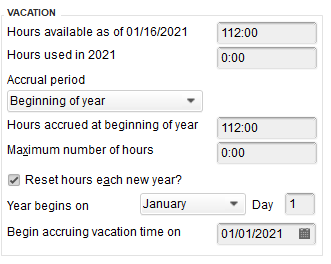
EE #1 - not showing accural on paystub
 

3.PNG

1.PNG


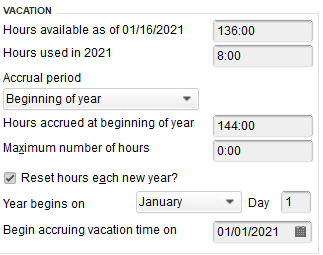
EE #2 - showing accrual

4.PNG

2.PNG

1 reply

January 19, 2021

Hello there, @brookeanne.


I can help you sort it out.


Let's make sure that the Do not accrue sick/vacation pay option is unchecked. You can go to the Paycheck Detail and review it from there.


Here's how:


  1. Go to the Employees menu, then select Employee Center.
  2. Choose the employee from the Employees tab.
  3. Find and select the paycheck you want to show the vacation hours taken. 
  4. In the Paycheck - Checking window, click Paycheck Detail...
  5. Uncheck the Do not accrue sick/vac option from the Review Paycheck window, then select OK.
  6. Click the Save icon from the Paycheck - Checking window.
  7. Select Pay Stub in the Print drop-down.
  8.  the Select Pay Stubs window, click Preview to make sure the vacation hours are showing, then select Print.

That will resolve it. You can view this article for more details: Sick and Vacation Time Incorrect or not Accruing on Paychecks.


In case you want to update the employees sick and vacation accruals, you can go to the profile to set it up.


Feel free to post it here if you have additional questions. I'll wait for your reply. Stay safe and have a great day!

January 19, 2021

That box is not checked nor was it ever checked? 

January 20, 2021

I’ve got you covered, @brookeanne.


Some details showed in the paystubs depend on the set up of your employees. You can customize their pay stub to display your preferred information, such as company addresses, sick and vacation details.


Here’s how:


  1. Go to Edit, then select Preferences.
  2. Click Payroll & Employees.
  3. Select the Company Preferences tab.
  4. Hit the Pay Stub & Voucher Printing button.
  5. In the Payroll Printing Preferences window, mark and unmarked the options you want to display.
  6. Press OK twice. 


You can also contact our Payroll Support to make sure it is set up appropriately. That way, all employees present the same information on their pay stubs. Here’s how:


  1. Select the Help menu.
  2. Click QuickBooks Desktop Help F1.
  3. Select Contact us.


Check out these resources to learn set preferences for payroll and how to customize their paycheck layout in QuickBooks Desktop Payroll. I’m sure you’ll find it helpful. 


If you have further questions about payroll, please reach out to us again. We’re always here to help you out. Have a good rest.