

June 27, 2023
Question

WA Cares not showing in paychecks

  • June 27, 2023
  • 2 replies
  • 0 views

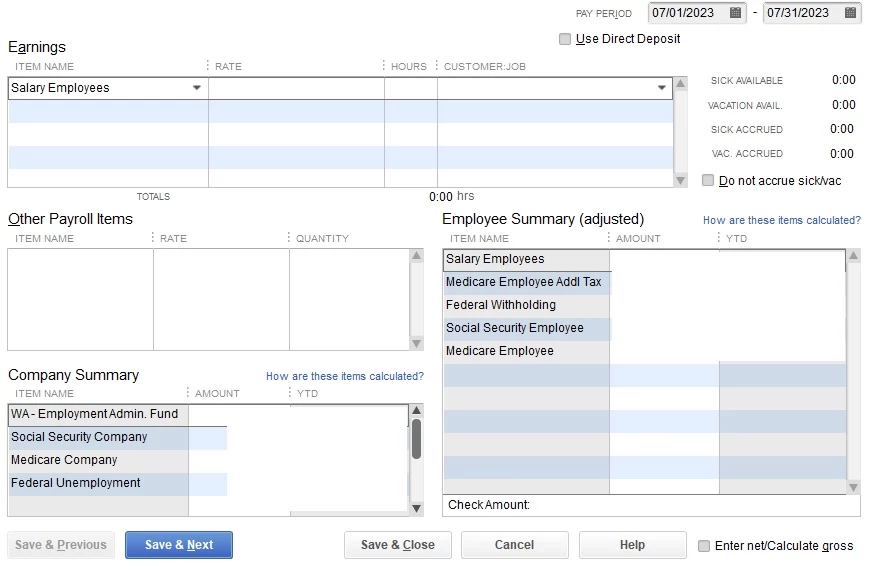
Using QB Desktop Pro Plus 2023 with Enhanced Payroll, I have the latest payroll update 22312. I followed instructions to set up WA Cares in Payroll Item list at 0.58% and added it for each eligible employee under "other taxes," but it's still not showing up in paycheck detail and the total paycheck amounts are the same as last month:
2 replies

June 27, 2023

It's a pleasure to have you here today, @TT1670.


I recognize the urgency of this matter, and I'm here to ensure you can get through this situation. Before anything else, I appreciate you for attaching the screenshot to your post, and because of this, I was able to think of a possible reason WA Cares doesn't show in your paycheck details. Please know that for them to show up in the paycheck details, you'll have to ensure that WA Cares is also in those eligible employees' profiles in the Payroll information section. I'll input the steps below to get you going:


  1. Go to Employees, then select Employee Center.
  2. Double-click your employee's name.
  3. Go to the Payroll Info tab.
  4. From Additions, Deductions, and Company Contributions, add the reimbursement item.
  5. Repeat steps 2-4 for each employee.


You can visit this article for more information: Set up Washington Cares Fund payroll tax.


Additionally, here's an article in case you'd like to modify and add more details to your report to ensure your data stays accurate inside QBDT: Customize reports in QuickBooks Desktop.


@TT1670, feel free to mention me in the comment section below if you need further assistance with this or have any additional QuickBooks-related concerns. I'll be here, ready to help you. Take care, and have a nice day! 

TT1670Author
June 28, 2023

@Kurt_Mthanks for the quick response. I followed the online instructions to set up the payroll tax:

And I did as you suggested and added WA Cares to the eligible employees' "Additions, Deductions, and Company Contributions." I had to add a new item in that window as "WA - Cares Fund" was not already an option like it is under the Payroll Item List.


I also ensured WA Cares was added under taxes:


I saved everything and tried doing both an unscheduled payroll and a scheduled payroll, but WA Cares is still not showing up and is not being deducted from the paychecks.

July 1, 2023

I also have my employees set up for this new tax, made sure it's correct in the Payroll Tax list, and have tried several scheduled & unscheduled paychecks...no WA Cares.


I've been using QB Desktop for over 25 years, I know how to add new taxes.  I started when I could enter the taxes manually every week and not pay exorbitant payroll fees so someone else can give me the tax amount for our 3 employees.  Everything is set up including the scheduled quarterly reporting and it's still not showing up on the paychecks. 


As employers, we're responsible for deducting this fee and now QB is so controlling, I'm not allowed to do it on my own.  I have to wait until someone comes back from the weekend and fixes this!  SOMETHING THAT SHOULD BE WORKING BY NOW!


Very frustrated QB customer

July 3, 2023

Here's the fix that I just learned!! 

  • Pull up your payroll (Employees/Payroll Center/Payroll Tab/ Pay Employees Tab)
  • Resume Scheduled Payroll
  • For the paychecks that the WA Cares is NOT showing on, right click, and select "Revert Paycheck". 
    • Repeat this for each necessary employee. 
  • Now that the paycheck has been reverted, pull up the employee again and verify that the deduction is now showing. 
  • Viola! 
July 6, 2023

Thank you KSchadel! This worked for me. The most recent staff we've hired weren't showing the deduction, but this work-around fixed it. How intuitive (HAHA)

July 6, 2023

You're so welcome! I couldn't keep the fix to myself, I'm so glad it worked!!