July 31, 2020
Solved

When running payroll, employees have hours entered from last pay period.

  • July 31, 2020
  • 1 reply
  • 0 views

I have added 2 employees and run payroll for the first week. Now everytime I run payroll the previous weeks hours are automatically entered for these 2 employees when I open up the paycheck detail. The rest of the employees do not do this, it is blank every time. It is only an issue because the hours worked are different every week and it is confusing. How do I correct this?


Best answer by MadelynC

I'll help you resolved this, @KJAuto.


To stop the previous weeks hours entered automatically, you'll have to update your payroll preference.


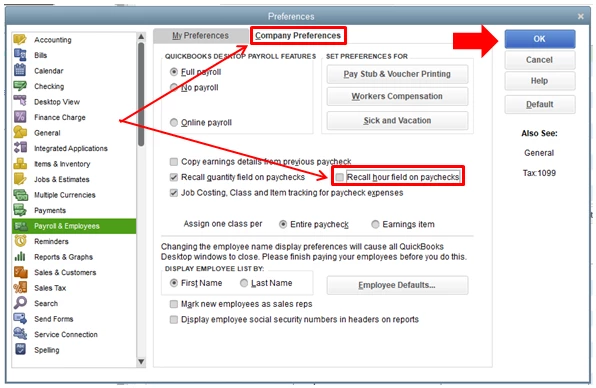
You'll want to unmark the recall hour field on the paycheck. This way, when you run payroll, the previous details won't automate. You can follow these steps below:


  1. Go to the Employees menu.
  2. Choose Payroll Center.
  3. Select the Payroll tab beside Transactions.
  4. Click Preferences at the top.
  5. Under Company Preferences, uncheck the Recall hour field on paychecks.
  6. Press Ok button.


After you run your payroll, you can use reports to review each detail entered in the system. This can help manage company headcount and give an overview of total labor hours, wages paid, and other useful statistics: Customize reports in QuickBooks Desktop.


If you have any other questions, please don't hesitate to reach out. I'm always here to help. Have a great day ahead.

1 reply

MadelynCAnswer
July 31, 2020

I'll help you resolved this, @KJAuto.


To stop the previous weeks hours entered automatically, you'll have to update your payroll preference.


You'll want to unmark the recall hour field on the paycheck. This way, when you run payroll, the previous details won't automate. You can follow these steps below:


  1. Go to the Employees menu.
  2. Choose Payroll Center.
  3. Select the Payroll tab beside Transactions.
  4. Click Preferences at the top.
  5. Under Company Preferences, uncheck the Recall hour field on paychecks.
  6. Press Ok button.


After you run your payroll, you can use reports to review each detail entered in the system. This can help manage company headcount and give an overview of total labor hours, wages paid, and other useful statistics: Customize reports in QuickBooks Desktop.


If you have any other questions, please don't hesitate to reach out. I'm always here to help. Have a great day ahead.

KJAutoAuthor
July 31, 2020

That did it. THANK YOU!!!!

July 31, 2020

Hi, KJAuto. 


I'm happy to see that my colleague was able to help you find a solution! If you need any help going further, don't hesitate to reach out here.


Thanks for your time and have a lovely weekend.