February 3, 2020
Solved

When the %$*@# is Intuit going to allow people over 50 to contribute the extra money ($6000 for 2019; $6,500 for 2020) to their 401k?

  • February 3, 2020
  • 1 reply
  • 0 views
Original commenter did not share additional details

Best answer by AlexV

There's a different way of setting up 401(k) Catch-up, craibuc.


The default limit for 401(k) is $19, 500. For employees over 50 years, we can set up 401(k) Catch-up for the additional $6, 500 for a total of $26, 000, which is the limit for the year 2020. 


401(k) and 401(k) Catch-up are two different payroll items. The screenshot you've provided is only for 401(k). You can follow these steps to add 401(k) Catch-up:
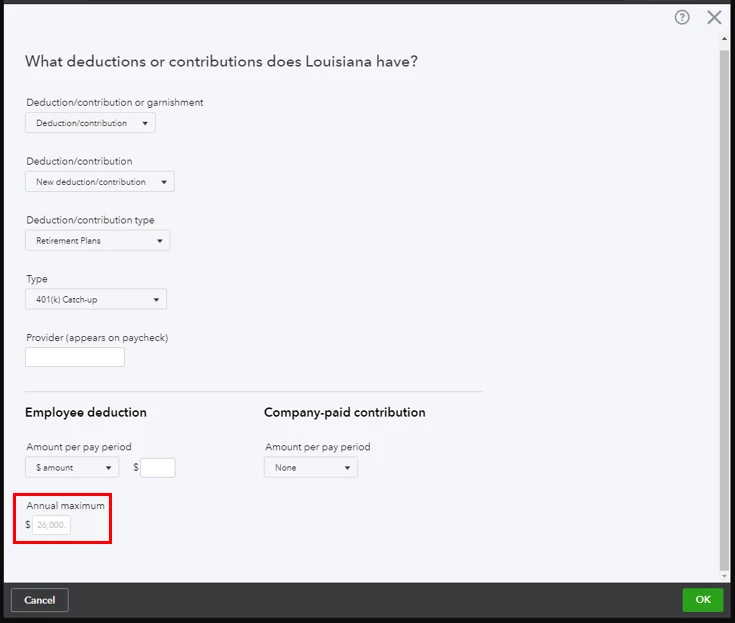
  1. On the employee profile, click +Add a new deduction.
  2. Select Deduction/contribution > New deduction/contribution > Retirement Plans401(k) Catch-up.
  3. Enter the other details needed, click OK to save.

You can also read this guide about payroll: Payroll 101.


Comment again if you have other concerns. I'll be here!

1 reply

February 3, 2020

Thanks for reaching out, @craibuc.


There are two limits for each retirement plan. One limit is for employees under 50 and the other is for employees 50 years of age and over. You can defer compensation limits that are a voluntary contribution to a savings plan designed for retirement income.


For further information please check out these articles:

Benefit Plan Contribution Limits for 2020

Retirement Plan Deductions/Contributions


If you need anything, I’m just a post away. I hope you have a great evening.

craibucAuthor
February 4, 2020

You will note (in the attachment) that the yearly limitation for 2020 is $19,500.  For individuals over 50, that should be $26,000.


Is there a way to fix this?


AlexV
AlexVAnswer
February 4, 2020

There's a different way of setting up 401(k) Catch-up, craibuc.


The default limit for 401(k) is $19, 500. For employees over 50 years, we can set up 401(k) Catch-up for the additional $6, 500 for a total of $26, 000, which is the limit for the year 2020. 


401(k) and 401(k) Catch-up are two different payroll items. The screenshot you've provided is only for 401(k). You can follow these steps to add 401(k) Catch-up:

  1. On the employee profile, click +Add a new deduction.
  2. Select Deduction/contribution > New deduction/contribution > Retirement Plans401(k) Catch-up.
  3. Enter the other details needed, click OK to save.

You can also read this guide about payroll: Payroll 101.


Comment again if you have other concerns. I'll be here!
