It's nice hearing back from you, @NMichRocks.
Let's get the 401 (k) contributions to show up as liabilities to pay.
Here are the possible reasons you're unable to see the 401 (k) liability amount:
• The scheduled payment wasn't set up.
• The posting liability account is incorrect.
• The payroll liability isn't active in the Chart of Accounts.
To help fix this, let's run the Payroll Liability Balances report. This way, we can check if the payroll item was correctly set up. Here's how:
1. Go to Reports menu at the top.
2. Select Employees & Payroll, then choose Payroll Liability Balances.
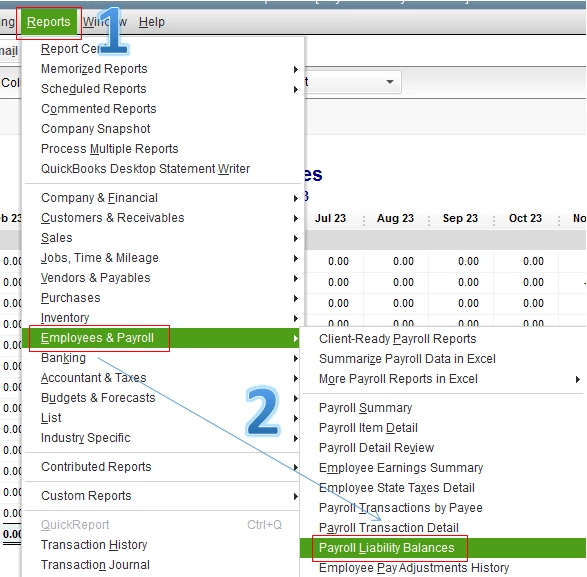
3. Check the amount of the payroll item. If it's negative, there is an overpayment.
If the payroll item is present on the report, you can create a payment schedule for payroll liabilities. Please take note that once you've set up a scheduled payment, it will no longer be removed. I'll guide you how:
1. Go to the Employees menu.
2. Select Payroll Center.
3. Click the Pay Liabilities tab.
4. At the bottom, under Other Activities, select Change Payment Method.
5. Go to Schedule payments, then select the tax liability you want to edit or schedule a payment for.
6. Select Edit.
7. Enter the appropriate information.
8. Select Finish, then click Finish Later.
If the payroll item isn't present on the report, it's possible that it was set up on the wrong account or inactive in Chart of Accounts. The posting liability account should have the Other current liabilities type. Here's how to check the liability account:
1. Choose Lists menu at the top.
2. Select Payroll Item List.
3. Right click the Roth 401 (k) item, then choose Edit Payroll Item.
4. Select Next.
5. Change the liability account to Payroll Liabilities or any Other Current Liability account available for this payroll item.
6. Click Next until you can click Finish.
For more details, you can check out this helpful article: Edit Payment Due Dates/Methods are Missing Some Benefits and Other Payments.
Feel free to also visit our page about the articles to get started with Payroll for future reference: Commonly used articles to get started with Payroll.
Stay in touch with me how it goes on your end, @NMichRocks. Feel free to click the Reply button below if you have follow-up concerns. I'm always here to help.

