August 18, 2021
Solved

Workforce

  • August 18, 2021
  • 1 reply
  • 1 view

I don't want Workforce available to my employees.  

I've entered all their e-mail addresses in their employee files and don't want to delete them.

Is there a way to opt out of Workforce as the employer?


Best answer by MaryLandT

Let me help you turn of Workforce so employees can't access their paychecks and W-2s online, HawkUtah.


You can start by having the latest maintenance release and the latest payroll updates. It helps pull up the Manage Payroll Cloud Services option where you can change the status.


Once done, here are the steps you can follow:


  1. In your QuickBooks Desktop company, select Employees, then Manage Payroll Cloud Services.
  2. If you don't see the Manage Payroll Cloud Services option, you don't have the latest QuickBooks Desktop release or the latest payroll updates.
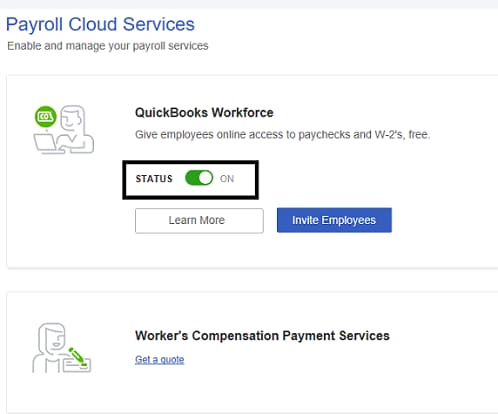
  3. In the Payroll Cloud Services window, under QuickBooks Workforce toggle the status to OFF.
    QBWF
  4. Follow onscreen instructions to complete the process.
     

In case you change your mind and want them to access their paychecks and W-2's online, you can invite them again. Check out this link for instructions and detailed steps: Invite your employees to QuickBooks Workforce.


For future help, here are some articles to help you get ready during tax season: 

Let me know if there's anything else I can do to help you with concerning payroll. I'm here to lend a hand. Take care and have a great day.


1 reply

MaryLandT
MaryLandTAnswer
August 18, 2021

Let me help you turn of Workforce so employees can't access their paychecks and W-2s online, HawkUtah.


You can start by having the latest maintenance release and the latest payroll updates. It helps pull up the Manage Payroll Cloud Services option where you can change the status.


Once done, here are the steps you can follow:


  1. In your QuickBooks Desktop company, select Employees, then Manage Payroll Cloud Services.
  2. If you don't see the Manage Payroll Cloud Services option, you don't have the latest QuickBooks Desktop release or the latest payroll updates.
  3. In the Payroll Cloud Services window, under QuickBooks Workforce toggle the status to OFF.
    QBWF
  4. Follow onscreen instructions to complete the process.
     

In case you change your mind and want them to access their paychecks and W-2's online, you can invite them again. Check out this link for instructions and detailed steps: Invite your employees to QuickBooks Workforce.


For future help, here are some articles to help you get ready during tax season: 

Let me know if there's anything else I can do to help you with concerning payroll. I'm here to lend a hand. Take care and have a great day.
