Hello... is there any fix to this year please? I have the same problem.
Thanks for joining on this thread, @LouLou65.
I appreciate you for following up on this investigation. Let me share with you some tricks that you'll want to follow. This way, the new tax year button will appear in your account.
The investigation status mentioned above is already closed and resolved. Let's try the workaround provided by our product engineers to resolve the issue. To progress into the new year, you'll need to roll back the monthly payroll, then re-run and submit FPS (Full Payment Submission) filings, an EPS (Employer Payment Submission).
Here's how to Standard Payroll:
- Go to the Payroll menu, then click the recent period in the Payroll History.
- Tap Actions drop-down and choose Delete payroll.
- Type Yes in the box and click Delete.
![]()
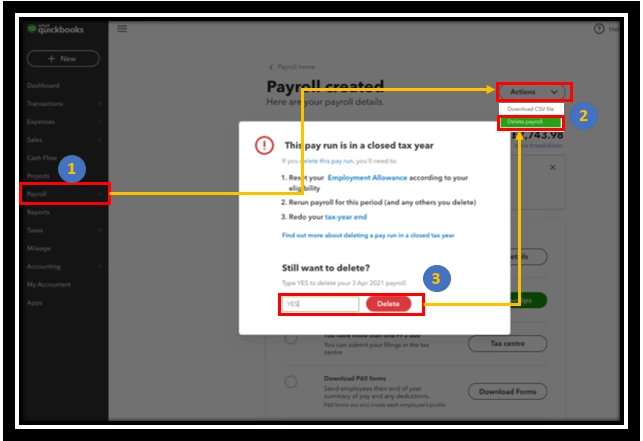
After deleting the payroll, the EPS filing will be deleted in the system if you didn't pay it yet. But if you already create a new payroll payment, then the FPS will override the EPS on record with HMRC. You may refer to this article: Delete a pay run.
For Advanced Payroll:
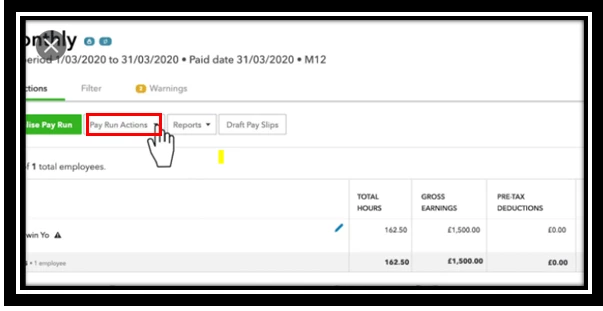
- Click on the required pay run in the Pay Runs screen.
- Tap on Pay Run Actions, then choose Unlock.
![]()
3. Enter the reason and choose OK.
4. Go to the unlocked payroll, then select the Delete Pay Run button.
5. Tap Delete.
You can go back to the current period and your figures will be updated and most importantly, your FPS to HMRC will be updated too. Check out this page: Unlock or delete a pay run.
Once done, re-run the payroll and the new year should then be available.
Feel free to visit these articles about handling your new tax year payroll and other related topics.
Fill me in if you have any other questions about QBO Payroll. I'll be around to help you out. Keep safe and healthy.

