I admire you for going through the steps shared by my colleague above, Martin.
Allow me to join you in this thread and help you update your employees' payslips address.
The Payroll Settings option is only available in the QuickBooks Online (QBO) Plus version. To ensure you'll run your payroll seamlessly, I suggest logging out and logging in to your account.
This refreshes your QBO and ensures the changes you made are in effect. Once done, you'll want to download your employees' payslips to double-check. Let me show you how.
- Go to the Employees or Payroll menu.
- Click the Payroll tab.
- Select Pay your Employees.
- Click Review Payroll.
- Select the employee whose payslip you want to view, then click Download Payslip.
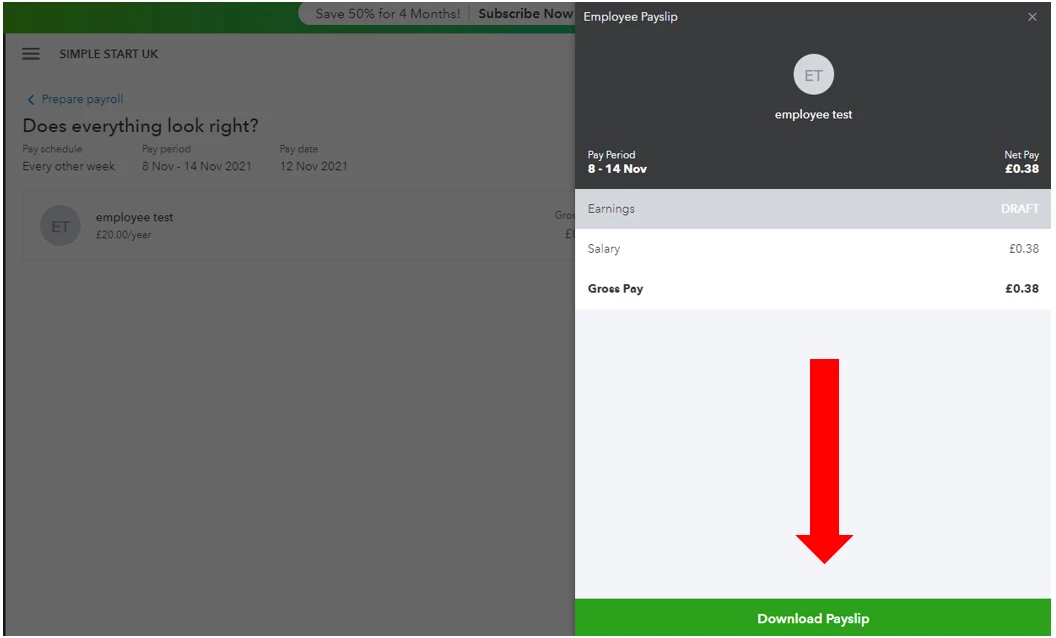
Once you're all set, you can now efficiently process your payroll whenever you're ready.
In case you need more help with your employees and payroll, you're always welcome to tag me in your reply. I'll be here to assist you. Keep safe!

