

May 17, 2021
Question

Advanced payroll furlough holiday top up

  • May 17, 2021
  • 1 reply
  • 0 views

I am trying to automate the Annual Leave / Holiday pay top up 20% for staff on furlough.

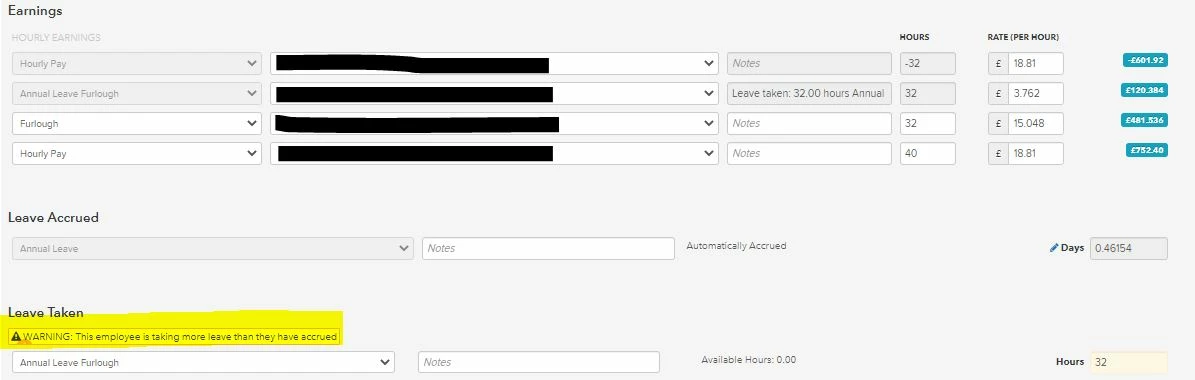
I can get the pay correct, but am unable to get the Leave balance correct.


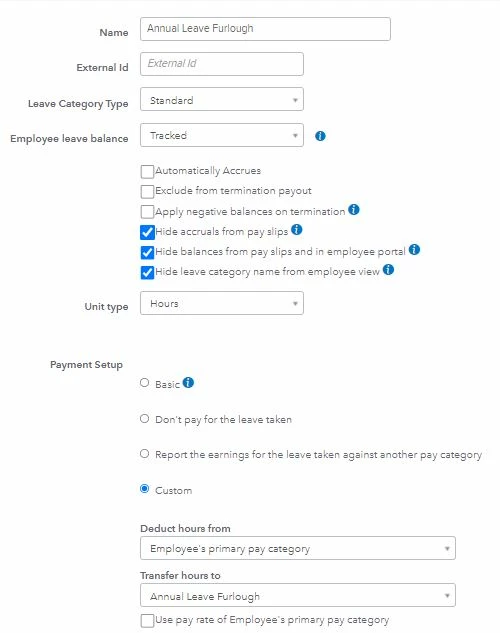
I have created an Annual Leave Furlough category of Leave (as opposed to the standard Annual Leave category), with a pay rate at 20% of normal pay rate. By doing this I am able to automate the correct rate of pay for the top up, as well as adjust the normal pay hours accordingly, simply by adding Take Leave, Annual Leave Furlough and entering the relevant hours/days.


My only problem is that I can't find a setting which gets the Days/Hours Furlough leave taken off of the Annual Leave Balance, rather than creating a negative Annual Leave Furlough balance.


Income lines of pay run shown below:


Leave category setting below.


If I can't get the Leave balance correct (in this case deduct 32 hours from annual Leave balance) then it looks like I am going to have to turn leave tracking off and continue to track it manually as we have always done. The rest of the payroll works fine using the above settings.


Any help would be most appreciated.

1 reply

May 18, 2021

I'll share some information about this, @csacs100.


I understand that the setup should track and deduct your leave balance. However, how QuickBooks calculates it is working as design. You can either add it as earning items or continue to track it manually.


Refer to this article for adding earning lines to a pay run in QuickBooks Online Advanced Payroll.


If you need further assistance with the setup, please contact our Payroll Support. They can guide you through the process. Here's how to reach out:


  1. Go to Help at the top.
  2. Scroll down and tap Contact Us.
  3. Enter "annual leave" in the field, then select Let's talk.
  4. Click Chat.


As always, feel free to visit our page if you need help with other payroll tasks. Just look for topics that fit your concern. Here's the link: QuickBooks Online Advanced Payroll hub.


Please know that you're always welcome to post or reply anytime if you have other questions or concerns with payroll. I'm more than willing to assist you. Take care and have a good one.

csacs100Author
May 18, 2021

Thank you for your response ShiellaGrace,


If I am unable to allocate my Annual Leave Furlough days to my Annual Leave balance then there is no point in tracking holidays in Advanced Payroll.  If the system is designed not to assist with this type of thing then that is a flaw in the design, in my opinion.


Adding an additional line of income does not resolve the Leave balance issue. If I add it as Annual Leave then the system will want to pay annual leave at normal pay rate, not the 20% rate and using the Take Leave option prevents me from changing the rate of pay for Annual leave. 


There must be thousands of businesses with the same issue and I was hoping somebody who has been using Advanced Payroll for an extended period would have worked out a solution and would share it.


It is possible there is another way of getting Furloughed Annual Leave to calculate at the correct rate (currently 20% of normal wage, though this will change in July and again in August so pay rates for all staff will need to be amended manually twice) and adjust the Annual Leave days balance, but it would appear that Quickbooks is unwilling to make that information freely available, if it is indeed possible, or to amend the design to cope with this if it is not currently possible.


I am sure I am not the only business with this requirement.

May 18, 2021

Hi csacs100

You can create an additional leave catorgory set this to auto accrue and enter how much you want it to accrue for
Use pay rate of the employee's primary pay category for transferred earnings line and apply againts the pay catogry if you wish,

This will show on payrun as leave accrued and can edit as needed