Solved
Can someone tell me how to generate a p45 on Payroll Advanced?
Original commenter did not share additional details


Hi there, josiecantelowes.
I'm here to ensure that you'll be able to generate a p45 in QuickBooks Online Advanced Payroll.
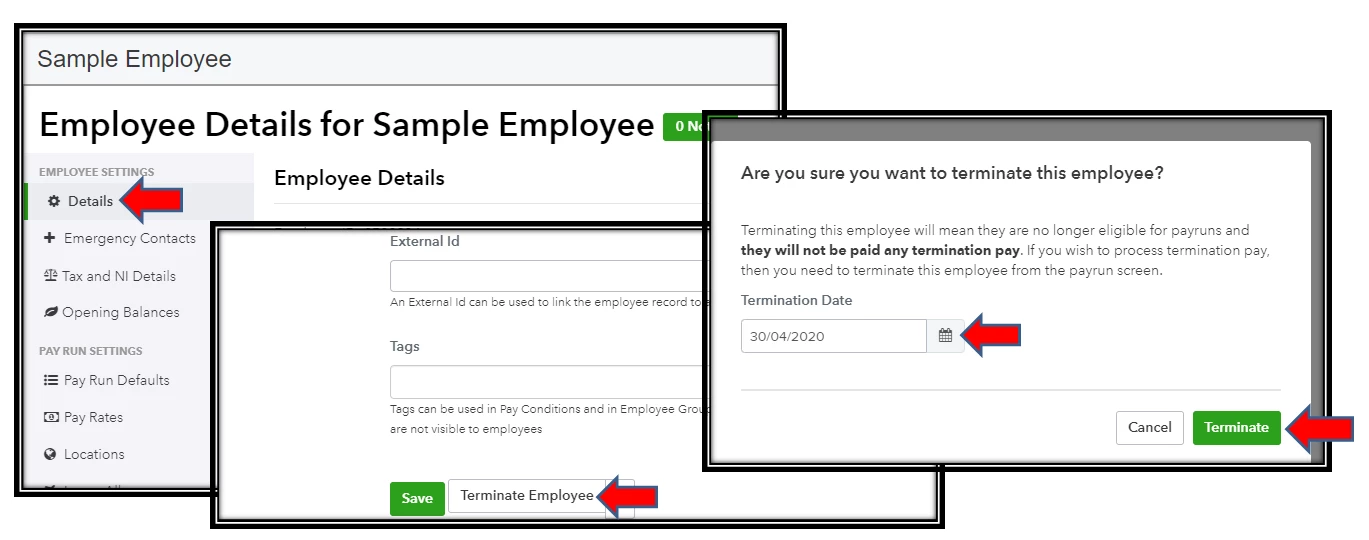
We will need to terminate the employee first afterward that would be the right time to run payroll if they're still included in that pay period. In terminating the employee, we can do it within the employee details. Let me guide you how:
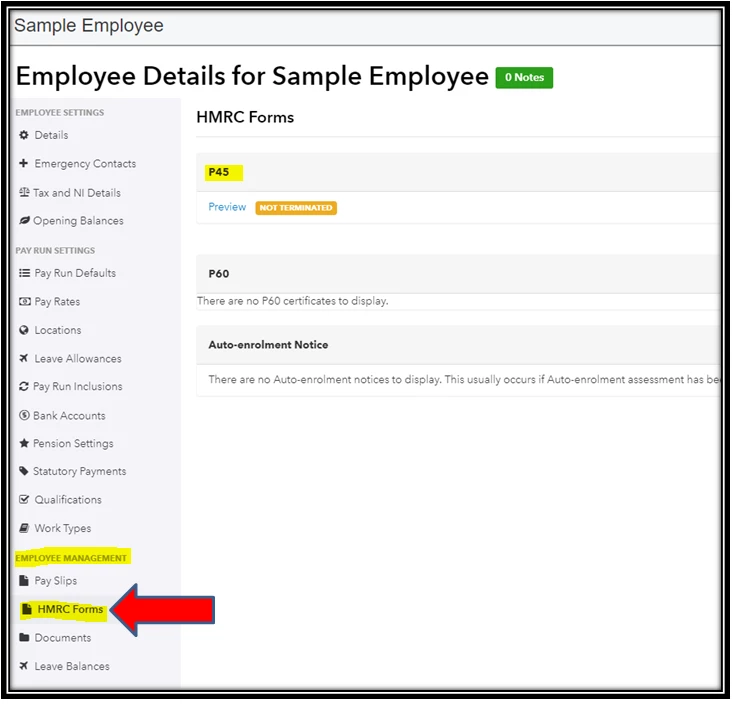
After terminating and running payroll to this employee, let's go back to the employee's profile to check the p45 form. Within the details of your employee, select HMRC Forms under Employee Management. From there, you'll be able to review it.
You may also want to visit these articles. Each of them contains information about QuickBooks Online Advanced Payroll, such as managing your payroll settings and others.
If you still have questions about forms, please get back to me anytime. I'm willing to guide you further. Keep safe, and be well!
Enter your E-mail address. We'll send you an e-mail with instructions to reset your password.