Solved
Have added another employee now and want to him for Jun 19 pay. Please advise how to run additional pay run for Jun 19 which i have already run on 30 Jun 19
Original commenter did not share additional details


Greetings, @SM02.
If you're using QuickBooks Online Payroll (QBOP), you only have one submission per pay period. In this case, you'll need to delete the previous payroll and recreate them with the new employee. This way, you can redo the FPS when submitting it to HMRC.
Before we proceed with the steps, make sure to print out all the payslips and payroll reports. Then, you have all the information needed for all the employees.
To delete the payroll:
1. Go to Employees from the left menu.
2. Select Payroll.
3. In the Payroll History section, choose the most recent period.
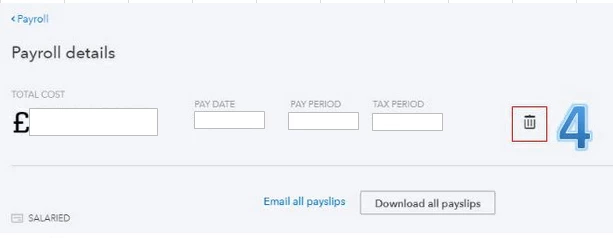
4. On the Payroll details page, click the Bin (trash) icon.
5. Read through the checklist and enter Yes in the box.
6. Click Delete.
Once deleted, you may now proceed on recreating them again with the new employee. Then, resubmit the FPS to HMRC. Consider checking out this article for the detailed steps:
On the other hand, if you're using PaySuite, I highly suggest contacting our Phone Support team. They have the specialized tools to roll back your submitted pay run.
Keep me posted on how everything goes in the comment section. I'm only a post away if you have any additional questions. Have great day!
Enter your E-mail address. We'll send you an e-mail with instructions to reset your password.