June 22, 2020
Solved

Maximum Allowance for SSP

  • June 22, 2020
  • 1 reply
  • 0 views

I have an employee who has reached his maximum allowance for SSP, but payroll is still generating a payment to him when I understand it should be £0?


Best answer by IamjuViel

Hello, @grahamjburley.


Let's try to isolate this unexpected behaviour by accessing your account using an incognito/private browser for possible browser-related.


Here are the corresponding hotkeys you can use:

  • Google Chrome: press Ctrl + Shift + N
  • Mozilla Firefox: press Ctrl + Shift + P
  • Safari: press Command + Shift + N

Once logged in, let's first make sure that your employee's information is set up properly. Here's how:
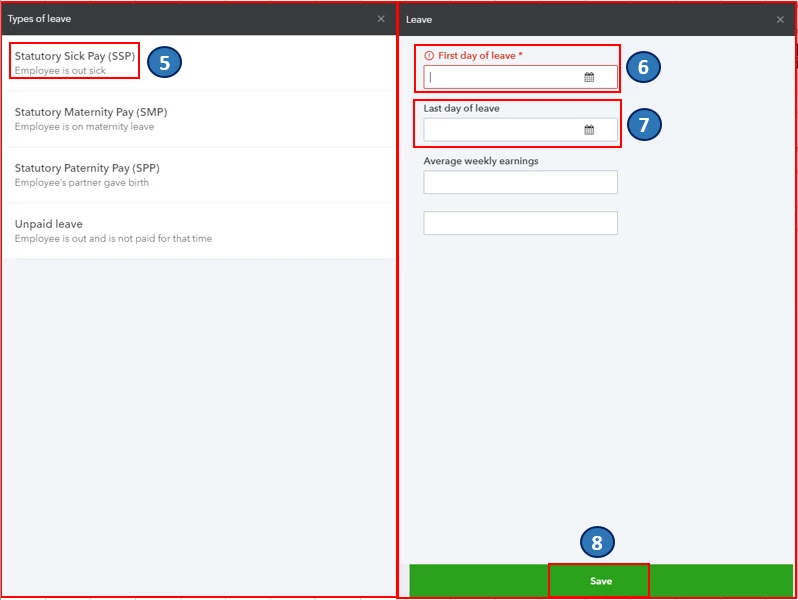
  1. Go to the Employees menu.
  2. Select Employees.
  3. Choose the applicable employee.
  4. Click the Actions drop-down arrow, then select Employee's Leave.
  5. Select Statutory Sick Pay (SSP).
  6. Enter the First day of leave by clicking the calendar button.
  7. If you’re unsure about the Last day of leave, you can choose to set the end date to the best of your knowledge.  
  8. Click Save

Once reviewed, let's try to run payroll again. If it calculates your employee's payroll correctly, you can clear your browser's cache and cookies. The stored browsing history can get corrupted and could cause unexpected behaviour. You can read through these articles for more guidance in managing your employees and payroll: 

Post again here if you have other questions. I'm just a few clicks away.

1 reply

June 22, 2020

Hello grahamjburley,


When your employee reached the maximum allowance for SSP, you can no longer pay them with SSP and will be prompted in the View Log page. Employees qualifying days pattern can be set up in Employee DetailsPay run Defaults, and Standard Work Week. Then, you can click on Advanced to edit the days your employee works. You can use this link for reference: Statutory Sick Pay (SSP) in QuickBooks Online Advanced Payroll.


Meanwhile, SSP is paid the same way as you pay the wages in QuickBooks Online Standard Payroll. As an employer, you will be responsibl efor paying the SSP to employees who meet the qualifications. You can use this link for reference: Statutory Sick Pay (SSP) - employer guide.


To know more about it you can browse these articles: 

Keep us posted if you need additional assistance with this. Have a great day!

June 23, 2020

Hi James,

I am using Standard payroll and have just started using this in the new tax year. The employee in question started their SSP period before hand and despite putting the correct number of days it is still putting the SSP in.

Graham

IamjuViel
IamjuVielAnswer
June 23, 2020

Hello, @grahamjburley.


Let's try to isolate this unexpected behaviour by accessing your account using an incognito/private browser for possible browser-related.


Here are the corresponding hotkeys you can use:

  • Google Chrome: press Ctrl + Shift + N
  • Mozilla Firefox: press Ctrl + Shift + P
  • Safari: press Command + Shift + N

Once logged in, let's first make sure that your employee's information is set up properly. Here's how:

  1. Go to the Employees menu.
  2. Select Employees.
  3. Choose the applicable employee.
  4. Click the Actions drop-down arrow, then select Employee's Leave.
  5. Select Statutory Sick Pay (SSP).
  6. Enter the First day of leave by clicking the calendar button.
  7. If you’re unsure about the Last day of leave, you can choose to set the end date to the best of your knowledge.  
  8. Click Save

Once reviewed, let's try to run payroll again. If it calculates your employee's payroll correctly, you can clear your browser's cache and cookies. The stored browsing history can get corrupted and could cause unexpected behaviour. You can read through these articles for more guidance in managing your employees and payroll: 

Post again here if you have other questions. I'm just a few clicks away.