

October 24, 2022
Solved

Payroll Bankline Payment File

  • October 24, 2022
  • 1 reply
  • 0 views

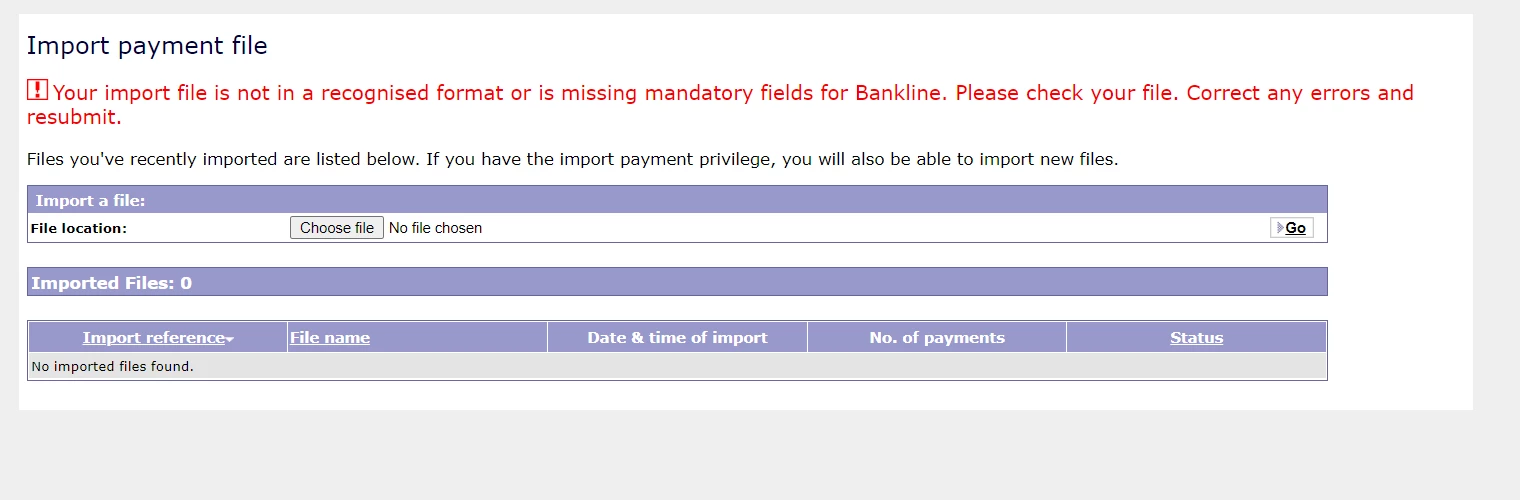
I have run my October payroll and am trying to create a payment file for Natwest Bankline. I have entered my bank account details into the Payroll payment settings and when I click Download Payment File link I can generate a .csv file. When I try to import this into bankline I get the following error:

Has anyone seen this and resolved it?
Best answer by pamelaTW

Hi pamelaTW, thanks for getting back to us with that information - we currently only offer CSV format payment files for Natwest Bankline - are you saving as a text file on Excel using a Windows or Mac device? 


Thank you for your response. I have managed to resolve this by taking the following steps: (I am using Windows 10)

Export .csv file and save

Locate file and open with Notepad

Save as .txt file.

The file is now in the correct format for NatWest Bankline.


Thank you,

1 reply

October 24, 2022

Welcome to the Community, pamelaTW.


I'll share some information to help you in importing your payroll bankline payment file into QuickBooks Online.


You can currently import payment files in BACS format using QuickBooks. The error may have been caused by downloading a bank-specific format from Natwest Bankline. To fix this, I advise contacting Natwest bank to resolve this as the error you encountered was caused by a file format that isn't supported by QuickBooks.


Once you have the supported file format, please follow these steps to import them:


  1. From the left menu, select Payroll.
  2. Click the Pay Runs tab, then enter the pay period you need.
  3. In the Actions tab, select Download Payment File.
  4. Click the Payment File settings, then locate the payment file to use.
  5. Follow the on-screen instruction to complete the process.


I've also included the following article to help you if you need to adjust the pay schedule in QuickBooks Online: Edit your company pay schedule in QuickBooks Online Standard Payroll.


If you need anything else, let us know. We're always available to help you.

pamelaTWAuthor
October 25, 2022

Hello,

Thank you for your swift response. I have not downloaded anything from Natwest, I went through the steps detailed to create my payment file.

Payroll > Payroll Settings > Payment Settings

I then entered my bank account details and select the file format NatWest BankLine CSV payment file.

When I had completed the payment run, I clicked the Downloand Payment File link and saved the export as a .csv.

When I import the .csv to bankline it says the format is not valid. I contacted BankLine who requested I save the export as .txt and retry the upload. This was when I got the error in my screenshot regarding missing or invalid information.

Please can you help me fix this?

Thank you


October 25, 2022

Hi pamelaTW, thanks for getting back to us with that information - we currently only offer CSV format payment files for Natwest Bankline - are you saving as a text file on Excel using a Windows or Mac device?