January 25, 2021
Solved

Payroll Taxes are not shown in P&L Statement

  • January 25, 2021
  • 1 reply
  • 0 views

Hi there, hope you are doing well.


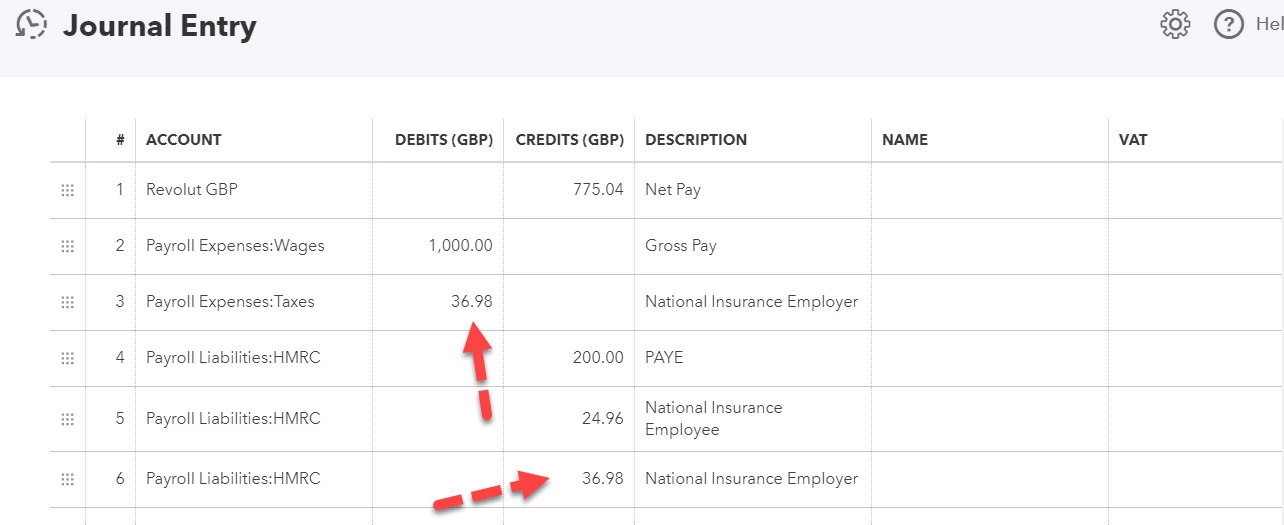
I have an issue with tax appearance in P&L Statement. The National Insurance Employer Tax that we pay is not shown in the P&L. I attached a screenshot of how by Journal Entry I've done payroll and a screenshot of the P&L report, where for some reason Tax is indicated as zero.


For example, we pay the employees Gross £1,000, plus NI Employer Tax £36 - so for this tax of £36 will be as an expense as well, but why it doesn't show on P&L?

Please tell me what I'm doing wrong?

Best answer by emmam6

I got you, Akmal. Let me help you resolve this.


The journal entry is recorded accurately. The payroll tax should show on the Profit and Loss report. 


I've replicated it on my end, and I was able to see the taxes on the report. You might be experiencing some web issues. It can be a reason why you're unable to see them. We'll perform a few steps to fix this.


Let's start with logging into your account through a private browser. It's the best place to identify browser hiccups. Here are the shortcut keys:

  • Google Chrome: press Ctrl + Shift + N 
  • Mozilla Firefox: press Ctrl + Shift + P
  • Safari: press Command + Shift + N

If you can see the payroll taxes using the private browsing session, go back to your regular browser and clear its cache. It helps us refresh the program.


On the other hand, you can also use a different browser to narrow down the issue.


Let me also add these articles for future reference:

Feel free to click the Reply button below after trying the recommended steps. We're right here to help you.


Hello Community Users, We just wanted to pop in and update this thread with the resolution as to why in this case the taxes were not showing on the p and l statement in the hope that it is helpful to future viewers of the thread. In this case the sub account that was set up and posted to was linking to a liability. This was corrected and the sub account was re-added and the Journal then posted as customer expected in the p and l.

Any questions or if you have a similar situation we'd be happy to help here at the Community.

1 reply

January 25, 2021

Hello Akmal, thanks for the screenshots, can we ask if you go to accounting>chart of accounts and payroll expenses taxes and account history can you see them in that account, and if so what kind of chart of account does it show as is it showing as an expense account or a liability?

akmalAuthor
January 26, 2021

Hi, yes I can see them in Payroll Liabilities account (attached a screenshot)


However, when I record them I added them to Payroll Expenses - Taxes account


Kristine Mae
January 26, 2021

I got you, Akmal. Let me help you resolve this.


The journal entry is recorded accurately. The payroll tax should show on the Profit and Loss report. 


I've replicated it on my end, and I was able to see the taxes on the report. You might be experiencing some web issues. It can be a reason why you're unable to see them. We'll perform a few steps to fix this.


Let's start with logging into your account through a private browser. It's the best place to identify browser hiccups. Here are the shortcut keys:

  • Google Chrome: press Ctrl + Shift + N 
  • Mozilla Firefox: press Ctrl + Shift + P
  • Safari: press Command + Shift + N

If you can see the payroll taxes using the private browsing session, go back to your regular browser and clear its cache. It helps us refresh the program.


On the other hand, you can also use a different browser to narrow down the issue.


Let me also add these articles for future reference:

Feel free to click the Reply button below after trying the recommended steps. We're right here to help you.