

April 15, 2022
Question

Serious bug in Payroll which affects accrual

  • April 15, 2022
  • 1 reply
  • 0 views

I think i've found a serious bug in Payroll Advanced which could potentially effect thousands of employers and employees!


My understanding is....


Under UK law holiday is accrued when a member of staff is taking annual leave, whether paid or unpaid. For example an hourly paid worker accrues 7 minutes of holiday per hour, or 56 minutes per 8 hour day.


In QB under Payroll > Payroll Settings > Pay Cateogries > Annual Leave Taken


There is a tick box that says Accrues Leave. When ticked, this should indicate that annual leave is accrued when annual leave is taken? Correct?
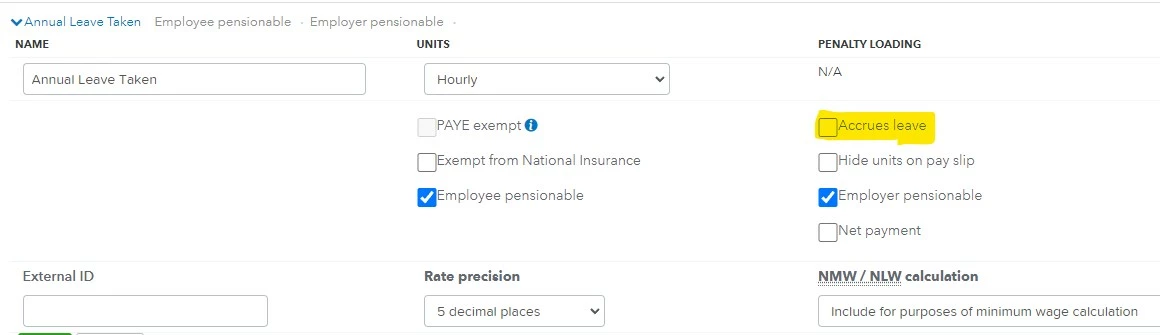


HOWEVER. It actually doesn't. Employees only accrue annual leave on holiday taken when this option is UNTICKED


I noticed this today when I had an employee who had 7.5 hours holiday accrued and wanted to take 8 hours holiday. When the box was ticked and I added the holiday I got a warning saying that the employee didn't have enough holiday. Which I thought was strange as adding the 8 hours holiday should have added another 56 minutes to his allowance, giving him over 8 hours holiday.


When I unticked the box, deleted and re-entered his 8 hours holiday it added the additional minutes accrued and the error message dissapeared.


Now either my understanding of this is all wrong or this is a serious bug?


1 reply

April 15, 2022

Hello there, @mdj101. Thanks for providing further details and screenshots.


There maybe be too many files in your cache storage that are causing unusual behavior. You can use a private browser to help QuickBooks perform efficiently. If you haven't tried it yet, you can follow the steps below.


Access QuickBooks in an incognito window:


  • Ctrl + Shift + N for Google Chrome
  • Ctrl + Shift + P for Firefox & Microsoft Edge
  • Command + Shift + N for Safari


If it works, you can go back to your original browser. Then, clear the cache. It lets your browser start fresh. If it persists, you can use compatible browsers with QBO


Also, I recommend contacting our Customer Care Team. They can further check and investigate why this odd behavior is happening on your end. Here's how:


  1. Sign in to your QuickBooks Online account.
  2. Go to the Help.
  3. Utilize the Contact us button.


Also, you'll want to check out these articles for additional details:


Please leave a comment below if you have any other issues or concerns. I'm always here to assist, mdj101.

mdj101Author
April 15, 2022

It's your answer to everything but never works!


This was already set up like this and I cahnged it in an Icognito window whilst on a screen share with one of your support staff.


There is no way that a Cache issue would cause a tick box to be the wrong way round, that's a back end coding issue or a text / wording issue for the action / box.

April 15, 2022

I appreciate your time doing the steps provided by my colleague, @mdj101. I'll point you in the right direction and help you proceed to your business work.


Since the suggested troubleshooting steps are not working on your end, we can try to contact our technical support team to further review this error in working your employee's annual leave.


You can contact them by:


  1. Go to your QBO company.
  2. Click the Help (?) button.
  3. Select Contact Us.
  4. Enter the error you encountered with the tick box for leave benefit, then select Let's talk.
  5. Choose a way to connect with us:
  • Start a chat with a support expert.
  • Get a callback from the next available expert.
  • Ask the community for help from businesses like yours.


Additionally, here are some of the articles for your reference that discuss more on how to manage your payroll in QuickBooks Online Advanced:


I hope they'll have a speedy recovery after the procedure! You can also include other future questions regarding QuickBooks Online payroll service.