April 15, 2020
Solved

We have changed to the new advanced payroll from paysuite, but the pension report does not show the correct pensionable earnings for the employees. Where can I find it?

  • April 15, 2020
  • 1 reply
  • 0 views
Original commenter did not share additional details

Best answer by Rea_M

Hello there, churnetvalleyboo.


I'm here to ensure you can find your employee's pensionable earnings. This way, you'll be able to keep track of your employee's transactions and 


You can monitor the correct amount of your employee's pensionable earnings by visiting the Pay Runs tab. Here's how:

  1. Go to the Employees menu.
  2. Select the Pay Runs tab.
  3. Click the pay run you want to view under the Pay Period column.
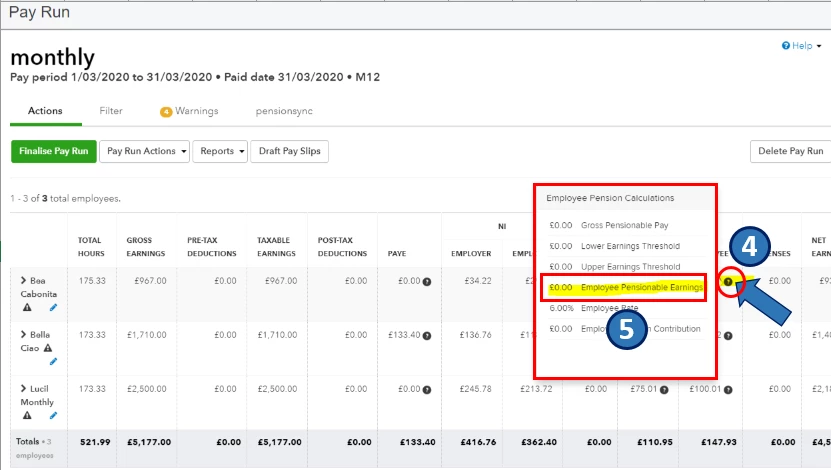
  4. Hover your mouse on the Question mark icon under the Pension column.
  5. In the Employee Pension Calculations pop-up, view the Employee Pensionable Earnings amount.

I've attached a screenshot below that shows the fourth to fifth steps.
Moreover, to learn more about reports and pensions in advanced payroll, kindly refer to the Reports & Pensions section in this article: QuickBooks Online Advanced Payroll Hub. It also contains related articles about managing your payroll settings and employees, processing pay runs, and payslips to name a few.


Please let me know if you have other concerns. I'm just around to help.

1 reply

Rea_MAnswer
April 15, 2020

Hello there, churnetvalleyboo.


I'm here to ensure you can find your employee's pensionable earnings. This way, you'll be able to keep track of your employee's transactions and 


You can monitor the correct amount of your employee's pensionable earnings by visiting the Pay Runs tab. Here's how:

  1. Go to the Employees menu.
  2. Select the Pay Runs tab.
  3. Click the pay run you want to view under the Pay Period column.
  4. Hover your mouse on the Question mark icon under the Pension column.
  5. In the Employee Pension Calculations pop-up, view the Employee Pensionable Earnings amount.

I've attached a screenshot below that shows the fourth to fifth steps.

Moreover, to learn more about reports and pensions in advanced payroll, kindly refer to the Reports & Pensions section in this article: QuickBooks Online Advanced Payroll Hub. It also contains related articles about managing your payroll settings and employees, processing pay runs, and payslips to name a few.


Please let me know if you have other concerns. I'm just around to help.

June 17, 2020

It would be really helpful if the pensionable earnings were either included in the Gross to Net report or Pension Contributions report that you can then download - the current format makes it really hard to extract the info.

Thanks
