December 17, 2020
Solved

quickbooks simple start

  • December 17, 2020
  • 2 replies
  • 0 views

where do i enter my clients purchase order number on the invoice in quickbooks simple start ?

Best answer by ReymondO

Hey there, @warren6.


I'll be glad to assist you in entering your client's purchase order number on your invoice.


You can use the Message on invoice field to enter this detail in your invoice. You can also use this field if you wanted to add more info to your sales transaction. Let me show you how:
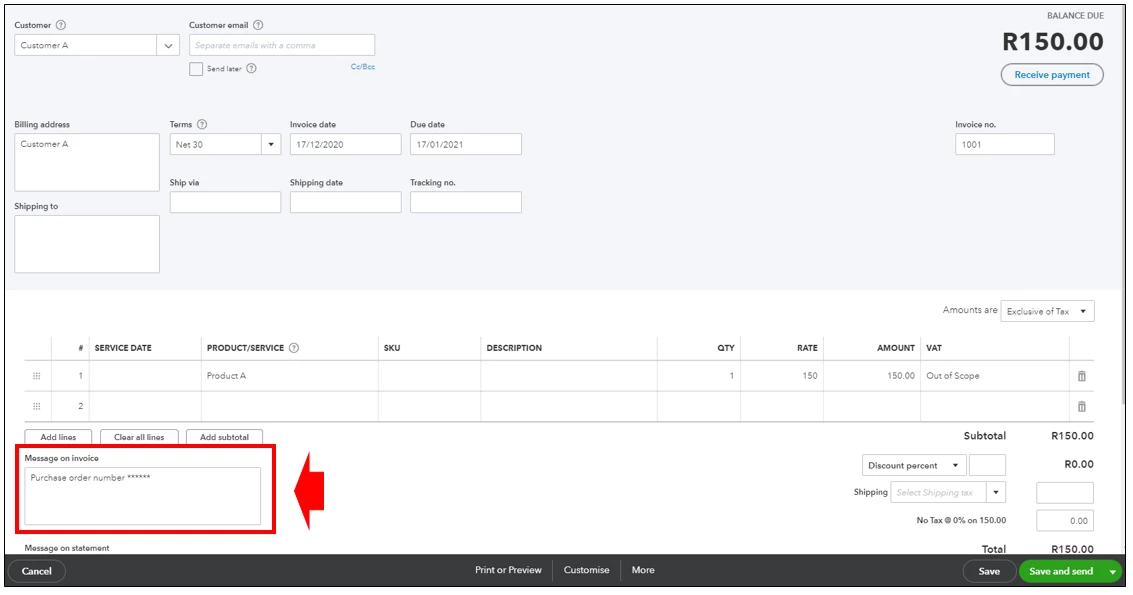
 

  1. Click the +New icon and select Invoice.
  2. Choose the name of your client in the Customer drop-down list.
  3. From the Product/Service column, select a product or service and enter a quantity, rate, and change amount if needed.
  4. In the Message on invoice field, add the purchase order number. 
  5. When you're ready to send the invoice, select Save and send

Please take note that before you get paid, QuickBooks puts open invoices into your Accounts Receivable account. You'll see this account on your Balance Sheet and other financial reports.


In case you need to inform your customers about their upcoming invoice due dates, here's how to send them a reminder message.


You're more than welcome to visit this thread again if you have other questions. Just add the details of your concern here and I'll help you out. 

2 replies

ReymondOAnswer
December 17, 2020

Hey there, @warren6.


I'll be glad to assist you in entering your client's purchase order number on your invoice.


You can use the Message on invoice field to enter this detail in your invoice. You can also use this field if you wanted to add more info to your sales transaction. Let me show you how:


  1. Click the +New icon and select Invoice.
  2. Choose the name of your client in the Customer drop-down list.
  3. From the Product/Service column, select a product or service and enter a quantity, rate, and change amount if needed.
  4. In the Message on invoice field, add the purchase order number. 
  5. When you're ready to send the invoice, select Save and send

Please take note that before you get paid, QuickBooks puts open invoices into your Accounts Receivable account. You'll see this account on your Balance Sheet and other financial reports.


In case you need to inform your customers about their upcoming invoice due dates, here's how to send them a reminder message.


You're more than welcome to visit this thread again if you have other questions. Just add the details of your concern here and I'll help you out. 

August 16, 2021

How do I login to my simple start account? 

August 16, 2021

Thanks for joining us here, @designershairstu.


I'll walk you through how you can access your QuickBooks Online Simple (QBO) Start account. Below are the easy steps.


  1. Go to https://quickbooks.intuit.com/za/quickbooks-login/.
  2. Tap Sign In at the top right portion of your screen or the QuickBooks Online button.
  3. Type in your User ID and Password.
  4. Click Sign In or press Enter on your keyboard.


With the above steps, you're able to access your account in QBO Simple Start. If you forgot your user credentials, just click the I forgot my user ID and Password link found at the bottom. See the image below.


That'll do it. Feel free to browse this link here if you need help managing your account. It has topics with articles that'll guide you along: Account management.


Drop a reply anytime if you still have questions or concerns with your account. I'll be here to help. Take care and stay safe.
