December 14, 2021
Solved

How do we issue invoices for sub-customers in the name of the parent customer?

  • December 14, 2021
  • 1 reply
  • 0 views
We have a parent customer with several sub-customers. We have individual invoices for each of the sub-customers which are sent to the parent customer. But the parent customer has requested that each invoice is issued in their name and not the individual sub-customers. How do we do that?
Best answer by alect

Hi there, @alect.


I've found a workaround you can use so you can generate an invoice with the parent customer's name on it. You may consider entering its full name in the sub-customer's information. Then, use the sub-customer's name as the display name. 
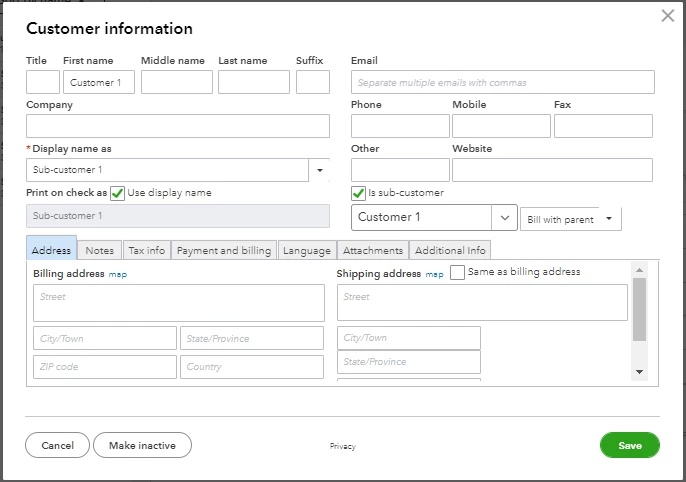
 

Here's how:

  1. Go to the Sales menu and select the Customers tab.
  2. Select the sub-customer's name and click Edit.
  3. Enter the parent customer's first, middle, and last name.
  4. Enter the sub-customer's name as the display name. 
  5. Click Save.


Once done, the parent customer's name will display on invoices. Check out this article to learn more on how a name is shown on the invoice: Use the bill with parent option on invoices.


You can also create a statement for your customer to send their outstanding balances or invoices.


Feel free to swing by if you have other questions about issuing an invoice. I'm more than happy to help.


Thanks - I stumbled on the workaround described under "Name to display on the invoice" by putting the Parent Customer Name in the Company field - which now displays on the invoices.

Thanks

1 reply

MaryLandT
December 14, 2021

Thank you for contacting us about issuing invoices to the parent customer, alect.


QuickBooks Online lets you use the parent billing option on your invoices. This method allows you to enter charges for a parent customer and a sub-customer. 


To do so, make sure to select the Bill with parent on the sub-customers profile. Let me guide you through the steps.


  1. Go to Sales from the left menu, then Customers.
  2. Find and open the sub-customer's profile.
  3. Click Edit.
  4. Select Bill with parent.
  5. Click Save.


I'm adding this link to learn more about this option: Use the bill with parent option on invoices in QuickBooks Online. It includes creating a delated charge and adding it to the invoice.


When customers pay their invoices, you can start recording their payments. Please browse this article for instructions and detailed steps: Learn how to receive and record invoice payments in QuickBooks Online.


Let me know if you have additional questions about issuing invoices to the parent customers. I'm always right here to help you.

alectAuthor
December 15, 2021

This doesn't help me.  I have that option set. The help links all talk about recording charges and delayed charges.  I already have the timesheet and charge data in invoices under each sub-customer.


Yet the invoice generated has the sub-customer's name on it.  How do I generate the invoice with the parent customer name on it?

LieraMarie_A
December 15, 2021

Hi there, @alect.


I've found a workaround you can use so you can generate an invoice with the parent customer's name on it. You may consider entering its full name in the sub-customer's information. Then, use the sub-customer's name as the display name. 


Here's how:

  1. Go to the Sales menu and select the Customers tab.
  2. Select the sub-customer's name and click Edit.
  3. Enter the parent customer's first, middle, and last name.
  4. Enter the sub-customer's name as the display name. 
  5. Click Save.


Once done, the parent customer's name will display on invoices. Check out this article to learn more on how a name is shown on the invoice: Use the bill with parent option on invoices.


You can also create a statement for your customer to send their outstanding balances or invoices.


Feel free to swing by if you have other questions about issuing an invoice. I'm more than happy to help.
