June 21, 2021
Solved

How to check if there are any Sales Receipts in Quickbook that's not being matched to actual bank transactions?

  • June 21, 2021
  • 1 reply
  • 0 views
Original commenter did not share additional details

Best answer by DivinaMercy_N

Welcome to the QuickBooks Community, @accounts-frostcr.


To clarify, are you referring to the sales receipts that haven’t cleared any of the bank accounts? If so, you can run a Transaction Report to view those transactions. Let me guide you on how:
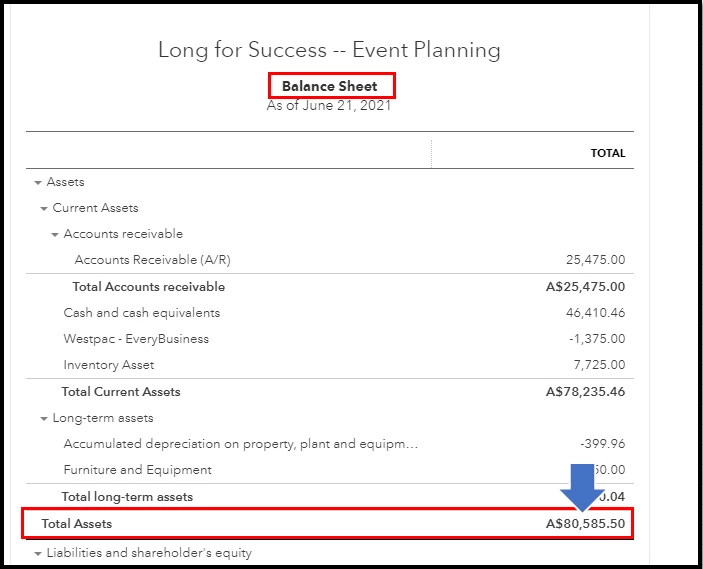
 

  1. Go to the Reports menu and choose Balance Sheet.
  2. Once opened, click the Total Assets amount
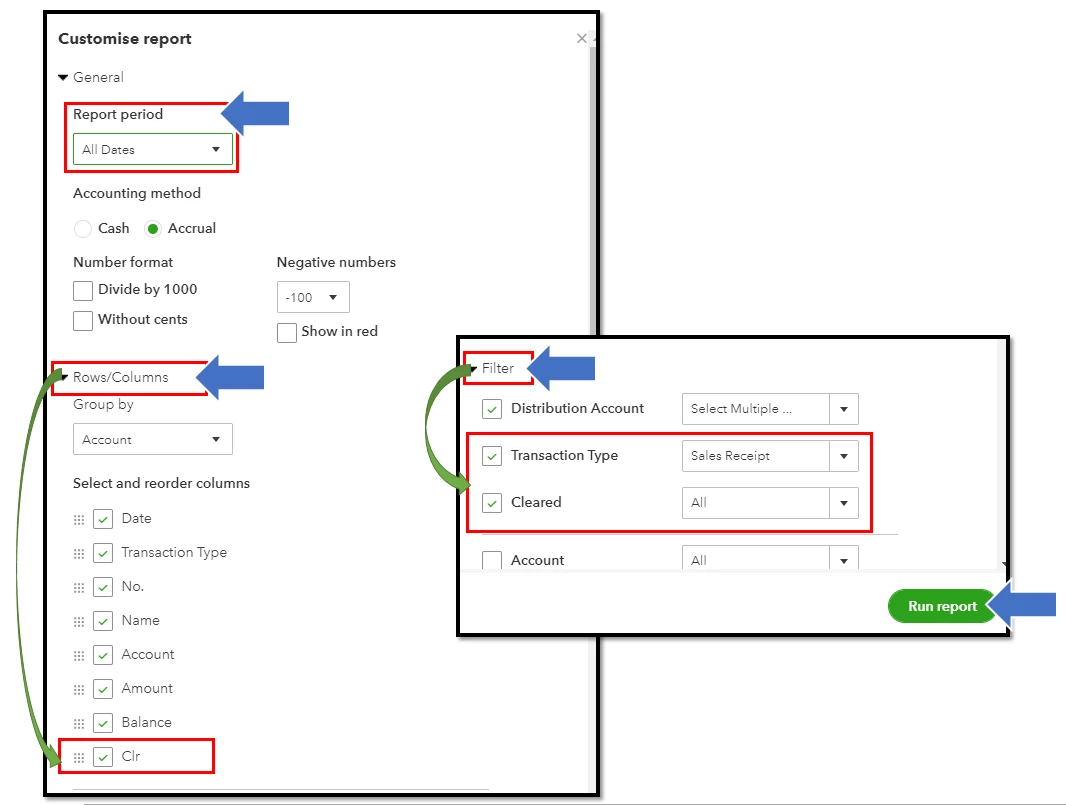
  3. Select the Customise button.
  4. From the Report period, choose All Dates.
  5. Next, go to the Rows/Columns field and check the box beside Clr
  6. Then, in the Filter section, check Transaction Type and choose Sales Receipts
  7. Check also the Cleared option. 
  8. Once done, click Run report


The report will let you see all the sales receipts that haven't been matched to any transactions on the bank statements (or haven't cleared the bank). If you want to view the details of the transaction, simply click the amount to open the Sales Receipt form. 
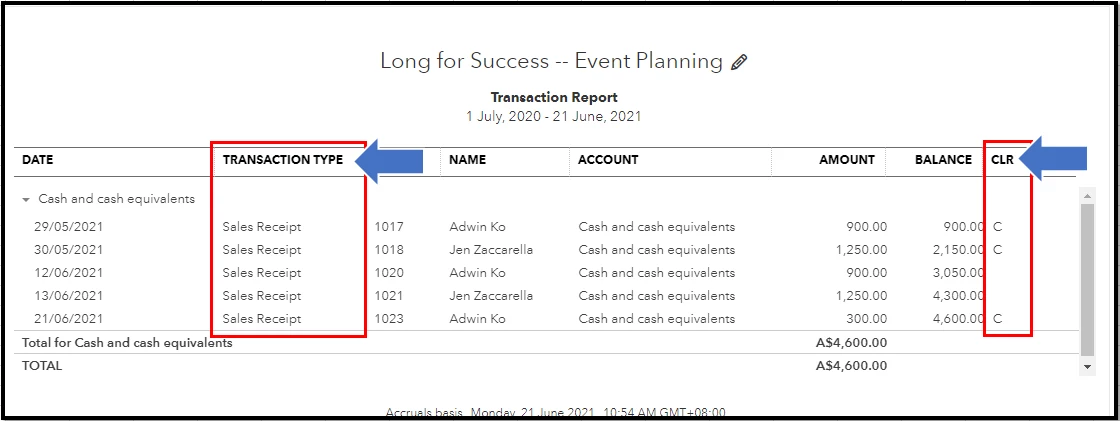
 

Also, QuickBooks Online (QBO) makes it easy to save your report customisation so you'll be able to use it in the future. To do so, simply click the Save customisation button in the reports window. 


If there is anything else I can do to help you in viewing sales receipts that haven't been matched in QBO, please post a response below. I'm always available to help in case you need it. Have a good one.

1 reply

DivinaMercy_N
June 21, 2021

Welcome to the QuickBooks Community, @accounts-frostcr.


To clarify, are you referring to the sales receipts that haven’t cleared any of the bank accounts? If so, you can run a Transaction Report to view those transactions. Let me guide you on how:


  1. Go to the Reports menu and choose Balance Sheet.
  2. Once opened, click the Total Assets amount
  3. Select the Customise button.
  4. From the Report period, choose All Dates.
  5. Next, go to the Rows/Columns field and check the box beside Clr
  6. Then, in the Filter section, check Transaction Type and choose Sales Receipts
  7. Check also the Cleared option. 
  8. Once done, click Run report


The report will let you see all the sales receipts that haven't been matched to any transactions on the bank statements (or haven't cleared the bank). If you want to view the details of the transaction, simply click the amount to open the Sales Receipt form. 


Also, QuickBooks Online (QBO) makes it easy to save your report customisation so you'll be able to use it in the future. To do so, simply click the Save customisation button in the reports window. 


If there is anything else I can do to help you in viewing sales receipts that haven't been matched in QBO, please post a response below. I'm always available to help in case you need it. Have a good one.

June 21, 2021

Thank you! That was very helpful!

June 21, 2021

You're welcome, accounts-frostcr!


Let us know if you have other concerns. Have a great day!
