September 3, 2020
Solved

I have paid for existing company activation. making the payment I did as new one. advise me how transfer payment to my existing company ID

  • September 3, 2020
  • 2 replies
  • 0 views
Original commenter did not share additional details

Best answer by Rose-A

Hi, Ansoff Business Solutions.


To ensure you're paying the right subscription, I'd suggest getting in touch with our QuickBooks Support. All account-related concerns are directed to our customer service for security purposes.


Agents have the necessary tools to look into your account in a secure environment. They can cancel the new QuickBooks Online (QBO) subscription and transfer the payment to your existing company ID.


Here's how you can reach them:
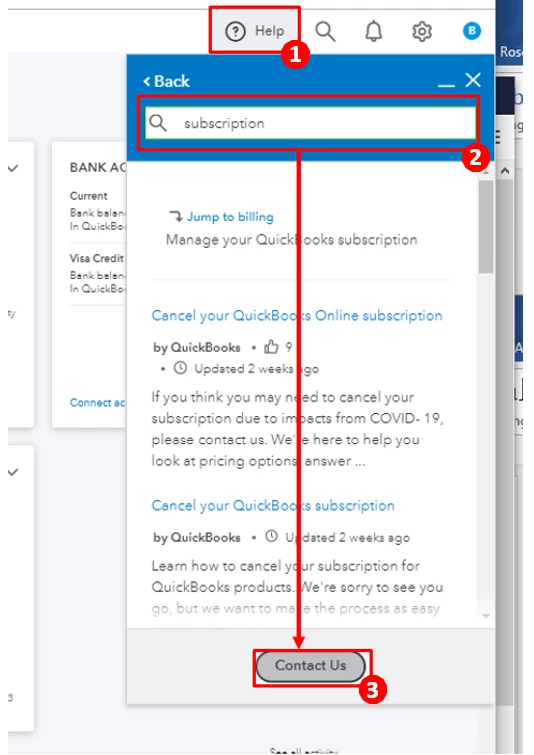
 

  1. Click the Help option on the top-right corner of your QuickBooks product.
  2. Enter your issue in the search bar (for example, “subscription”) and review the results.
  3. If you don’t find a solution, select the Contact Us button.
  4. On the Ways we can Connect menu, select the Chat option. You'll first have to review our support hours to ensure they can assist you on time.

You can also visit our Help Articles if you have other questions about QuickBooks Online (QBO).


You're always welcome to post any questions you have in this space. I'll be here if you need assistance with anything else. Have a great day!

2 replies

September 3, 2020

Hi @Ansoff Business Solutions , thank you for reach QB community. You could connect bank and credit card accounts to quickbooks online to your company payment.  Glad to assist you.

Fiat Lux - ASIA
September 3, 2020

@Ansoff Business Solutions 

If you open a trial account, you have to pay it from the menu Billing and Subscription to continue your works. Otherwise it will create a new account.

https://quickbooks.grsm.io/Asia-Pacific

https://quickbooks.grsm.io/EU


You may need a 3rd party tool to migrate data between QBO accounts.

Rose-A
Rose-AAnswer
September 3, 2020

Hi, Ansoff Business Solutions.


To ensure you're paying the right subscription, I'd suggest getting in touch with our QuickBooks Support. All account-related concerns are directed to our customer service for security purposes.


Agents have the necessary tools to look into your account in a secure environment. They can cancel the new QuickBooks Online (QBO) subscription and transfer the payment to your existing company ID.


Here's how you can reach them:


  1. Click the Help option on the top-right corner of your QuickBooks product.
  2. Enter your issue in the search bar (for example, “subscription”) and review the results.
  3. If you don’t find a solution, select the Contact Us button.
  4. On the Ways we can Connect menu, select the Chat option. You'll first have to review our support hours to ensure they can assist you on time.

You can also visit our Help Articles if you have other questions about QuickBooks Online (QBO).


You're always welcome to post any questions you have in this space. I'll be here if you need assistance with anything else. Have a great day!
