February 12, 2019
Solved

Why don't I have a reconcile undo option

  • February 12, 2019
  • 19 replies
  • 0 views
Original commenter did not share additional details

Best answer by Kristine Mae

Thanks for reaching out to us in the Community, @kevin-cota.


I'm here to share some information about the undoing reconciliations in QuickBooks.


Just to confirm, are you using QuickBooks Online Accountant (QBOA) version? If so, you have the option to undo a reconciliation. Here's how:


1. Go to the Gear icon at the top and pick Reconcile under Tools column.
2. On the Reconcile an account page, select History by account.
3. On the History by account page, click the Account and Report period to locate the reconciliation to undo.
4. Choose Undo on the Action column, then Yes.
5. In the final confirmation window, pick Undo and OK.


On the other hand, if you don't have this option, it's possible that you're not using QBOA. If that's the case, you need to manually edit each transaction to undo the reconciliation. Here's how:


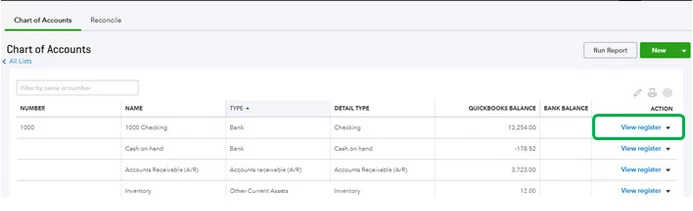
1. Go back to the Gear icon at the top, then pick Chart of Accounts under Your Company column.
2. Locate the appropriate account for the transaction and select View Register on the Action column.
3. Identify the transaction to edit.
4. In the reconcile status column (indicated by a check mark), repeatedly click the top line of the transaction to change the status, then Save.
  • C - Cleared.
  • R - Reconciled.
  • Blank - Not cleared or reconciled.


For your reference, you can also check out this article for further guidance: How to unreconcile a transaction or undo a reconciliation.


You can also get a QuickBooks-certified bookkeeper to help with reconciliations and other tasks:
Check out QuickBooks Live.


That should do it! Let me know how it goes by leaving a comment on this thread. I'd be glad to answer if you have any follow-up questions or concerns. Take care and have a good one.

19 replies

May 5, 2019

hi dont have undo option in qb

Kristine Mae
May 5, 2019

Thanks for reaching out to us in the Community, @kevin-cota.


I'm here to share some information about the undoing reconciliations in QuickBooks.


Just to confirm, are you using QuickBooks Online Accountant (QBOA) version? If so, you have the option to undo a reconciliation. Here's how:


1. Go to the Gear icon at the top and pick Reconcile under Tools column.
2. On the Reconcile an account page, select History by account.
3. On the History by account page, click the Account and Report period to locate the reconciliation to undo.
4. Choose Undo on the Action column, then Yes.
5. In the final confirmation window, pick Undo and OK.


On the other hand, if you don't have this option, it's possible that you're not using QBOA. If that's the case, you need to manually edit each transaction to undo the reconciliation. Here's how:


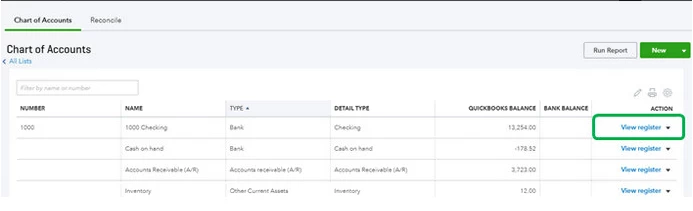
1. Go back to the Gear icon at the top, then pick Chart of Accounts under Your Company column.
2. Locate the appropriate account for the transaction and select View Register on the Action column.
3. Identify the transaction to edit.
4. In the reconcile status column (indicated by a check mark), repeatedly click the top line of the transaction to change the status, then Save.
  • C - Cleared.
  • R - Reconciled.
  • Blank - Not cleared or reconciled.


For your reference, you can also check out this article for further guidance: How to unreconcile a transaction or undo a reconciliation.


You can also get a QuickBooks-certified bookkeeper to help with reconciliations and other tasks:
Check out QuickBooks Live.


That should do it! Let me know how it goes by leaving a comment on this thread. I'd be glad to answer if you have any follow-up questions or concerns. Take care and have a good one.

June 17, 2019

Not having this function is a lot like having the mandatory password in desktop. It is of no value to anyone. 

Stuff happens and occasionally we need to un-reconcile one or more months to get things back on track. Changing transactions one at a time is ludicrous.

Not to mention, I paid substantially more for this "improved version".

Place a check in the 'not satisfied' column for me.

November 19, 2019


This is absurd  to manually untick 1200 items one by one, click by click (3 day's job just undoing a reconciliation).


Manually undoing reconciliation of 1200 transactions tick by tick creates more mistakes which the undoing process is trying to correct.


Poor Product


IamjuViel
November 19, 2019

I understand how much time it can take to manually un-reconcile your transactions, @Emmerson.


The ability to reconcile your account is a very important aspect of managing your business. However, once there's a mistake, undoing it yourself may pose more problems than a solution. Also, before you can undo an entire Quickbooks reconciliation, you first have to edit every transaction manually.  For more detailed steps, you can read through this article: Undo and remove transactions from reconciliations in QuickBooks Online.


I'd strongly recommend you to consult with an accountant. He or she will be able to undo an entire reconciliation without manually editing individual transactions. This is why only the user's with Quickbooks Online Accountant account has the exclusive ability to undo reconciliation 


Feel free to sing by here in the Community if you have other questions. I'm always here to help.

November 19, 2019

Wow, 

December 16, 2019

I had the Undo option for rest of the year and now with new update it disappeared. WTF? I am subscribed for the same type of services. In August I had 7 users, now only 5 and Undo Button, So have to think about Sage or Wave alternatives. 

IamjuViel
December 16, 2019

Hello, @Lanatim.


The undo reconciliation feature is available for QuickBooks Online for Accountant users. You may have logged in to a different QuickBooks account. Let’s make sure you're able to log in to your correct existing QBOA account.


Here's how:

  1. Go to the Gear icon.
  2. Choose Account and Settings.
  3. Click on Billing & Subscription.
  4. Compare the Next Charge date with your bank statements.

If the information shown on the Billing & Subscription page doesn't match with your correct QBOA account. Please log out from there and log back in using the correct credentials.


If the details on the Billing & Subscription show you're logged in to the right account but unable to undo reconciliation, I'd suggest contacting our  Customer Care Team.  An agent will be able to securely verify your correct QuickBooks Online for Accountant account and help you investigate this issue.


Feel free to swing by if you have other questions. I'm always here to help.

MarsStephanieL
January 2, 2020

I will take note of your feedback about undoing the reconciliation feature, @hnhglpk.


I understand that this feature is really important for basic reconciliation on all QuickBooks Online (QBO) types. I will personally take note on this to our Product Developers for future updates. Most of the ideas for the updates are from the feedback of QBO customers.


As of the moment, the feature for undoing reconciliation is only available in QuickBooks Online Accountant. What I can suggest is to consult accountant in QBO so that they can manually undo the reconciliation or make changes on your reconciled reports.


Loop me in if you have other concerns in QBO. I’ll be back to you. Take care always.

January 3, 2020

I agree with almost everything stated here by other users; I do not need to be an accountant to undo a reconciliation on my own books. It is absurd that you guys disallow us the most basic of functions from the get-go, and take others away in updates. Then again, Quickbooks (that's you) sends its own payroll to ADP on excel documents (not the fancy kind either) last I heard (perhaps you have updated in the last two years) so I can see how you're not understanding our frustrations with your software. 


This feature needs to be updated/included in our basic functions, and putting it in Italics that it's only available in one software package, basically is stating that we need to stop complaining about it. That's not a great way to treat your customers.

January 3, 2020

Hello @MaddM,


I want to let you know that your voice matters and I'm taking notes of your feedback and submitting it directly to our engineers.


As of the moment, you can only undo your reconciliation by manually editing the Reconciliation status of every transaction that has been reconciled already.


I've got you this article to learn more about how you can manually undo your reconciliation: Undo and remove transactions from reconciliations in QuickBooks Online.


If there's anything else that I can help you with, please let me know in the comment section down below. I'm always around happy to help.

June 4, 2020

This worked perfectly! Thank you!

July 7, 2020

After spending more than an hour talking/messaging to three different Intuit support staff trying to resolve this issue,  and at one point getting ready to look for another platform,  I finally struck gold with the last gentleman I spoke with (Thank you Christopher!)


The solution ended up being fairly simple; make yourself your own accountant! 

There is no charge for "accountants" with at least one client (in this case yourself) to access the QBO Accountant version of QBO.  


Assuming  you are the admin on your QBO account;

  • Click the Gear and select "Manage Accounts".   
  • Select the "Accounting Firms" tab and add a new firm.   Enter your own email address.   
  • You'll receive an email from Intuit prompting you to set up your firm.  Take the defaults.   
  • The next time you log into your QBO account (assuming you used the same email address for "Firm" as your QBO login), you'll be be in the QBO Accountant version of QBO. 
  • You'll be able to toggle between the Accountant view and the Business view AND the Reconcile "Undo" option is now available to you!


Echo

February 10, 2021

I'm glad thst helped. It doesn't always work since the accountant user needs to link the bank account which needs to be 'unreconciled' which requires downloading bank transactions.  We needed to go back more than the 18 months allowed by our bank's online portal. 


Bottom line is still that QBO has no option for everyday users to undo a bank reconciliation which is a basic function and should not require any workarounds such as adding an 'accountant' user or worse, manually editing cleared /reconciled flags. 

January 22, 2021

Mine does not look like this with the checkmarks.  How do I manually unreconcile?


January 22, 2021

Unreconciling entries in QuickBooks is just an easy process, @BBB5.


Thanks for joining the thread. Let me guide you on how to unreconciled transactions in QuickBooks Online.


You can follow these steps below to manually unreconciled an event:


  1. Go to the Gear icon at the top, then choose Chart of Accounts under Your Company.
  2. Select the appropriate account and select View Register on the Action column.
  3. Locate and select the transaction.
  4. Click the Edit button.
  5. In the Reconcile status column (indicated by a checkmark), keep clicking the field to change the status, then Save.
    • C - Cleared.
    • R - Reconciled.
    • Blank - Not cleared or reconciled.

For your reference, here are detailed steps on how to undo or remove transactions from reconciliations. If you want to make some modifications, you can visit this link to enter an adjusting entry in QuickBooks Online.


If you have additional questions besides unreconciling entry, please do let me know. I’m always around. Have a good rest!

April 20, 2021

This is absolutely insane that I came from the desktop version to this.  Really?!?!?!?!  This was a one click option before, now I need to uncheck over 500 transactions individually?!?!?!?!?!

January 6, 2022

I cant even do that, My mistake is the wrong date and i cant go in and fix it.

Sucks

January 6, 2022

Thanks for joining the thread. Let me assist you with undoing your reconciliation in QuickBooks Online (QBO).


You can manually undo transactions to enable the option to edit them. Kindly review the reconciliation report for you to know what transaction you want to edit. When you know which transaction you need to change, here’s how to amend and unreconcile a transaction.


  1. Select Accounting.
  2. Select the Chart of accounts tab.
  3. Find the account that has the reconciled transaction. Then select View register.
  4. Find the transaction. If the transaction is reconciled, you’ll see an “R” in the checkmark column.
  5. Select the transaction to expand the view.
  6. In the checkmark column, select the box with the “R” until the box is blank. This removes the transaction from the reconciliation.
  7. Select Save.
  8. Close the account register.


Once done, here’s how you can edit the dates.


  1. Select the transaction you want to edit.
  2. Under the date column, click the date of the transaction and select the correct dates.
  3. Click Save.
  4. A message will prompt you to confirm the changes, and then you can select Yes to confirm them.


If your accountant is also using QBO, you can also request to undo the reconciliation.


Additionally, I added the following articles for your future reference when doing your banking transactions.


Feel free to leave a comment below if you need further assistance with banking transactions. The Community always has your back. Stay safe!

May 5, 2021

I have followed your instructions to undo a reconciliation.  I have switched my view over to Accountant and the option to undo is still not available.  If I have missed an update from this conversation, please advise.  This was an easy option for the desktop version.  

AlexV
May 5, 2021

Hi Jason Tice1!


I understand that you need to undo a reconciliation. Let me help you.


The option to undo an entire reconciliation at once is only available to QuickBooks Online Accountants. If your accountant is using one, you can let them do it on your behalf. If not, you can invite them to access your account.


Also, switching to Accountant view still won't give you this option. This only gives you a different user interface, such as a different menu and buttons but the functions are the same.


If you don't have an accountant to do it, you can manually unreconcile the transactions. Follow these steps:

  1. Go to the Accounting menu and select Chart of Accounts.
  2. Find the account, select View register, and select the transaction you want to unreconcile to expand the view.
  3. You’ll see an “R” if the transaction is reconciled. Keep selecting it until the box is blank. This removes the transaction from the reconciliation.
  4. Select Save.


I've also added some articles for your reference. These will discuss more on how to undo reconciliation in QuickBooks Online:


Do you have more concerns. Post again here and we'll respond as soon as we can.

May 5, 2021

This should not be a feature that only an accountant can do. Quickbooks continues to perpetuate the model of needing hiring third party accountants to do work we all could do on our own with a click of a button. Here's to hoping their monopoly ends at some point.

June 7, 2021

Hello,

in case you do not have this option, it is conceivable that you're not utilizing QBOA. If that's the case, you need to manually edit each transaction to fix the reconciliation.MyLowesLife

June 7, 2021

An option to undo a reconciliation is a basic bookkeeping function. This has been requested by online users for over a year. My thought as to why the software update is not happening!! Money!! How many emails have you received in the last year recommending you use their inhouse accounting service?
