

September 27, 2023
Question

Can't edit hourly COST RATE inside a project for an employee

  • September 27, 2023
  • 2 replies
  • 0 views

I don't use QBO for payroll, however I use it for cost accounting in PROJECTS.


I add time for each employee and assign it to a service (operation type) and then to a project.

For example--

Jane Doe

9/1/2023

2 hours

Project: 123 Sculpture

Service: Paint Prep


I used to be able to edit the COST RATE, example $30/hr, for each time entry. We pay an hourly wage but sometimes employees are paid more to work off-hours.


Can someone please tell me how I edit the cost rate now since QBO changed the window for inputting time?


In the hourly costs under the Project page, I would click a time entry like you see below to edit it--



However, now the screen has NO way to edit the cost rate, see below --
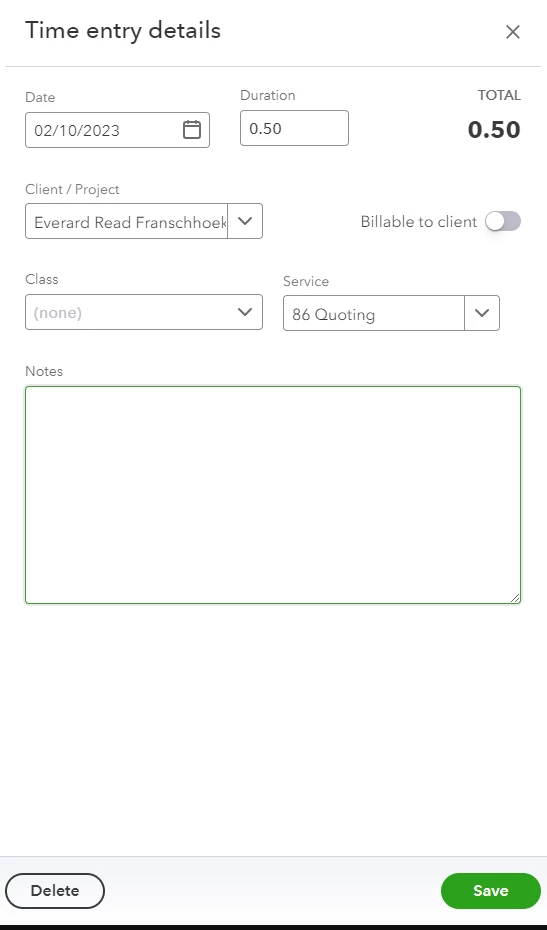
 

2 replies

September 27, 2023

Hi there, @artfabricators. Thank you for bringing up your concern regarding editing the cost rate under the project page in QuickBooks Online (QBO). I understand the importance of controlling cost rates for accurate project management.

I want to ask for further details to provide the proper resolution. You can give additional screenshots aside from the one that we got. 

I'll be waiting for your response. I'm just around to help. Keep safe always.

September 28, 2023

So um, what information do you need other than what I've posted?


Steps -- Go to projects, click on project, click on Hourly time cost, click on a time entry, and there is no where to edit the hourly cost rate.

September 28, 2023

Welcome back, artfabricators.


Let me join and provide more details on how you can edit hourly cost rates for your employees when entering time to a project in QuickBooks Online (QBO).


You can edit the cost rate for the time entry created by going to the Time Activity tab. I'll be happy to show you how.


  1. In the left menu, click Projects.
  2. Select and click the Project/Customer name.
  3. Go to the Time Activity tab.
  4. Locate the time entry and click on the drop-down on a specific date. Under the Employee/Vendor column, click the Employee name. 
  5. On the Time Activity page, edit the cost rate.
  6. Click Save and close when done.


In addition, you can set up hourly cost rates before starting to track time. This way, you'll no longer have to enter the cost rate manually. For more details, see this article and go to Step 3: Enter hourly cost rates for each employeeTrack hourly labor costs and profitability by project in QuickBooks Online.


For future reference, you can run the Time Activities by Employee Detail report to show the products and services (time activities) each employee provided, including hourly rate and duration.


If you have further questions about editing the cost rate, let me know by commenting below. I'll be happy to answer them for you. Have a great day!

December 27, 2023

I am having the same issue.  I just followed your instructions above but there is NO field for the Cost Rate that appears.  I called the helpdesk and they have no idea what I am even talking about.  I am inside of a Project and adding time for one of my contractors.  For this project, I want to pay my contractor a different rate than what he is usually paid. Please tell me how this can be done.