

November 28, 2023
Solved

Change employee access to see who's working

  • November 28, 2023
  • 1 reply
  • 0 views

I have employees that are not listed as users in QuickBooks, but they have access to Workforce/Time app to log in and out. Problem is they can see when the other employees are working and I want to disable this. The help article I found says the following: https://quickbooks.intuit.com/learn-support/en-us/help-article/track-worker-time/enable-clock-via-quickbooks-time-mobile/L1t0GhC26_US_en_US?uid=lpivnnpv


Issue- There is no My Team option just Time Team, and when I go there I'm not able to select Team Member or edit them. If I go to the payroll portion and try to edit employees I don't get the option to edit this permission. 


Help Please!
Best answer by Maybelle_S

Hello there, ktliz. I want to ensure you can remove employees' access.


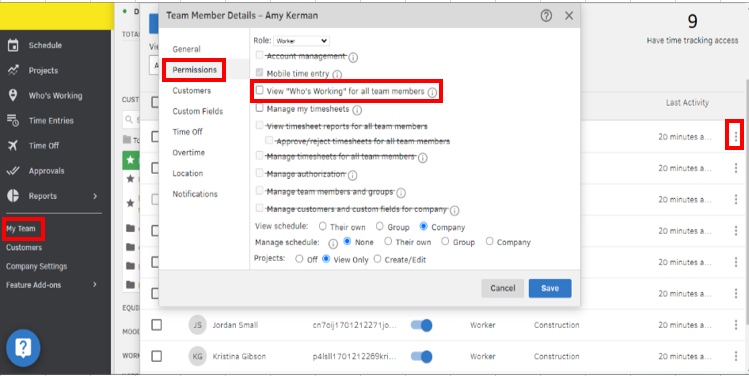
The My Team option is exclusive to QuickBooks Time. It seems like you're using your QuickBooks Online (QBO) account, that's why you only have the Time Team feature. I suggest opening your QB Time account and removing the access from there.


Here's how:


  1. Go to the My Team menu.
  2. Choose the employee you want to run.
  3. Click the horizontal dots and select Edit.
  4. Tap the Permissions tab.
  5. Untick the View "Who's Working" for all team members.
  6. Hit Save.


Additionally, you can refer to these articles for guidance on managing employees' timesheets and limiting clock-in/out locations in QuickBooks Time:


Let me know if you have other feature concerns or questions about managing employees' permissions in QuickBooks Time. I'm here to help. Take care.

1 reply

November 28, 2023

Hello there, ktliz. I want to ensure you can remove employees' access.


The My Team option is exclusive to QuickBooks Time. It seems like you're using your QuickBooks Online (QBO) account, that's why you only have the Time Team feature. I suggest opening your QB Time account and removing the access from there.


Here's how:


  1. Go to the My Team menu.
  2. Choose the employee you want to run.
  3. Click the horizontal dots and select Edit.
  4. Tap the Permissions tab.
  5. Untick the View "Who's Working" for all team members.
  6. Hit Save.


Additionally, you can refer to these articles for guidance on managing employees' timesheets and limiting clock-in/out locations in QuickBooks Time:


Let me know if you have other feature concerns or questions about managing employees' permissions in QuickBooks Time. I'm here to help. Take care.