

May 8, 2025
Question

Connectivity Issues with QB Time

  • May 8, 2025
  • 1 reply
  • 0 views

For several weeks I have been having connectivity issues while entering timecards in QB Time, and also when switching between employees. We are using QuickBooks Enterprise desktop but our data file is located on a cloud server.


Below is the message that I receive:
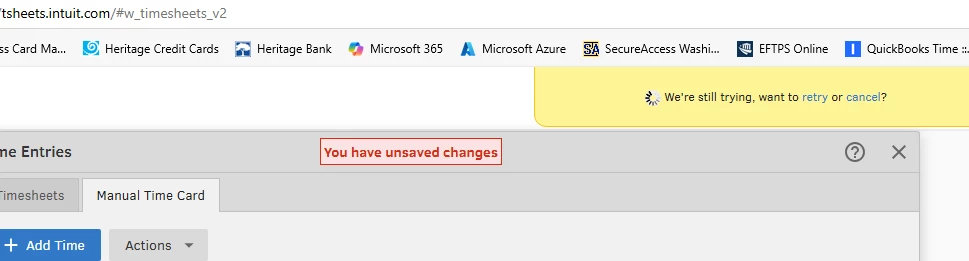


Is there a specific reason why this is happening and if so, what the solution might be?


Thank you

Cindy


1 reply

May 8, 2025

Consistent access to QuickBooks Time is vital for managing timecards efficiently. I understand how these connectivity issues impact your business, Cindy. Let's go through a series of troubleshooting to resolve this matter effectively.


First off, ensure your internet connection is stable since you're using a cloud server. Next, check your server status and review your antivirus settings, as these can sometimes interfere with the connection.


If the issue continues, try opening your QuickBooks Time using a private or incognito window. Occasionally, browsers store data from websites you often visit, which can cause unexpected behaviors on online platforms. You can utilize these keyboard shortcuts to access a private browser:


  • Google Chrome: Ctrl + Shift + N
  • Safari 11 or newer: Command + Shift + N
  • Mozilla Firefox: Shift + Ctrl + P
  • Microsoft Edge: Ctrl + Shift + N


Then, try entering timecards again. If it works, return to your regular browser and clear its cache. Moreover, you can consider using a supported browser to optimize your QuickBooks experience.


Additionally, for comprehensive guidance on managing employee timesheets in QuickBooks Time, visit this article: Approve, unapprove, and reject timesheets for QuickBooks Time.


Ensuring a seamless and efficient workflow is our top priority. Feel free to revisit this thread if you have more queries regarding connectivity. The Community is always ready to assist you.