June 27, 2024
Solved

TIME KIOSK

  • June 27, 2024
  • 1 reply
  • 0 views
one of my employee not showing up on quickbooks time kiosk. All other employees are showing up so they can clock in and out. I properly entered the employee as team member.
 
What am I doing wrong?

Best answer by

I appreciate what you've done so far, @andiie46. Allow me to assist you further to show your employee in the QuickBooks Time Kiosk successfully.


You can customize your kiosk preferences to control which users can clock in or out at this specific kiosk.


Here's how:
 

  1. Sign in to your QuickBooks Time Kiosk account.
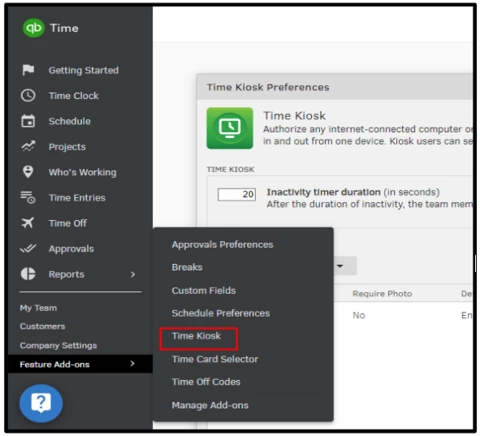
  2. Hover your mouse to the Feature Add-ons menu then click on Time Kiosk.
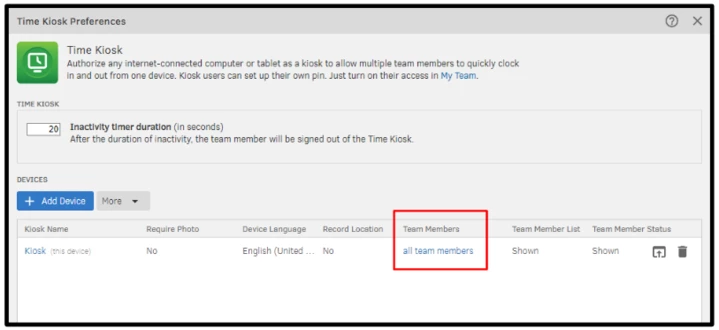
  3. From there, under Team Members, select all team members and make your selections.
  4. Once done hit on Save.

If the problem continues, I recommend reaching out to our QuickBooks Time Support. They have the tools and expertise to securely examine and assess your account and can offer comprehensive information and assistance regarding these concerns.


For more information check this article: Set up QuickBooks Time Kiosk.


Moreover, you can refer to this article for future reference about how to manage timesheets in QuickBooks Online: Enter a weekly timesheet in QuickBooks Online.


If you have any questions or need assistance with managing your employees on QuickBooks Time. Please don't hesitate to reach out. I'll be here to help you out.

1 reply

Answer
June 27, 2024

I appreciate what you've done so far, @andiie46. Allow me to assist you further to show your employee in the QuickBooks Time Kiosk successfully.


You can customize your kiosk preferences to control which users can clock in or out at this specific kiosk.


Here's how:
 

  1. Sign in to your QuickBooks Time Kiosk account.
  2. Hover your mouse to the Feature Add-ons menu then click on Time Kiosk.
  3. From there, under Team Members, select all team members and make your selections.
  4. Once done hit on Save.

If the problem continues, I recommend reaching out to our QuickBooks Time Support. They have the tools and expertise to securely examine and assess your account and can offer comprehensive information and assistance regarding these concerns.


For more information check this article: Set up QuickBooks Time Kiosk.


Moreover, you can refer to this article for future reference about how to manage timesheets in QuickBooks Online: Enter a weekly timesheet in QuickBooks Online.


If you have any questions or need assistance with managing your employees on QuickBooks Time. Please don't hesitate to reach out. I'll be here to help you out.

andiie46Author
June 27, 2024

Thank you @2366869 . It worked!! Will double check the preference next time. 

June 27, 2024

Hello, andiie46.


Thank you for getting back in this thread and verifying that my colleague's suggestions above worked for you. It's our goal to help you get the most out of QuickBooks.


We're glad to help you with any issue relating to QuickBooks. If there's more, add them below. Have a great day!
