

August 29, 2024
Solved

Adjusting CC in Remittance Advice

  • August 29, 2024
  • 1 reply
  • 0 views

Dear QB Community! 


I hope you're all doing well.


I need your help with configuring senders in my remittance advice. Right after paying my vendors I send remittance advice and among the people that receive (within my company for example cc accounting), some have moved on to other jobs. I can't seem to find the settings to edit this.


Your help will be greatly appreciated!

Thanks in advance! 
Best answer by KayePe

We're doing well, rigojr. Hope you're also.


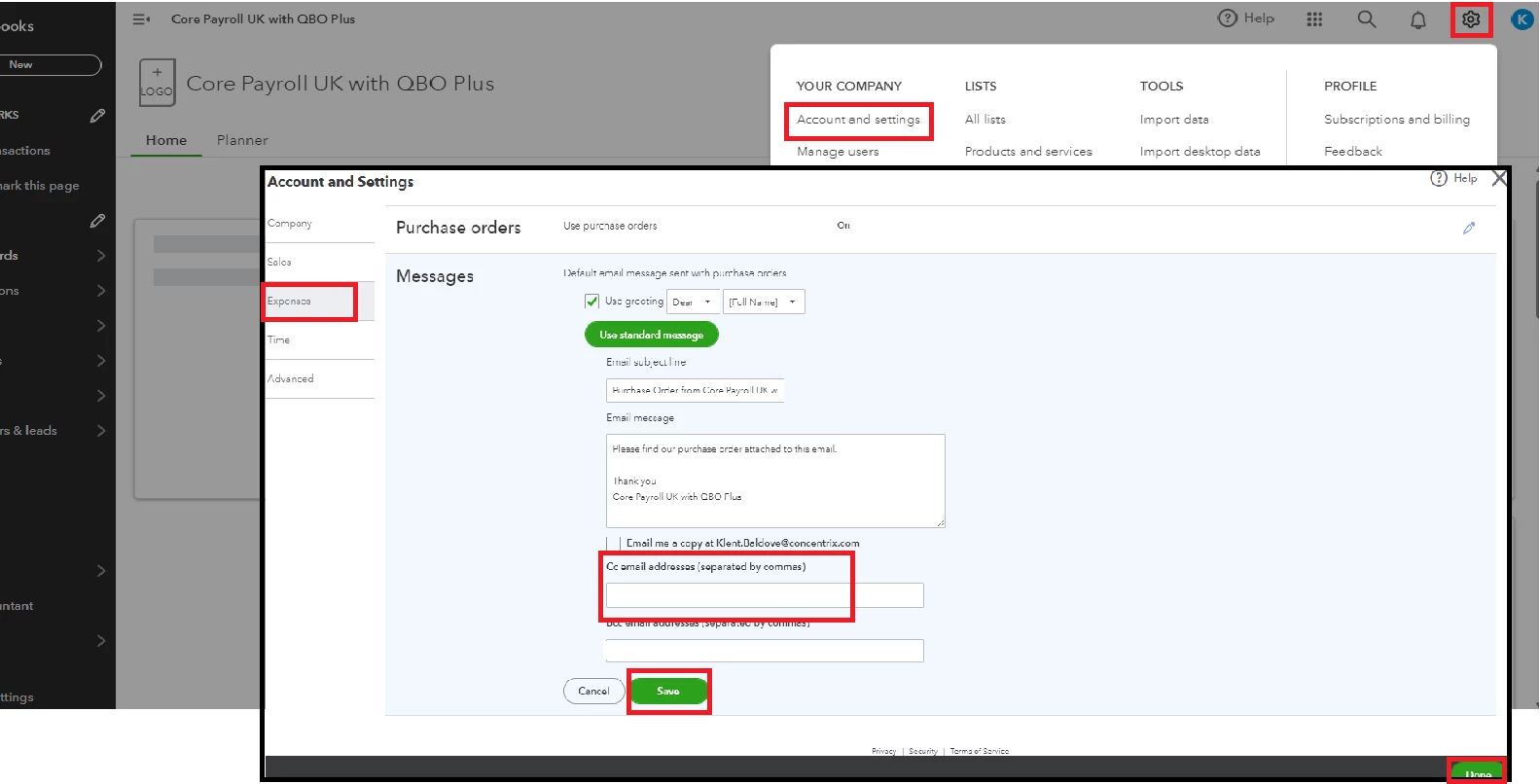
You can update the email addresses in the Account and Settings to remove or edit emails of employees who have changed jobs or left the company. Here's how to do it:


  1. In the Gear icon, hit Account and Settings.
  2. Hover to Expenses and click the pencil icon for Messages. Note that the changes can also affect your Remittance Advice even though it is labeled for purchase orders.
  3. Edit the emails on the Cc email addresses.
  4. After that, hit Save and Done.


For future purposes, you can also send your customers a statement to show them a notification of their balances.


When handling more about remittance advice or any QBO-related, you can post here again to let us know. We'll be here to assist you. 

1 reply

KayePeAnswer
August 29, 2024

We're doing well, rigojr. Hope you're also.


You can update the email addresses in the Account and Settings to remove or edit emails of employees who have changed jobs or left the company. Here's how to do it:


  1. In the Gear icon, hit Account and Settings.
  2. Hover to Expenses and click the pencil icon for Messages. Note that the changes can also affect your Remittance Advice even though it is labeled for purchase orders.
  3. Edit the emails on the Cc email addresses.
  4. After that, hit Save and Done.


For future purposes, you can also send your customers a statement to show them a notification of their balances.


When handling more about remittance advice or any QBO-related, you can post here again to let us know. We'll be here to assist you.