May 5, 2020
Solved

As a UK business, our VAT is set as accrual , I need to change to cash basis. HMRC say that you don't need to contact them, just amend your accounting system. How?

  • May 5, 2020
  • 1 reply
  • 0 views
Original commenter did not share additional details

Best answer by ChristieAnn 11

Hi there, info994.


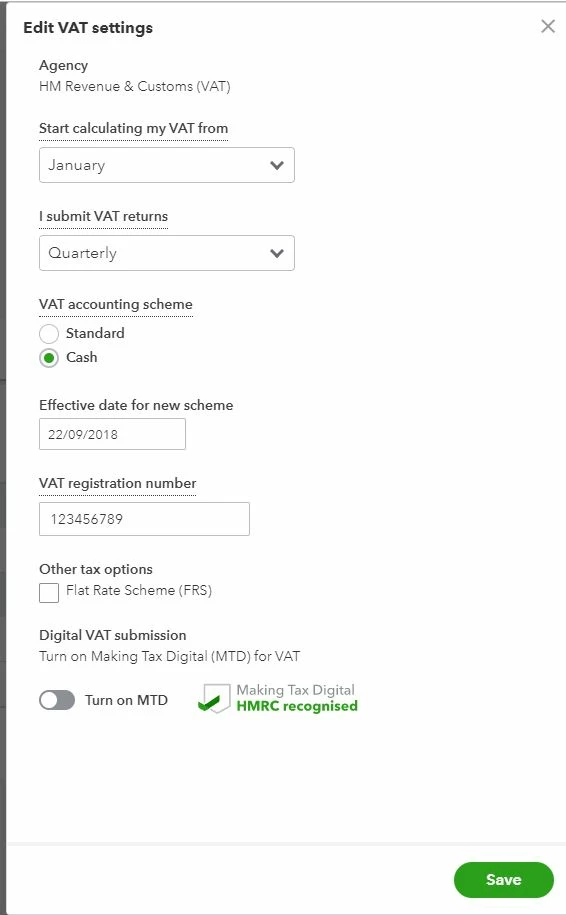
I suggest going to the Edit VAT settings page to change the Vat set up into a cash basis.


Here's how:


  1. Choose the Taxes menu at the left panel.
  2. Click the Edit VAT drop-down button at the upper right corner.
  3. Select Edit settings. Then, you'll be routed in the Edit VAT settings page.
  4. Go to a VAT accounting scheme section. Then select Cash by clicking the radio button.
  5. Hit the Save button.


I attached a screenshot below for visual reference.


For additional information on how you can make any changes to your VAT settings, codes, and rates, you can click this article: Set up and edit VAT settings, VAT codes, and VAT rates.


Please check to this article to see a table that contains a list of common VAT codes: Common VAT Codes.


You can also refer this article to see different information on how QuickBooks Online helps you automate your tax tracking: VAT: Getting Started.


Please know that you're always welcome to post if you have any other concerns. Wishing you and your business continued success.

1 reply

May 5, 2020

Hi there, info994.


I suggest going to the Edit VAT settings page to change the Vat set up into a cash basis.


Here's how:


  1. Choose the Taxes menu at the left panel.
  2. Click the Edit VAT drop-down button at the upper right corner.
  3. Select Edit settings. Then, you'll be routed in the Edit VAT settings page.
  4. Go to a VAT accounting scheme section. Then select Cash by clicking the radio button.
  5. Hit the Save button.


I attached a screenshot below for visual reference.


For additional information on how you can make any changes to your VAT settings, codes, and rates, you can click this article: Set up and edit VAT settings, VAT codes, and VAT rates.


Please check to this article to see a table that contains a list of common VAT codes: Common VAT Codes.


You can also refer this article to see different information on how QuickBooks Online helps you automate your tax tracking: VAT: Getting Started.


Please know that you're always welcome to post if you have any other concerns. Wishing you and your business continued success.
