May 27, 2020
Solved

Bundle Sales report

  • May 27, 2020
  • 3 replies
  • 0 views

Is there a way to pull a report that shows Bundle SKU, Quantity Sold, Dollar Amount Sold?  I was able to pull the Sales by Product/Detail report but it is missing the sales amount.  I feel like I'm missing something simple.

Best answer by Angelyn_T

They couldn't come up with anything either and directed me to come here to see if you all could brain storm something. It sounds like this doesn't exist.


I can share some information about this matter, @bhaines.


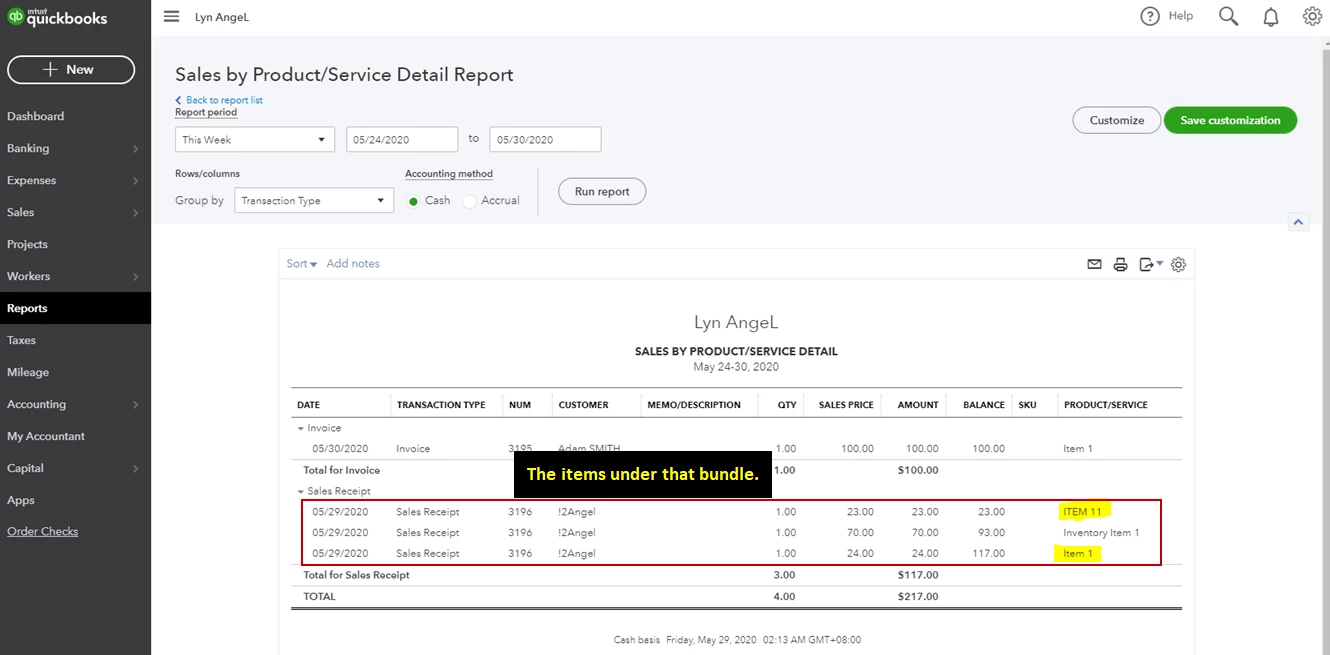
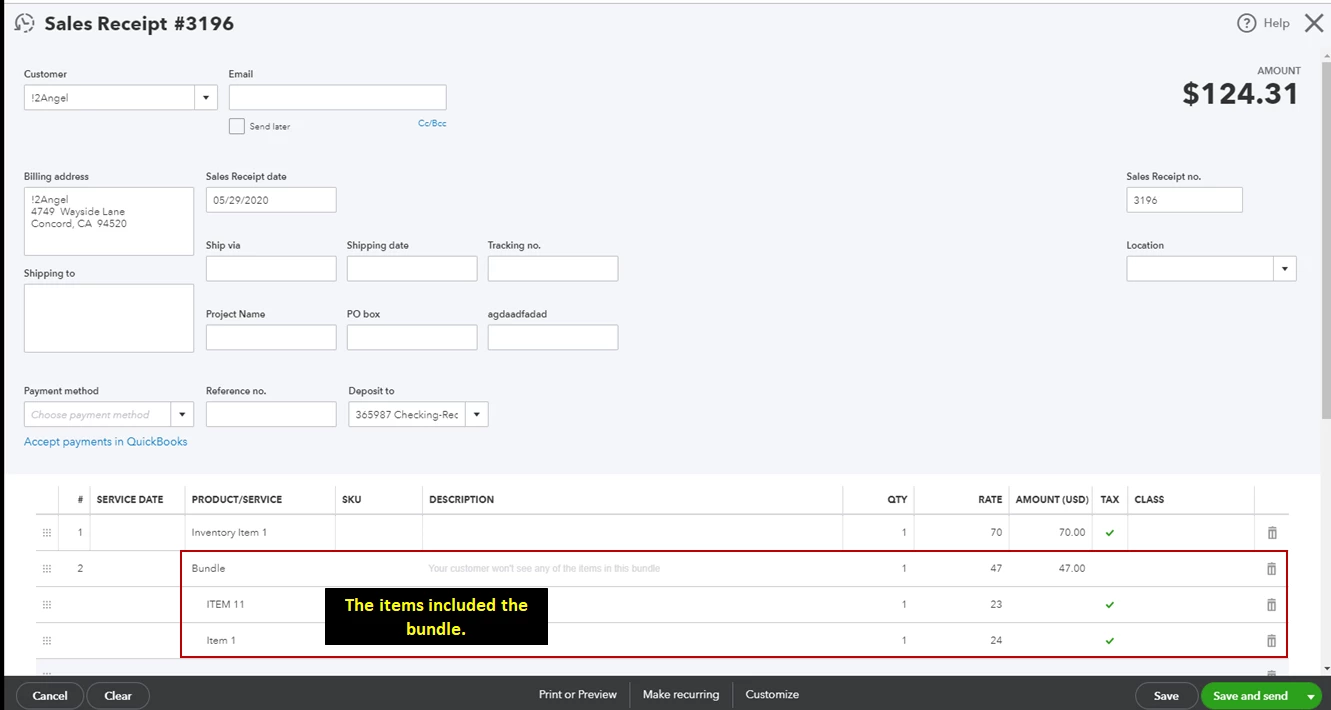
When running reports in QuickBooks Online, the bundle isn't included. An example is when running the Sale by Product/Service Detail report the report's filter doesn't even include the bundle item from there. Also, the report will let you see the sold quantity from the bundled item but won't indicate what bundle the item/s is coming from.


I've added these screenshots for your visual reference.
 

Get back to me if you have any other questions. I'm a few clicks away to help. Have a good day!

3 replies

JasroV
May 28, 2020

Thanks for sharing a screenshots with me, @bhaines.


You'll want to ensure the line items in the transactions have rates and total value amount. This way, it'll show the sales price in the report.


However, if there's already rates and total value in the transaction. I recommend deleting and recreating the sales receipt. Let me show you how.


On the Report page:

  1. Select the Sales Receipt to open the transaction.
  2. Click More and select either Copy or Delete.
  3. Make changes to the sales receipt if needed.
  4. Click Save and close when done.
  5. Then open the old sales receipt, click More and select Delete.

Once done, run the report again. Additionally, I got you this article that can guide you in personalizing your report and show the data you need: Customise reports in QuickBooks Online.


It's also a great idea to memorise the report to save its current settings. This way, you won't have to customise it again for the specific data you need.


You can always get back to me whenever you need help. I'll be around to assist you. Keep safe and stay healthy.

bhainesAuthor
May 28, 2020

That's the odd thing. It should be showing sales and the transaction has been paid on. It seems like if it is a bundle it wont show sales just QTY in the report.   Can you show an example of the report showing the sales of the bundle in a report that isn't broken down by each individual parts. For example how many sales for bundle 2...

I'm trying to see how many Bundles I sold and the total sales for this month. After reviewing the customize report article, the sales still don't show up. Can you show them on your side?

katherinejoyceO
May 28, 2020

Thanks for your prompt response, @bhaines.


To clarify, you'll need to enter each part (item) individually in the inventory before you can create a bundle. Hence, the reports will show you the break-down of the items used in that bundle.  


I've replicated the screenshots you've shared and it shows Bundle SKU, quantity sold, dollar amount sold when I run the Sales by Product/Service Detail report. See screenshot below: 


Oftentimes, browser's cache store temporary internet files that may cause unexpected behavior. This browser-related problem can be resolved by clearing the cache. I'd recommend using Google Chrome's incognito or a private window first to isolate the issue. Simply press these keys together, CTRL+SHIFT+N


If that works, you can go back to the default browser and follow the steps to troubleshoot browser-related issueIf the issue persists, try using another updated, supported browser such as FirefoxSafari, or Microsoft Edge.


I've also added an article that can help you set up the stock tracking feature in case you'll want to track product quantities in QuickBooks. 


Let me know if you need more assistance. We're always delighted to help. 


bhainesAuthor
May 28, 2020

I feel like we are so close.  The report needs to show sales and quantity for BUNDLES, not the break down of the components that make up the bundle.  This could be a feature request at this point not sure though because there really isn't a sales price attached to the Bundle in product and services, note attachment.   I have been working in incognito and cleared cache and cookies as well as restarted my computer. I feel like my pc is optimized for this and that really isn't a factor.  How can I pull a report that shows just BUNDLE sales and Quantity sold. If you preview an invoice with a bundle on it you can see the QTY and Sales just fine but it seems there is no way to pull a report that shows this same data...

November 3, 2024

It doesn't look like this problem is solved.  After 2 years, is there a Bundle sales report?

November 3, 2024

Thanks for joining the thread, @phenry1  Generating a Bundle Sales report inside QuickBooks Online (QBO) isn't an option at the moment. I'll walk you through sending requests to our Developers.


Currently, running a Bundle Sales report is unavailable inside the program. I recommend submitting a feature request to our Product Development Team so they can evaluate it and consider it for future updates. We'll outline the steps to get you going:


  1. Access your QuickBooks Online company.
  2. On the top right corner, click the Gear icon.
  3. Select Feedback.
  4. Enter a brief description of your request and then click Next to submit feedback.


See this page for more information: How do I submit feedback?


Moreover, here's an article to help you add more details to your report and save the current settings for future use:


I'll encourage you to visit the Community space or comment below if you have other questions related to the program. Rest assured, I'll be he are here to assist you and provide the details needed to resolve your queries. Stay safe