January 18, 2020
Solved

Can I run an Expenses by Supplier Summary report but display columns by Category ?I want to be able to check my expenses have been categorised correctlyThanks

  • January 18, 2020
  • 1 reply
  • 0 views
Original commenter did not share additional details

Best answer by ReymondO

Let me help you run a report that shows the Category of  a transaction, @sarah76.


The option to show the Category by customising the Expense by Supplier Summary report is unavailable in QuickBooks. However, you can customise the Transaction List by Supplier Report to view the Category. 


Here's how:
 

  1. Go to Reports.
  2. Select Transaction List by Supplier Report and click Customise.
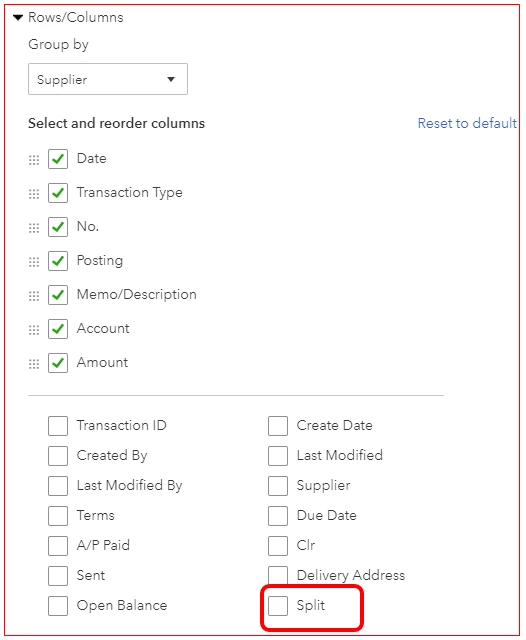
  3. In the Rows/Columns section, click Change columns.
  4. Check the Split box.
  5. Click Run report.

The Category will now show under the Split column. The transaction will show -Split- under this column if it consists of two or more Categories.


To know more about customising reports in QBO, you can check this article:


You click the reply button below if you need further help in customising your reports in QuickBooks. I'll get back to you in a moment.

1 reply

ReymondOAnswer
January 18, 2020

Let me help you run a report that shows the Category of  a transaction, @sarah76.


The option to show the Category by customising the Expense by Supplier Summary report is unavailable in QuickBooks. However, you can customise the Transaction List by Supplier Report to view the Category. 


Here's how:


  1. Go to Reports.
  2. Select Transaction List by Supplier Report and click Customise.
  3. In the Rows/Columns section, click Change columns.
  4. Check the Split box.
  5. Click Run report.

The Category will now show under the Split column. The transaction will show -Split- under this column if it consists of two or more Categories.


To know more about customising reports in QBO, you can check this article:


You click the reply button below if you need further help in customising your reports in QuickBooks. I'll get back to you in a moment.
