May 4, 2020
Solved

Can I start posting to the new financial year before I have closed the books on last year?

  • May 4, 2020
  • 1 reply
  • 0 views
Original commenter did not share additional details

Best answer by SarahannC

Hi there, nbaldwin-nlcc.


Let me share some ideas on how QuickBooks works before closing the financial year.


Yes, you can create or post new transactions as long the dates are covered for the new financial year when you record them in QuickBooks Online. Otherwise, it'll affect  your last year's financial reporting. However, it's advisable to close the book before starting to post new transactions.


You may want to reach out to your accountant to seek some information on what's the better way of tracking them. They can also guide you further in this situation.


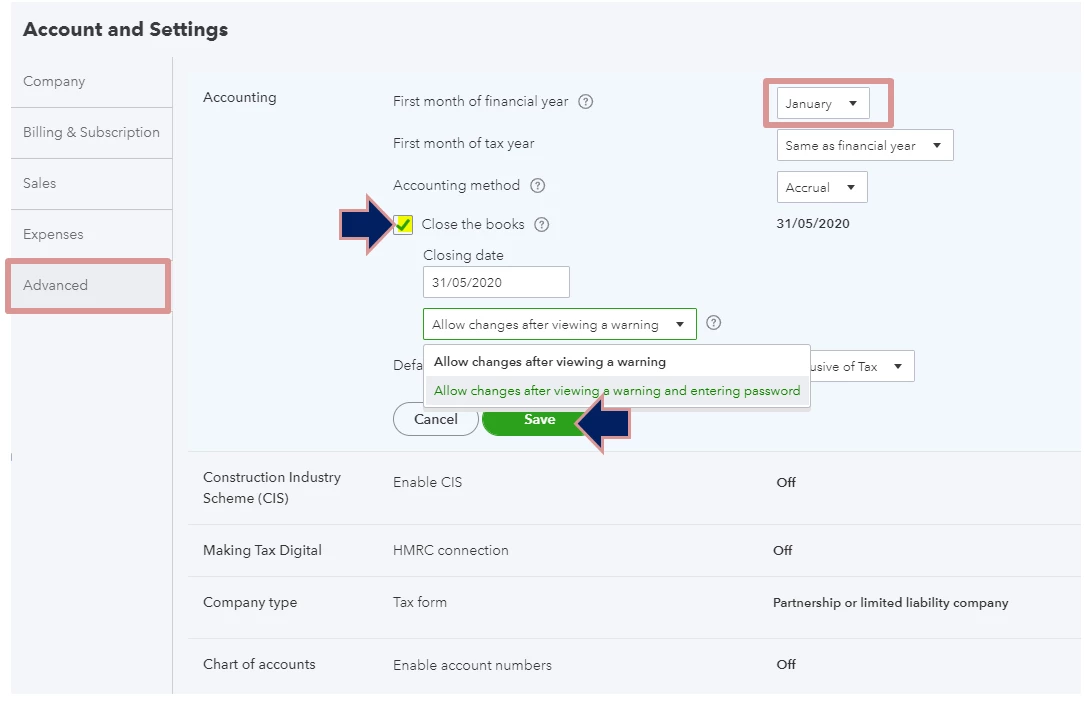
Let me include the steps  on how to close the book. Here's how:
 

  1. Go to the Gear icon.
  2. Select Account and Settings under Your Company.
  3. Click Advanced on the left side.
  4. In the Accounting section, hit the Edit icon.
  5. Select the month when your new financial year will start.
  6. Enter a closing date. Put a check mark next to the Close the books box.
  7. Select the Allow changes after viewing a warning and entering a password option from the drop-down menu if you want to require a password before editing your closed books.
  8. Hit Save. Then, Done.


Here are some articles that you can explore anytime. It's all about modifying the closed book and additional information about the year-end guide and checklist: 


If there's anything that you need to clarify or need assistance with the process, please let me know by commenting below. I'm here to help. Keep safe!

1 reply

SarahannCAnswer
May 4, 2020

Hi there, nbaldwin-nlcc.


Let me share some ideas on how QuickBooks works before closing the financial year.


Yes, you can create or post new transactions as long the dates are covered for the new financial year when you record them in QuickBooks Online. Otherwise, it'll affect  your last year's financial reporting. However, it's advisable to close the book before starting to post new transactions.


You may want to reach out to your accountant to seek some information on what's the better way of tracking them. They can also guide you further in this situation.


Let me include the steps  on how to close the book. Here's how:


  1. Go to the Gear icon.
  2. Select Account and Settings under Your Company.
  3. Click Advanced on the left side.
  4. In the Accounting section, hit the Edit icon.
  5. Select the month when your new financial year will start.
  6. Enter a closing date. Put a check mark next to the Close the books box.
  7. Select the Allow changes after viewing a warning and entering a password option from the drop-down menu if you want to require a password before editing your closed books.
  8. Hit Save. Then, Done.


Here are some articles that you can explore anytime. It's all about modifying the closed book and additional information about the year-end guide and checklist: 


If there's anything that you need to clarify or need assistance with the process, please let me know by commenting below. I'm here to help. Keep safe!
