November 20, 2020
Solved

Can we report what amounts customers owe us on sales sorted by service date? Can this be further sorted by class? Thanks

  • November 20, 2020
  • 1 reply
  • 0 views
Original commenter did not share additional details

Best answer by MadelynC

I can help you, @richard91.


QuickBooks is designed based on the most needed functions and features to make sure your preferred settings, customization, and other components are provided. However, it varies depends on the type of reports you’ve chosen.


QuickBooks Customer Balance Reports will show you detailed information about your customers' balances and tells you how much each customer owes you. You can then use the Description to display what specific item or category you’ve entered. However, it will only be included if you’ve filled in the said field at the time you’ve created the transactions.


Here’s how:
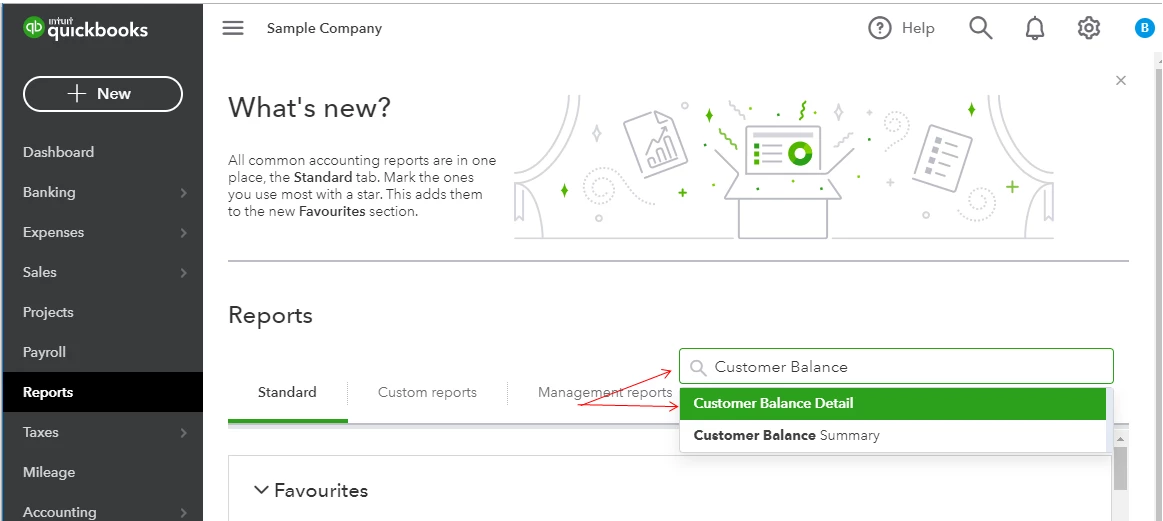
 

  1. Go to the Reports menu.
  2. Enter/select Customer Balance Detail in the search field.
  3. Click Customise, then filter the necessary details.
  4. Make sure Memo/Description is marked.
  5. Press Run report.


On the other hand, you’ll need to generate a separate report for class. You can run Sales by Class Detail report to achieve it. Consider exporting them to an Excel spreadsheet to combine the details you need.


In case you need to save the current customisation settings, you can memorise it. This feature allows you organize and create scheduled emails in case you want to send all reports in the group to the recipients you specify.


If you need further assistance with these reports, just leave us a message. I’ll make sure to take care of them for you.

1 reply

MJoy_D
November 20, 2020

Thank you for posting, @richard91.


I can see that you've posted this question twice and my colleague already added an answer. You can go to this link to check his answer.


Let me know if there's anything that I can help. I'm always here to help. Have a wonderful day!


richard91Author
November 20, 2020

Hi MaryJoy,


I have a separate thread with your colleague to solve another question. This question is different.


I can not find a report to show what customers owe us sorted by service date and by class.


I have looked at every standard report and reviewed the custom columns and filters for each but can not find a way to do this. Can you help please?


Thanks, Richard


MadelynCAnswer
November 20, 2020

I can help you, @richard91.


QuickBooks is designed based on the most needed functions and features to make sure your preferred settings, customization, and other components are provided. However, it varies depends on the type of reports you’ve chosen.


QuickBooks Customer Balance Reports will show you detailed information about your customers' balances and tells you how much each customer owes you. You can then use the Description to display what specific item or category you’ve entered. However, it will only be included if you’ve filled in the said field at the time you’ve created the transactions.


Here’s how:
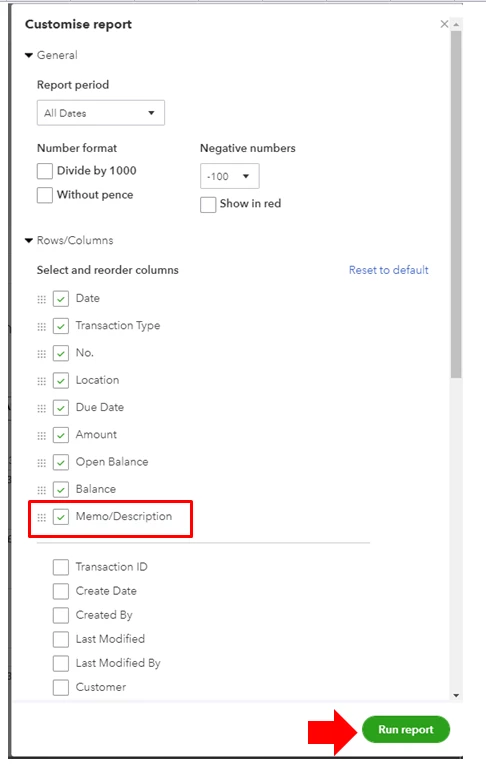
 

  1. Go to the Reports menu.
  2. Enter/select Customer Balance Detail in the search field.
  3. Click Customise, then filter the necessary details.
  4. Make sure Memo/Description is marked.
  5. Press Run report.


On the other hand, you’ll need to generate a separate report for class. You can run Sales by Class Detail report to achieve it. Consider exporting them to an Excel spreadsheet to combine the details you need.


In case you need to save the current customisation settings, you can memorise it. This feature allows you organize and create scheduled emails in case you want to send all reports in the group to the recipients you specify.


If you need further assistance with these reports, just leave us a message. I’ll make sure to take care of them for you.
