Hello, Louisa12.
We all start from somewhere and I'm happy to give you more details about the Chart of Accounts page.
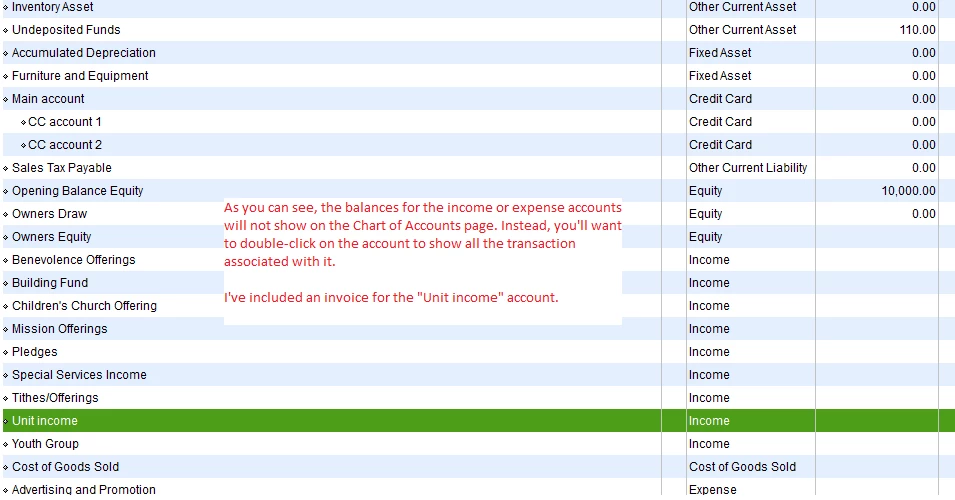
The Chart of Accounts page will only show the balances for the banks, assets, debtors or creditors and credit card accounts. It won't show the amounts for income and expense accounts.
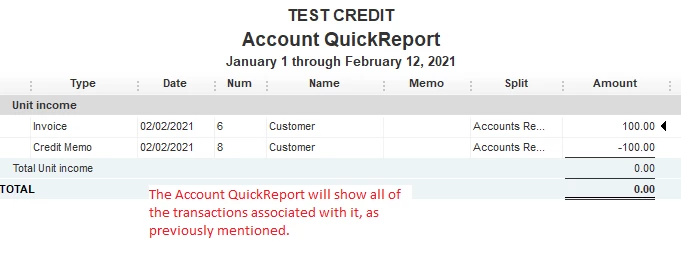
Since there are balances in the Trial Balance report, you'll want to use the QuickReport feature instead. This will show all of the transactions associated with the rental income account.
Simply double-click on the rental income account in your Chart of Accounts.
You can learn more about the Chart of Accounts page in this article: Learn about the chart of accounts in QuickBooks.
I would also recommend reading other articles if you want to learn the ropes. You can browse for a topic, then look for an article in our general support page.
Do you have more questions on the features and functions in QuickBooks Desktop? Let me know by replying to this thread. I'll help you out again.

