

August 29, 2020
Question

Duplicate sales in Paypal account

  • August 29, 2020
  • 1 reply
  • 0 views

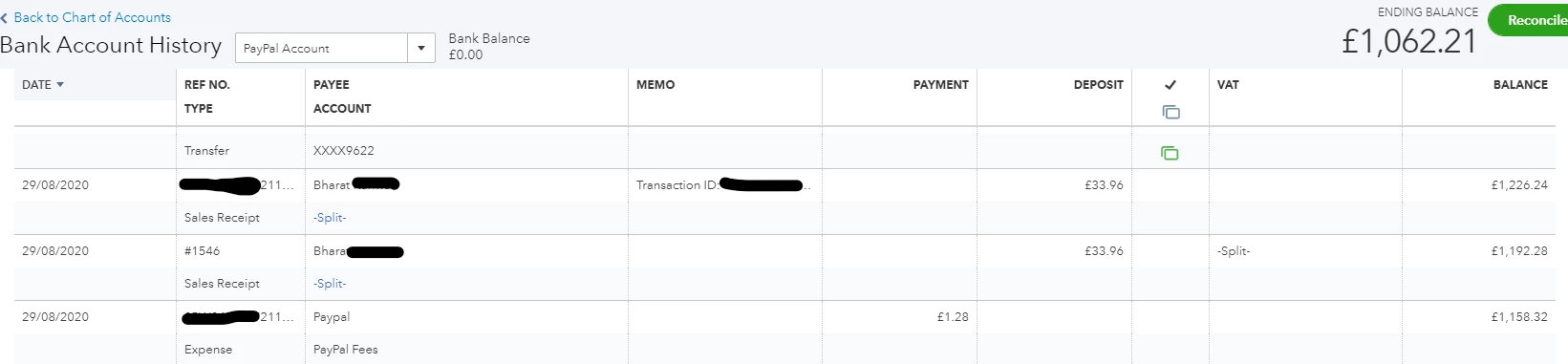
I'm trying to reconcile my paypal accounts with no luck, there appears to be duplicate transactions in my chart of accounts for each sale. For example this customer spent £33.96 today and paypal took a fee of £1.28. Whilst the fee is only appearing once, the sale itself is appearing twice. This is the case for every single transaction made. How do I fix this error and avoid it happening again in the future? Thanks!


1 reply

August 29, 2020

Consider me a detective on the case of that duplicate sales transactions, @TheFriendlyEco.


Looking at the screenshot it seems that the duplicate transaction was manually created in QuickBooks. You'll want to review the transaction if PayPal is importing and delete the duplicate one.


To delete, here are the steps.


  1. Double-clicked the duplicate transaction to open.
  2. Click Delete.
  3. Hit Yes when prompted.

With these steps, you're able to remove the duplicate and reconcile your PayPal account.


I'm also attaching this article about the differences between Connect to PayPal app, Sync with PayPal app, and PayPal Bank Feeds which I'm sure you'll find helpful. It has details that'll guide you through between the connections and how transactions are handled and imported into QuickBooks.


Please let me know if you have other questions or concerns. I'll be around to assist you further. Thanks for reaching out to us today and have a great weekend ahead.