Solved
How do I allocate journal entry (payment for expense/bill) to journal entry (expense/bill)? Transactions imported from different software.
Original commenter did not share additional details


I have attached it again. For some reason attachments do not open unless they are downloaded.
Help has arrived, @userequiptrainingser.
Thank you for providing screenshots and information about your issue. This helps me to come up with a solution to help you. Let me first share some insights about how journal transactions work in QuickBooks. If the bill and payment were created as a JE, it will be displayed as overdue if you did not link the same JE and remained open to the A/P account.
To resolve this, let’s create a dummy bill to link those JE's. Here's how:
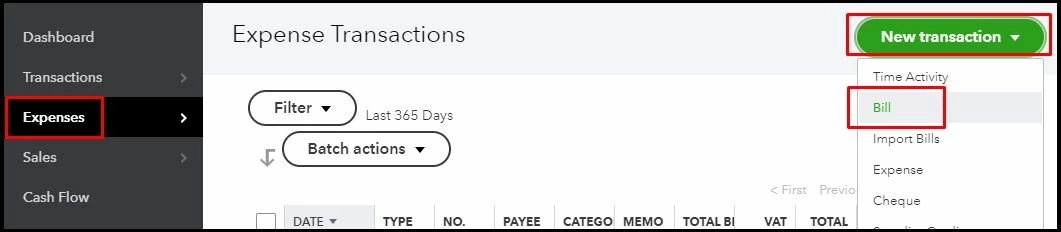
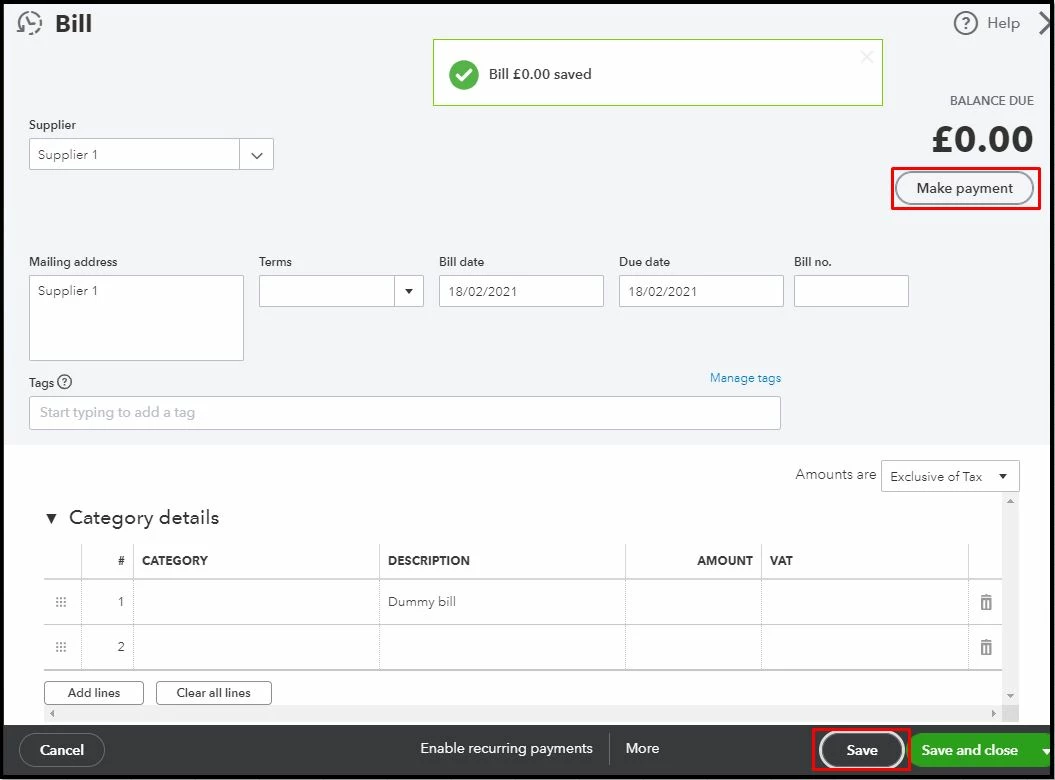
For more info about the process, please see this article: Enter bills and record bill payments in QuickBooks Online.
Also, in QuickBooks, accessing a supplier report to view all money you paid is a breeze. For the detailed guide, visit this page: Run a report with supplier totals.
Let me know how this goes and leave a reply below if you need further assistance in managing your journal transactions in QuickBooks. I'm just a post away if you need help. Have a good one.
Enter your E-mail address. We'll send you an e-mail with instructions to reset your password.