Hi there, @Arzini.
Let's edit the invoice date to show the association dues for October instead of the current month in your A/R Aging report.
When creating an invoice, you'll need to make sure that the invoice date will be dated base on your association dues. This way, your invoice will show on the month of the association dues in the A/R report.
Here's how to edit your invoice date:
- Go to the Customer Center menu.
- Select the customer, then find the invoice.
- In the Date section, edit the date into the association dues for October.
- Click Save and Close.
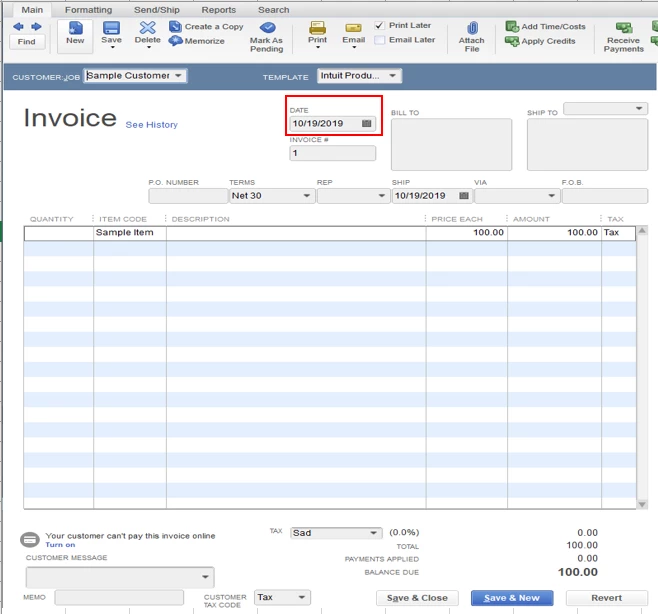
Once done, you can now review the A/R Aging report to double-check.
Moving forward, you can utilize the Invoice Memorize Transactions to automate transactions entry upon creating monthly invoices.
- Go to the Customers menu, select Create Invoices.
- Fill out the necessary information.
- Click the Memorize option from the Invoice Menu.
- Select Automate Transaction Entry.
- Choose Monthly from the How Often drop-down.
- Select the next date.
- Enter the necessary information you want to add.
- Click OK.

Here's an article you can read on for more details: Create, Edit, or Delete Memorized Transactions.
In case you can to send progress invoices in the future, you can check out this article for your reference: Set up and Send Progress Invoices in QuickBooks Desktop.
Feel free to visit us again if you have any other questions with QuickBooks. We're always here to help.

