Hi there, userryan-jarvis.
Thank you for posting here in QuickBooks Community. I'll provide different steps on how you can record incoming donations in the QuickBooks account.
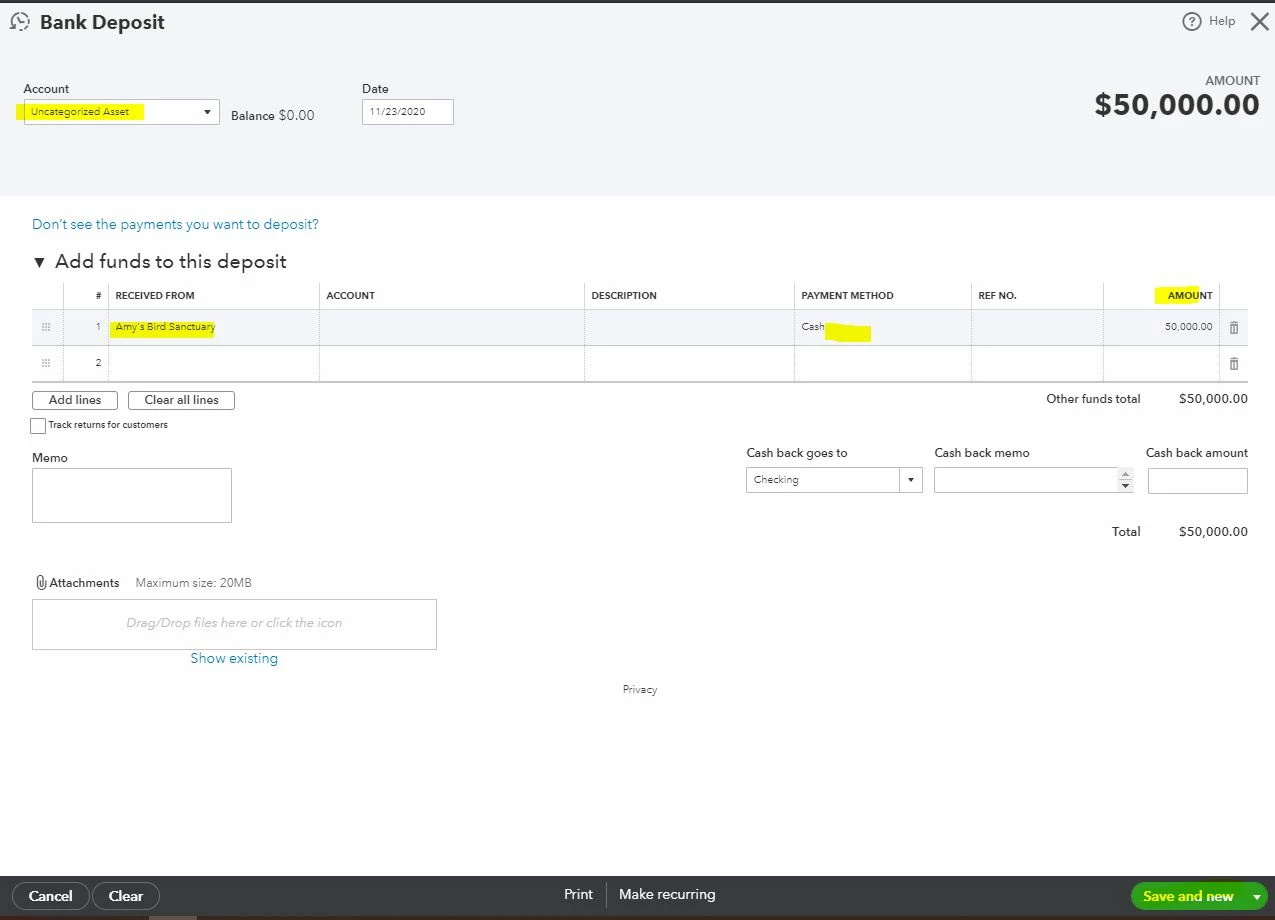
Once you have a Paypal Bank account, I'd suggest recording the incoming donation as a bank deposit. Then, post it into your Paypal or Donation account.
Here's how:
- Select + New.
- Choose Bank Deposit.
- From the Account dropdown, choose the account you want to put the money into.
- Enter the name of the donor in the Received From column.
- From the Account dropdown, choose the chart of account you want to post the money to.
- Enter the amount and other necessary fields.
- Hit Save and close.
However, if you don't have a Paypal account, you can manually enter bank deposit to record the incoming donations. Then, use the Undeposited funds. To see additional information about how bank deposit works in QBO, you can refer to this article: Record and make bank deposits in QuickBooks Online.
You can also click this article to see different details on how to track fund donations you receive via credit card, bank transfer, or as cash in QuickBooks Online: Track funds you receive from donors in QuickBooks Online.
Please refer to this article on how you can use different reports and projections to get a clear look at your current and future business's finances: Track your cash flow in QuickBooks Online.
Please let me know if you need clarification about this, or there's anything else I can do for you. I'll be standing by for your response. Have a great day.

