Thanks for the interest in upgrading your subscription, @zrservices-proto.
Currently, self-assessment reports are unavailable in QuickBooks Online (QBO). This is because QBO and QuickBooks Self-Employed (QBSE) are two different platforms with varied functionalities.
To learn more about it, you can check out this handy article: QuickBooks plans comparison.
Once you've decided to switch your subscription, you can follow steps 2 to 3 in this article for the detailed instructions: Upgrade QuickBooks Self-Employed to QuickBooks Online.
For now, I recommend downloading or exporting your tax reports to keep a copy on hand for future use. Here's how:
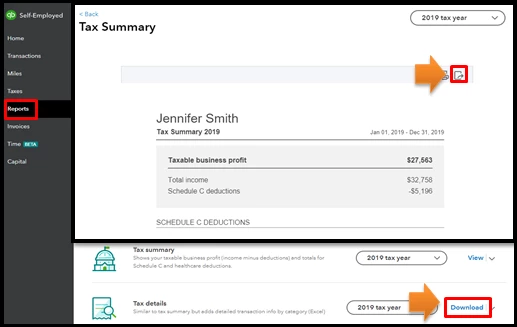
- Go to the Reports menu.
- Select the tax reports you want.
- Click the Download link or the export icon to continue.
![]()
Also, you can visit our QuickBooks Blog page to keep up with the latest news and product updates.
Lastly, you can cancel your QuickBooks Self-Employed subscription in case you no longer need it.
You're always welcome to comment back if you have some follow-up questions regarding this. I'd be glad to answer them for you. Have a good one.

