May 3, 2021
Solved

Income & Expenditure per Class shows wrong balance

  • May 3, 2021
  • 1 reply
  • 0 views

When I run a report of income and expenditure by class, the total for each class is wrong in that sales receipts are added to expenditure.  So a sales receipt of £50 and an expense of £16.20 should show a total of £33.80, but it shows £66.20. 


I must have something basic not set up correctly ?

Best answer by DivinaMercy_N

I just ran a class report in QBO and same issue. This is not ok and should be fixed. That is the beauty of class reports. (Desktop version does this correctly.) The one "expense" item that was subtracted was actually attached to the income account.


I've got your back, sooverit2. Here's everything you need to know about running a report by class in QuickBooks Online (QBO). 


When you pull up a Class QuickReport in QBO, the total amount per class item is the sum of all transactions regardless of the type. This is why you see that it adds up all the amount of your transactions and subtract only the negative one. To know more information, please check out this article: Run reports by class.


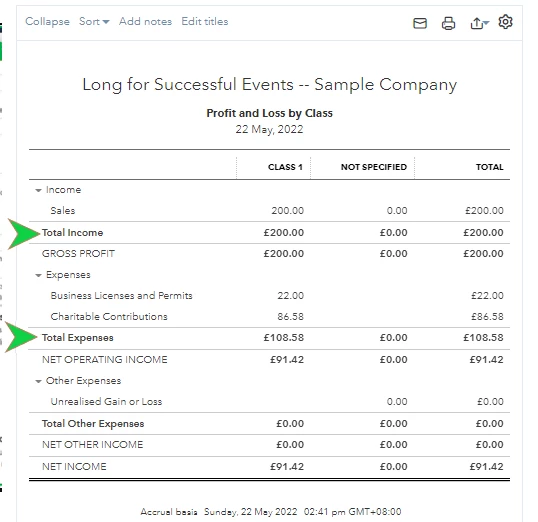
If you want to monitor the total amount of your income and expense accounts per class, you can run the Profit and Loss by Class report instead. This group all the expenses and incomes separately to easily view the totals. To do so, refer to the outlined steps provided by my colleague, Angelyn_T above. Please see the screenshot below for visual reference:
 

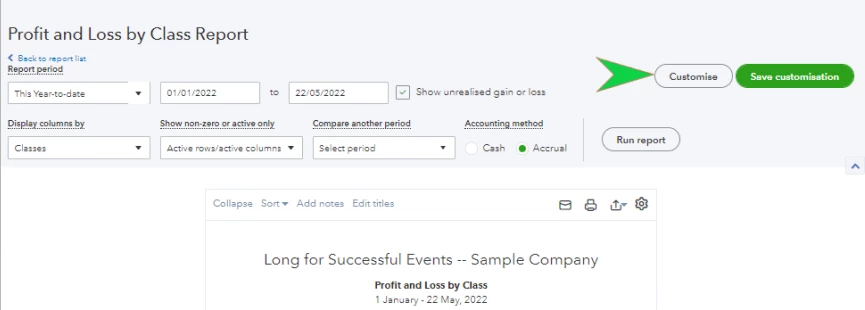
Customising reports in QBO is a breeze. This will further help you easily view the necessary details within a specified time frame. Not just that, the program also allows memorising the modification made for future use. To get started, simply click the Customise button located at the upper part of the page. 
 

It's my top priority to ensure all your queries are taken care of. In case you have additional questions about running a report by class or any QBO concerns, leave a comment below. I'll take every opportunity to help. Have a great week ahead. 

1 reply

DivinaMercy_N
May 5, 2021

Welcome to the Community, @Moray Baby Bank.


I got steps to help you fix the incorrect balance on your Income & Expenditure by Class report. To start, let's first check the expense transaction. Let's make sure that you create this as an Expense or Bill and not a Deposit. To easily locate it, let's run a QuickReport for the specific class:


  1. Go to the Gear icon and choose All lists.
  2. Click Classes.
  3. Find the class you assigned the Sales Receipt and Expense transactions.
  4. Click the Run report
  5. Set the correct date you've created the transactions.
  6. Look for the transaction that shows as Expense. If you see a Deposit this might be the reason why the balance shows as £66.20 instead of £33.80. 
  7. Check the details. 


If the transaction amounting to £16.20 is correctly created as an Expense, your report should have the correct data. If it's created as a Deposit, let's delete and recreate it as an Expense or Bill. Here's how:


  1. Take note of the details of the transaction before you proceed.
  2. Select the More button.
  3. Choose Delete.
  4. Then, Yes
  5. Next, recreate the transactions as Expense or Bill.
  6. Go to the +New menu and choose Expense.
  7. Enter the needed details such as the Payee, DateAmountClassCategory, etc.
  8. Once done, click Save and close.


When finished, let's check again your Income and Expenditure by Class report. Simply go to the Reports tab, scroll down to the Business overview section and click Profit and Loss by Class report. 


Also, QBO can help you personalise and include only the details you need when running financial reports. See this article for guidance: Customise reports in QuickBooks Online


Feel free to get back here if you need further assistance correcting the balance of your Income & Expenditure per Class report. I'll be around to help. Keep safe. 

May 7, 2021

Hello:


I have checked as you suggested and the expense is created as an expense and not a deposit.  Please attached screenshot.


As you can see I have a sales receipt for £200 and an expense for £200, so the balance should be £0, not £400.


Thank you

May 7, 2021

Hello Moray Baby Bank, Thank you for your response, we are unable to see the attachment on the post could you try uploading that again in your reply? Thank you.
