May 1, 2022
Solved

My accounts in Quickbook have USD as my home currency. I need to translate the financial statements into GBP, can I do this automatically with Quickbooks Online?

  • May 1, 2022
  • 2 replies
  • 0 views
Original commenter did not share additional details

Best answer by jamespaul

Hello, userddb.


In addition to Fiat's suggestion, I have a way to help you show the GBP value on your financial statements. 


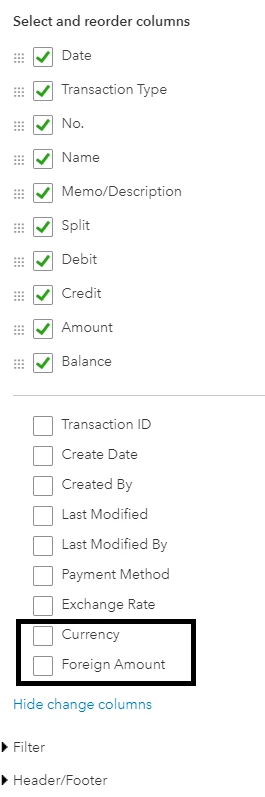
Fiat is correct. The reports will always generate the currency value based on your home currency. Although, we can add columns that'll let us see the GBP value of the transactions on reports. Here's how to do it:
 

  1. Pull up a report (we can use the Balance Sheet Detail as an example). 
  2. Click the Customise button.
  3. Expand the Rows/Column section.
  4. Click Change columns
  5. Check the Currency and Foreign Amount options (if needed, we can also add Exchange Rate). 
  6. Add other customisation options if needed. 
  7. Once done, click Run report


Keep in mind that not all reports have this option. For example, the Detail type reports have this but the Summary types don't. 


Also, this works if you've used GBP (and other currencies) on your transactions. 


Although, this might not work if we deal entire with USD for the transactions. So, we'll want to consider Fiat's option in using a third-party application. 


We can also search for other app options here: https://quickbooks.intuit.com/app/apps/home (make sure to change the flag to UK for UK-only apps). 


Need help utilising other options on the Reports feature? Check out this article for a guide: Run reports in QuickBooks Online.


If we're ready to reconcile your accounts for the next period, we have an article that'll help us do the process smoothly: Reconcile an account in QuickBooks Online.


Drop by here if you have other questions about running reports or managing your currencies in QuickBooks Online. Want to record other entries? Let me know and I'll guide you through the process. 

2 replies

Fiat Lux - ASIA
May 1, 2022

Are you using QBO US version and USD as the home currency? Your reports will be generated in USD as the default currency. You may have to use the BI app if you need reports in another currency or purchase a third party conversion service to duplicate data to a new QBO account and set GBP as the home currency.

jamespaulAnswer
May 1, 2022

Hello, userddb.


In addition to Fiat's suggestion, I have a way to help you show the GBP value on your financial statements. 


Fiat is correct. The reports will always generate the currency value based on your home currency. Although, we can add columns that'll let us see the GBP value of the transactions on reports. Here's how to do it:


  1. Pull up a report (we can use the Balance Sheet Detail as an example). 
  2. Click the Customise button.
  3. Expand the Rows/Column section.
  4. Click Change columns
  5. Check the Currency and Foreign Amount options (if needed, we can also add Exchange Rate). 
  6. Add other customisation options if needed. 
  7. Once done, click Run report


Keep in mind that not all reports have this option. For example, the Detail type reports have this but the Summary types don't. 


Also, this works if you've used GBP (and other currencies) on your transactions. 


Although, this might not work if we deal entire with USD for the transactions. So, we'll want to consider Fiat's option in using a third-party application. 


We can also search for other app options here: https://quickbooks.intuit.com/app/apps/home (make sure to change the flag to UK for UK-only apps). 


Need help utilising other options on the Reports feature? Check out this article for a guide: Run reports in QuickBooks Online.


If we're ready to reconcile your accounts for the next period, we have an article that'll help us do the process smoothly: Reconcile an account in QuickBooks Online.


Drop by here if you have other questions about running reports or managing your currencies in QuickBooks Online. Want to record other entries? Let me know and I'll guide you through the process.
