June 8, 2023
Solved

add footer to management report

  • June 8, 2023
  • 1 reply
  • 0 views

Hi there

Is there a way to have footers that appear in custom reports to show up when those reports are pulled into a management report? I love this management report feature - especially the ability to click on a page number in the table of contents to get to a specific report.

I see in the Basic Company Financials management report provided by Intuit, the name of the company appears in a footer. How did that happen and can I replicate it?

Thanks so much.

Best answer by ChristieAnn 11

Hi there, newyorktutor.


I appreciate you for coming back to the thread and adding clarification about the steps above. I'll share a screenshot and troubleshooting steps so you can find the ADVANCED option in QuickBooks.


You can view the attached picture below for visual reference.
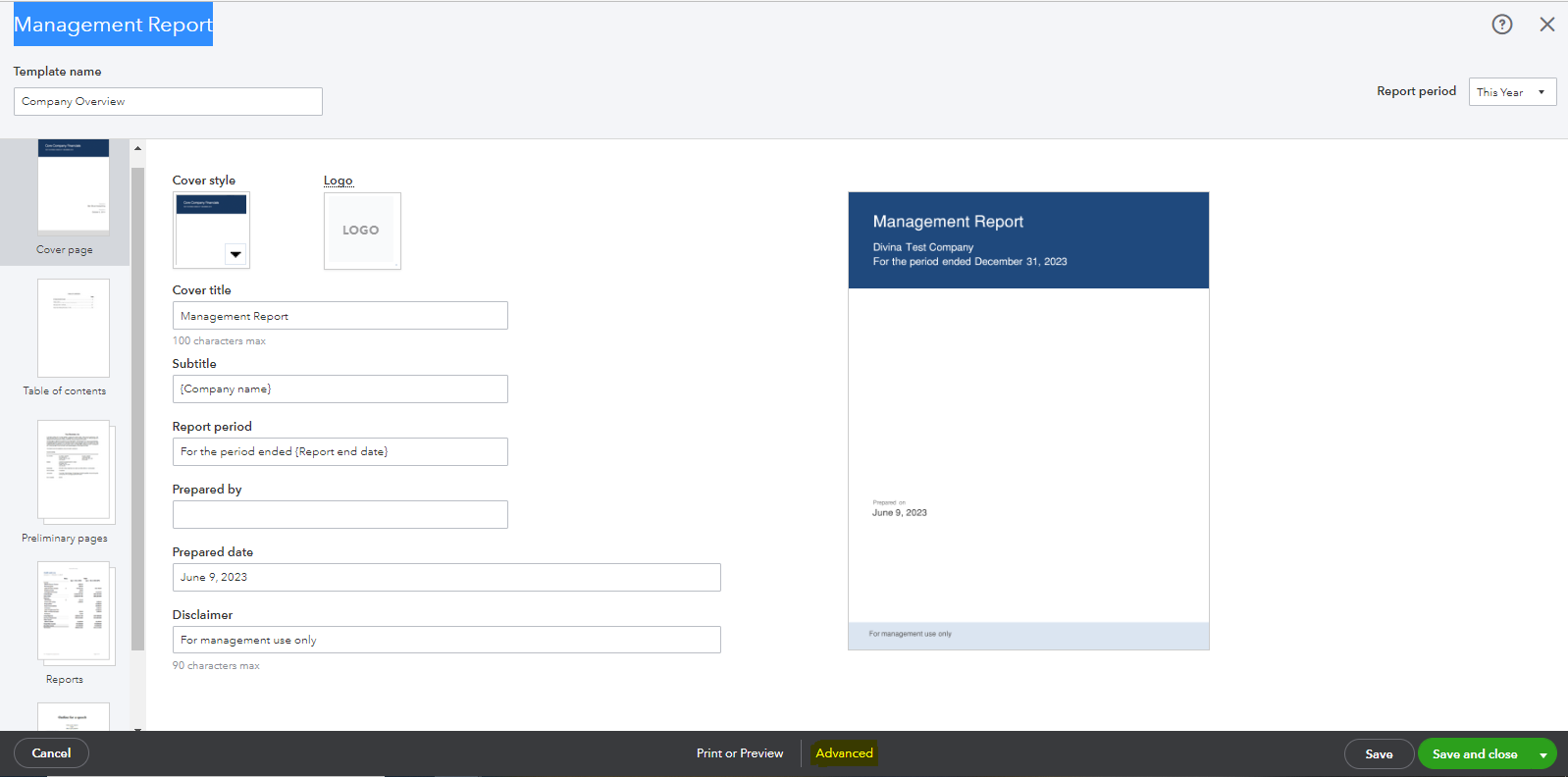


However, if you're still unable to see the said option, I recommend logging into your QBO account on a private browser and going to the Management Report from there. This is to rule out the possibility of a webpage issue that might cause unexpected behavior.


Use these keyboard shortcuts based on the browser you're using:


  • For Firefox or Microsoft Edge, press Ctrl + Shift + P.
  • For Chrome, press Ctrl + Shift + N.
  • For Safari, hold down Command + Shift + N.


If it works in incognito, I suggest clearing the cache of your regular browser. This removes the history or log of sites so you can start with a clean slate. If the steps above don't work, use another supported browser as an alternative.


Lastly, I'm adding this if you need help in printing, emailing, and exporting reports so you have a backup copy of your data in QuickBooks: Run reports in QuickBooks Online.


Feel free to click the comment section below if you have other concerns with regard to managing reports in QBO. I'll be sure to get back to you. Have a good one, newyorktutor.


1 reply

June 8, 2023

Hello newyorktutor, 


Nice to see you here in the QuickBooks Community! I am happy you love the management report feature. Yes, you can edit the Management Report footer to have that replicated. Here's how:


  1. From Management reports, select the Action dropdown for a report, then choose Edit.
  2. You can change the Template name or the Report period on the screen that appears. Other options are in different sections you can select from the side panel.
  3. In Advanced, you can select the Footer option and make the edit.
  4. When finished, select Save and close.


I am adding this link so you can see all your options when it comes to viewing and editing your management report. Let me know if you have any other concerns! I will be around to help. 


June 10, 2023

Thank you, Sasha. I follow you up until Step 3. I can't find an ADVANCED option. Is it possible to send me a screenshot?

Appreciate your time

June 10, 2023

Hi there, newyorktutor.


I appreciate you for coming back to the thread and adding clarification about the steps above. I'll share a screenshot and troubleshooting steps so you can find the ADVANCED option in QuickBooks.


You can view the attached picture below for visual reference.


However, if you're still unable to see the said option, I recommend logging into your QBO account on a private browser and going to the Management Report from there. This is to rule out the possibility of a webpage issue that might cause unexpected behavior.


Use these keyboard shortcuts based on the browser you're using:


  • For Firefox or Microsoft Edge, press Ctrl + Shift + P.
  • For Chrome, press Ctrl + Shift + N.
  • For Safari, hold down Command + Shift + N.


If it works in incognito, I suggest clearing the cache of your regular browser. This removes the history or log of sites so you can start with a clean slate. If the steps above don't work, use another supported browser as an alternative.


Lastly, I'm adding this if you need help in printing, emailing, and exporting reports so you have a backup copy of your data in QuickBooks: Run reports in QuickBooks Online.


Feel free to click the comment section below if you have other concerns with regard to managing reports in QBO. I'll be sure to get back to you. Have a good one, newyorktutor.