

February 8, 2020
Solved

Add new IRS mileage rate (Desktop QuickBooks)

  • February 8, 2020
  • 1 reply
  • 0 views

I need to enter the 2020 IRS business mileage rate in desktop QuickBooks so it can calculate mileage costs to be reimbursed.  I click on Company > Enter vehicle mileage > click on the "Mileage Rates" tab at the top; a new window displays a 7-row table with the last 7 years' start dates and mileage rates.  If I enter the 2020 rate in the top row, where the cursor is automatically positioned, the 2020 rate replaces 2019 rate, which I don't want to do.  I don't want to lose ANY of the rates from previous years.  So how do I add a new rate for 2020 without losing a previous year's rate?  There's no blank row at the top (or bottom)... Does the table only have a maximum of 7 rows?
Best answer by ShiellaGraceA

Hi @Dillopk,


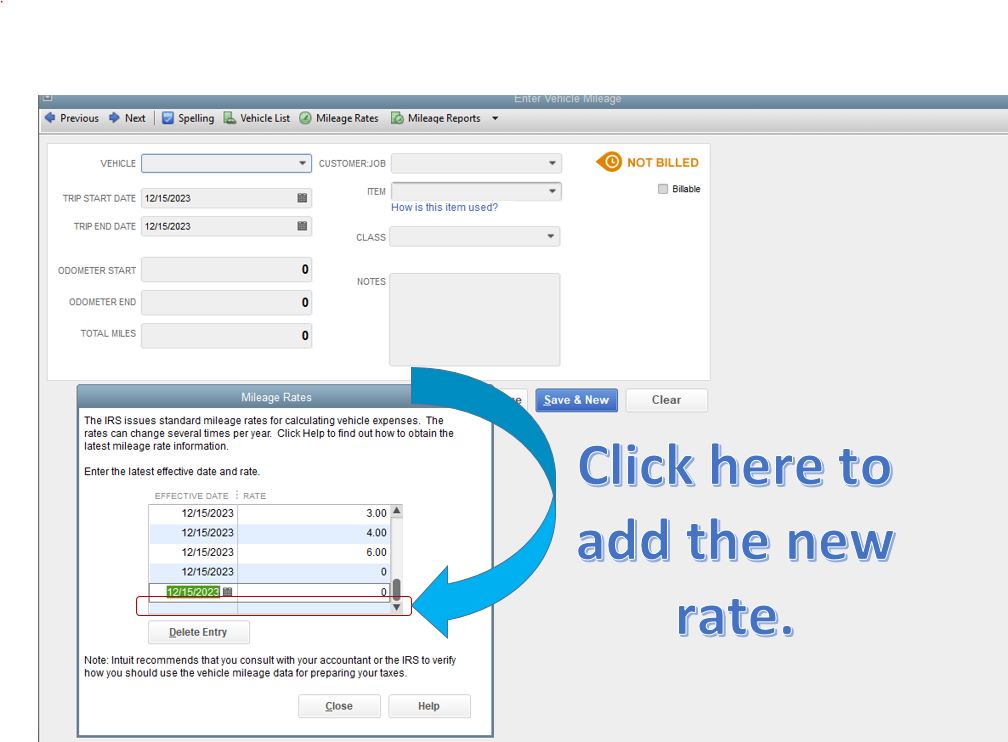
You'll have to click on the last row to add your latest mileage rate. Let me walk you through the steps.


  1. Go to Company, Enter Vehicle Mileage, then Mileage Rates.
  2. Click on the space row after your last rate and then add the new Effective Date and Rate (see attached screenshot below.)
  3. Tick Close.

On the other hand, you can add as many rows as you can in the Mileage Rates window. Just use the sidebar to scroll up and down.


For more in-product help articles about vehicle mileage, press F1 on your keyboard and type "Mileage" in the Search field.


I'd be around if you have other questions about QuickBooks. Thanks for dropping in and happy weekend.


1 reply

February 8, 2020

Hi @Dillopk,


You'll have to click on the last row to add your latest mileage rate. Let me walk you through the steps.


  1. Go to Company, Enter Vehicle Mileage, then Mileage Rates.
  2. Click on the space row after your last rate and then add the new Effective Date and Rate (see attached screenshot below.)
  3. Tick Close.

On the other hand, you can add as many rows as you can in the Mileage Rates window. Just use the sidebar to scroll up and down.


For more in-product help articles about vehicle mileage, press F1 on your keyboard and type "Mileage" in the Search field.


I'd be around if you have other questions about QuickBooks. Thanks for dropping in and happy weekend.


January 4, 2021

I went through the above steps but QB is still charging the 2020 rate.