November 11, 2022
Solved

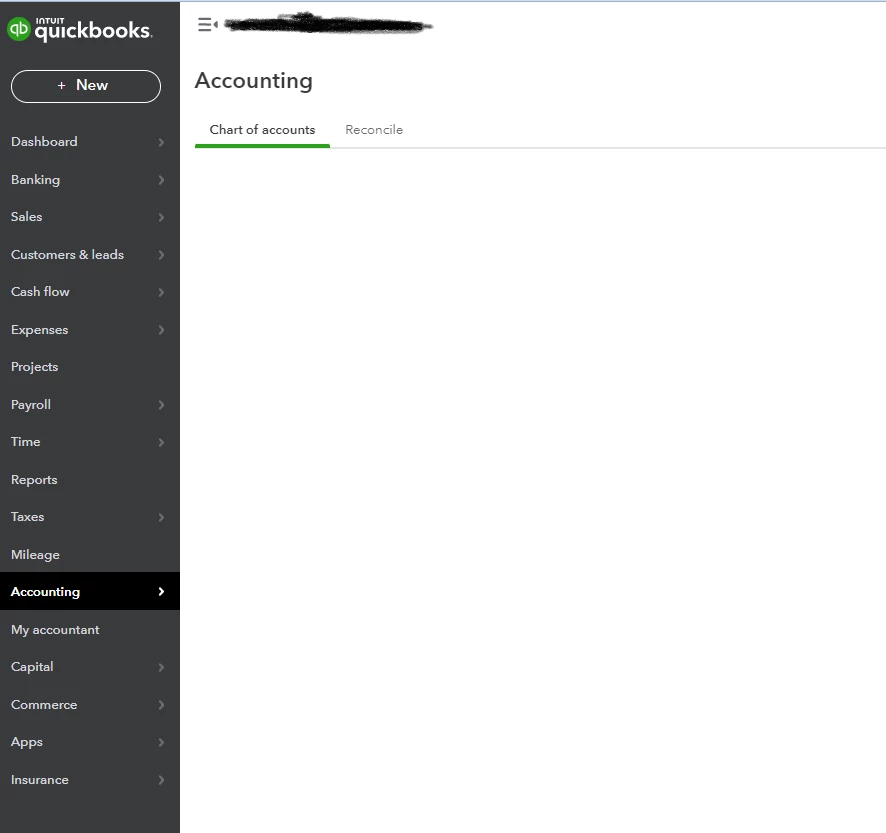
Blank Chart of Accounts

  • November 11, 2022
  • 1 reply
  • 0 views

New issue that I think started within the last 2 days.  When I click on Accounting/Chart of Accounts, sometimes the entire Chart of Account list is gone...nothing there.  If I logout & back in, sometimes my COA reappears. Software bug or user error?

Best answer by Rubielyn_J

Let me provide some insights about a blank page in your Chart of Accounts, @BoosterMom.


There are times when the browser is full of frequently accessed page resources, which causes some errors or unusual responses. We can perform some troubleshooting steps to fix this. Let's start accessing your account using a different or private browser. You can use either of these shortcut keys:


  • Google Chrome: Ctrl + Shift + N
  • Mozilla Firefox: Ctrl + Shift + P
  • Microsoft Edge: Ctrl + Shift + P
  • Safari: Command + Shift + N


Once it shows data in the Chart of Accounts page, go back to your regular browser and clear its cache. This is done to speed up the process the next time you do a transaction in QuickBooks Online. Also, an alternative way is to use other compatible browsers.


I've also attached some articles you can refer to for your future guidance in managing your Chart of Accounts:


Feel free to leave a comment below if you have any other questions about adding blank data in your Chart of Accounts. I'm always here to help. Wishing you and your business continued success.


1 reply

Rubielyn_J
November 11, 2022

Let me provide some insights about a blank page in your Chart of Accounts, @BoosterMom.


There are times when the browser is full of frequently accessed page resources, which causes some errors or unusual responses. We can perform some troubleshooting steps to fix this. Let's start accessing your account using a different or private browser. You can use either of these shortcut keys:


  • Google Chrome: Ctrl + Shift + N
  • Mozilla Firefox: Ctrl + Shift + P
  • Microsoft Edge: Ctrl + Shift + P
  • Safari: Command + Shift + N


Once it shows data in the Chart of Accounts page, go back to your regular browser and clear its cache. This is done to speed up the process the next time you do a transaction in QuickBooks Online. Also, an alternative way is to use other compatible browsers.


I've also attached some articles you can refer to for your future guidance in managing your Chart of Accounts:


Feel free to leave a comment below if you have any other questions about adding blank data in your Chart of Accounts. I'm always here to help. Wishing you and your business continued success.
March 16, 2023

Thanks - clearing the browser cache worked for this problem.

MariaSoledadG
March 16, 2023

Hello BoosterMom, 


I'm glad the steps above have fixed the issue. Anyway, if there's anything else that you'd like to help us with, let us know so we can help you as soon as possible. The Community is always here to further assist you 24/7.