
July 17, 2020
Solved

Budget figures not showing in reports.

  • July 17, 2020
  • 2 replies
  • 0 views

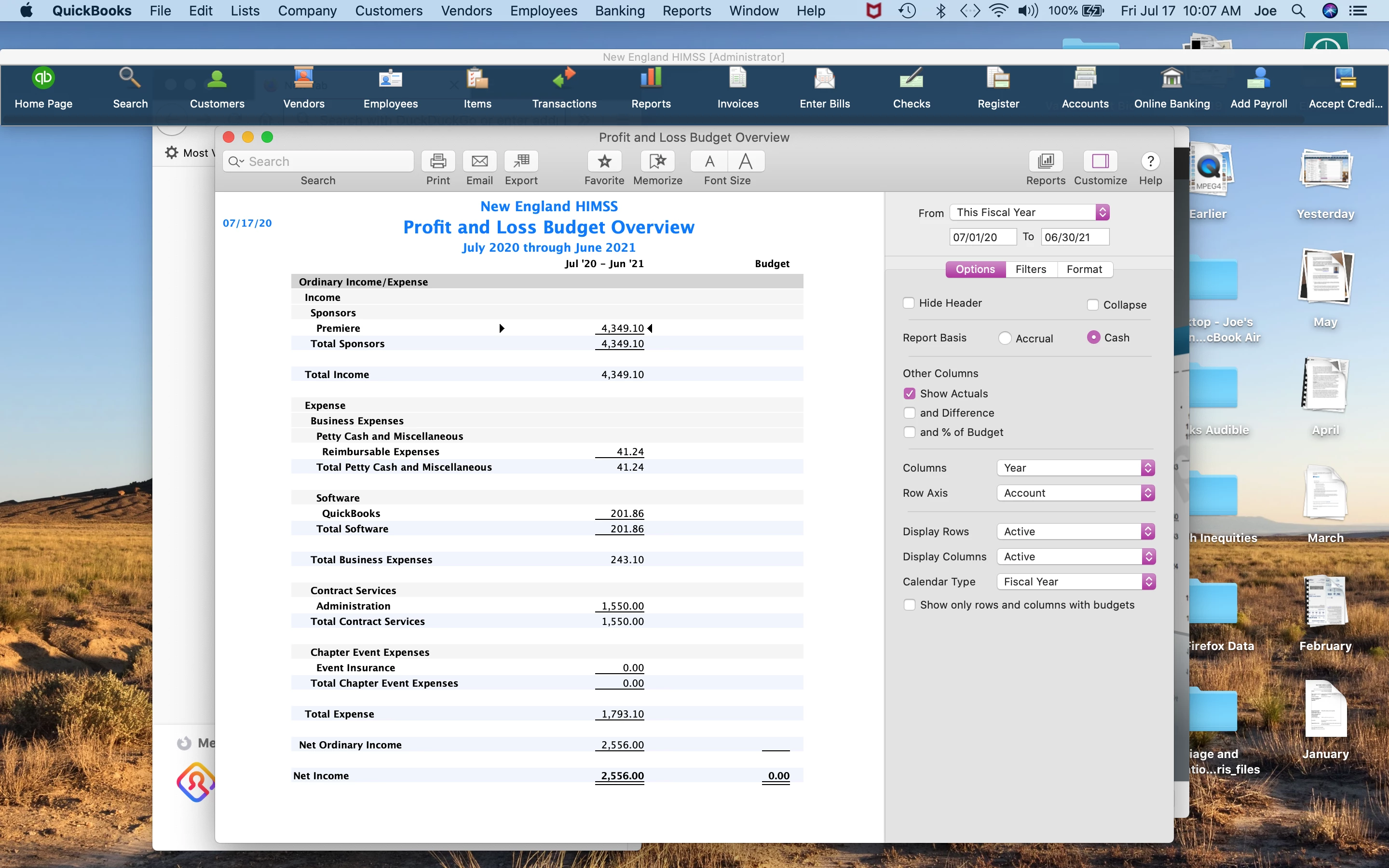
I am new to QB for Mac.  I created a budget, but I did something wrong and budget figures do not show in any reports.  Actuals do show. 
 

Best answer by Adrian_A

Thank you very much.  My version of QB for Mac 2020 is up to date with 19.0.4.860 R5.1.  I could try re-installation if you so advise me.  I tried chatting several times last week.  On Friday, I waited from 3PM to 6PM Pacific time, but chat never started.  I did not find an opportunity for a call back.  I had hoped to have this fixed by Monday morning when I am supposed to present the final budget.  I do not think that will work out.


I appreciate you for trying to reach ou to our Chat Support team, joeheymanb.


Before reinstalling the program, let's verify first how you set up the budget. In QuickBooks, all expense and income accounts in the Chart of Accounts will reflect in the Budget Reports. The data, however, depends on how you set up the budget.


First, make sure the correct Fiscal Year is used for reporting. To check if it matches your company settings, follow the steps below:


  1. From the Company menu, select My Company.
  2. Click the Pencil icon and choose Report Information.
  3. Go to the First month in your fiscal year field to see if the correct month is selected. Update if necessary.
  4. Hit OK to save the changes.


Next, if the information is correct and there are still missing data, double-check if these income and expense accounts have budgeted amounts entered. Fill in any empty fields.


If you did all these and still haven't got any positive outcome, you can recreate the budget for the same Fiscal Year. Then, launch a new Budget vs. Actual report to compare if it does the same thing. Follow the steps in this article to set up a new one: Create a budget or forecast in QuickBooks Desktop.


Delete the old budget report using these steps:

  1. Go to the Company menu, choose Planning & Budgeting, and then click Set Up Budgets.
  2. Click the Budget drop-down list and choose the budget that you want to delete.
  3. Additionally, you can specify the Class or Customer:Job if necessary.
  4. Go to the Edit menu found at the top toolbar, and click Delete Budget.
  5. Press Yes to confirm the action.


If you want some tips when running a budget report, you can check this article: QuickBooks Desktop Mac 2020.


There you have it, joeheyman. Let me know how these steps work on your end. I'm always here to help. Have a great day!

2 replies

joeheymanAuthor
July 17, 2020

Here is a screenshot of the budget itself.

Tori B
July 17, 2020

Hey there, @joeheyman


Let's get your budget figures working correctly. 


You may be experiencing some data-integrity issues that could be preventing your budget figures from showing. Let's try running a Rebuild and Verify to scan and resolve the errors in the file. I've included the steps to do this below. 


Verify Data:


  1. From the File menu, select Utilities, then Verify.  
  2. Hit OK to close all windows for the Verify to begin. 

Rebuild Data:


  1. Open the File menu again, click on Utilities, the Rebuild
  2. Hit OK to close all windows.
  3. QuickBooks will ask to create a back up first. You can choose to Cancel if you wish to continue without a backup. 


For additional details, check out Verify and rebuild data in QuickBooks Desktop for Mac


Let me know the results of your Verify and Rebuild. I look forward to your reply. Feel free to reach out to the Community any time. Have a wonderful weekend! 


joeheymanAuthor
July 17, 2020

Thank you for trying.  VERIFY said all was OK.  REBUILD went without a hitch.  The report is unchanged!  Previously, I thought perhaps I could not have budget figures in a category if the subcategory had figures in it, so I removed all figures from the top categories whenever there were subcategory figures, but that did not work.  I am at wit's end!

joeheymanAuthor
July 18, 2020

I now removed all subcategory figures and only the top categories have figures in them.  IOt still does not work.  No report will display budget figures.  What else can I try?

