November 18, 2019
Solved

Budget vs Actual Report

  • November 18, 2019
  • 2 replies
  • 0 views

We are using the Non-Profit Version and when we run the above report, it includes the inactive accounts.  The other reports omit the inactive accounts.  


Is there a way or fix to hide the inactive accounts in the Budget vs Actual Report?


Thanks in advance from Texas!

Best answer by Charies_M

Welcome to the Community, Reader13.


You can customize what specific type of accounts (e.g. All accounts and Multiple accounts) you'd want to show on the Budget vs. Actual report. However, excluding inactive accounts is not yet an option.


Here's a good article that you can check to know more about reports in QuickBooks Desktop: Understand reports.


I can see how this option gives convenience for you and to all other users who shares the same goal. That said, I'll be sure to relay this idea to our product developers for consideration in future updates.


For now, I encourage you to check our QuickBooks New Features to be updated of the latest product enhancements.


Here's how:

  1. Go to Help.
  2. Click New Features.
  3. You can either choose New Feature Tour or What's New.
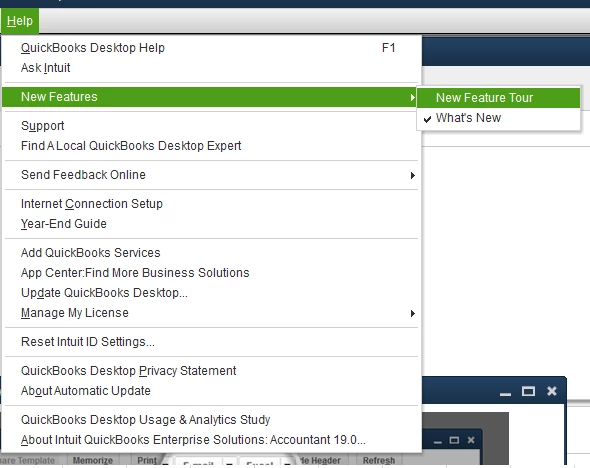
 

I also suggest you regularly check out our most recent product updates through this link: https://www.firmofthefuture.com/product-industry-news/product-updates/.


You can always reach back to me for any questions. It's always my pleasure to help. Have a good one.


2 replies

Charies_MAnswer
November 18, 2019

Welcome to the Community, Reader13.


You can customize what specific type of accounts (e.g. All accounts and Multiple accounts) you'd want to show on the Budget vs. Actual report. However, excluding inactive accounts is not yet an option.


Here's a good article that you can check to know more about reports in QuickBooks Desktop: Understand reports.


I can see how this option gives convenience for you and to all other users who shares the same goal. That said, I'll be sure to relay this idea to our product developers for consideration in future updates.


For now, I encourage you to check our QuickBooks New Features to be updated of the latest product enhancements.


Here's how:

  1. Go to Help.
  2. Click New Features.
  3. You can either choose New Feature Tour or What's New.


I also suggest you regularly check out our most recent product updates through this link: https://www.firmofthefuture.com/product-industry-news/product-updates/.


You can always reach back to me for any questions. It's always my pleasure to help. Have a good one.

July 26, 2022

Hello, 

Has there been any updates here?

This feature would be really helpful.

Thanks,

July 26, 2022

Hello,

We're also experiencing the same issue.

Has QuickBooks addressed this yet?

Thanks,

July 26, 2022

I appreciate you for checking this with us, PHFgive.


As an update, the option to remove the inactive accounts in the Budget vs. Actual report is still unavailable. The Profit & Loss Budget vs. Actual report by default shows all the accounts (active or inactive) associated with the budget in a given period. While there isn't a way we can filter it to remove the inactive accounts, you can export the report and manually remove the inactive accounts.


To do this, just click the Excel button and choose to Create New Worksheet.


In case you encounter issues when exporting the report, you can visit this article for the steps on how to fix it: Fix export to Excel issues in QuickBooks Desktop.


You may also find these resources helpful when managing reports in QuickBooks Desktop:

We continue making improvements with the product and while doing so, I want you to be updated with the new features added in the software. Kindly visit this link for more information: QuickBooks Updates: New QuickBooks Accounting Software Updates.


Please leave a comment on this thread if you need anything else. We are always around to help you some more. Take care.