Thank you for your prompt reply, @HollyJoy. Let me share some information with each of the details you need.
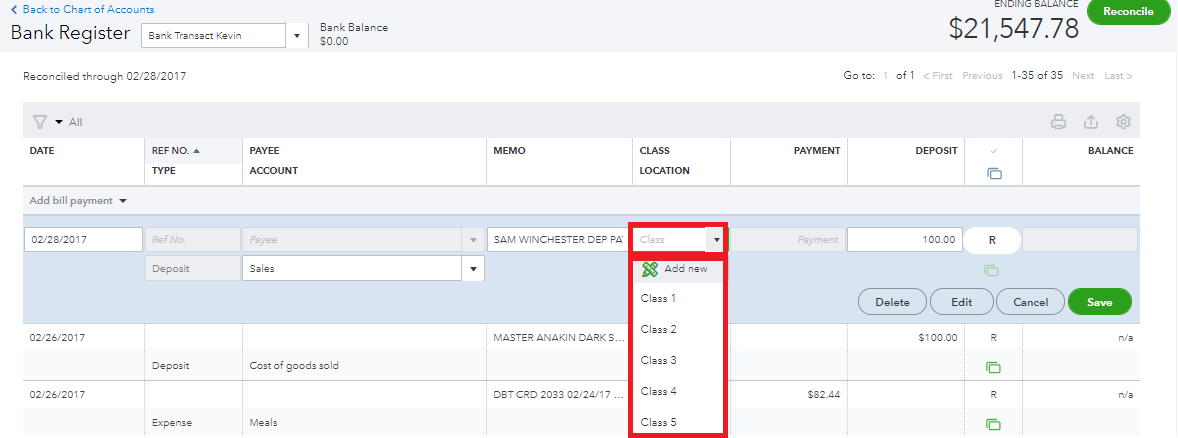
Here's how you can connect classes to each of your accounts in the chart of accounts:
- Go to Chart of Accounts from the Accounting menu.
- Find the account register you want to review, then select View register from the Actions column.
- Select the transactions that you want to connect with classes.
- Then choose your specific class for that transaction under Class Location.
Follow these steps to be able to run a report for "Class 1 - Worship" that has 12 expense accounts:
- Go to Profit and Loss by Class from the Reports menu.
- Click on the associated amount of your expense account to show your transactions.
To go through with your year-to-date and add class IDs to past bills, you can manually include the class in the existing bills or transactions.
Importantly, make sure you have created a budget before running a Budget vs. Actual by Class report.
Furthermore, you can also check out this article to learn more about running a report in QuickBooks Online.
Please feel free to post a question in the comments below if you have anything else in mind. I'll be sure to get back to you. Have a great day!

