


ljtaylorsales
January 12, 2021
Question

Build Assemblies and Cost of Goods Sold

  • January 12, 2021
  • 5 replies
  • 0 views

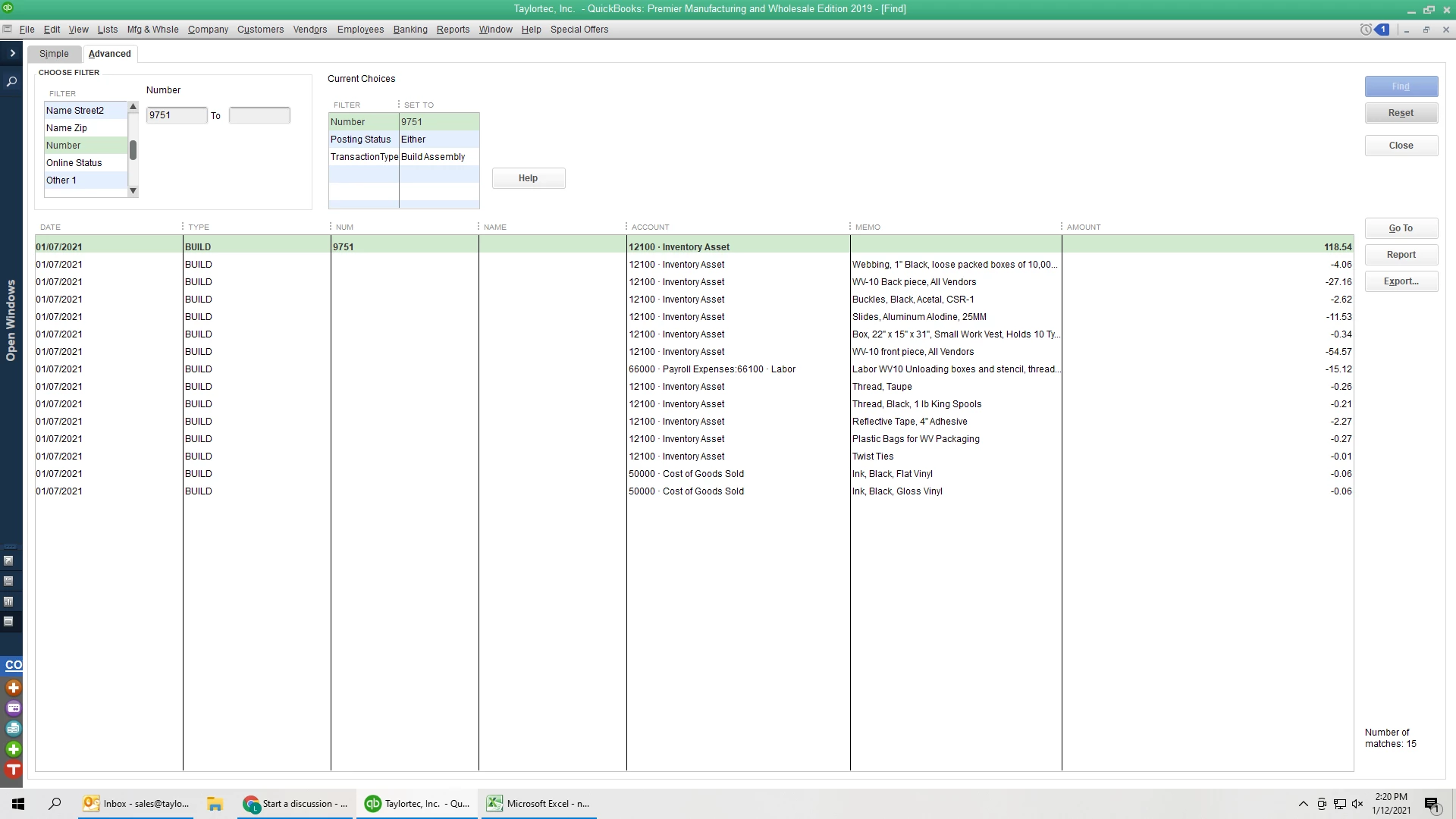
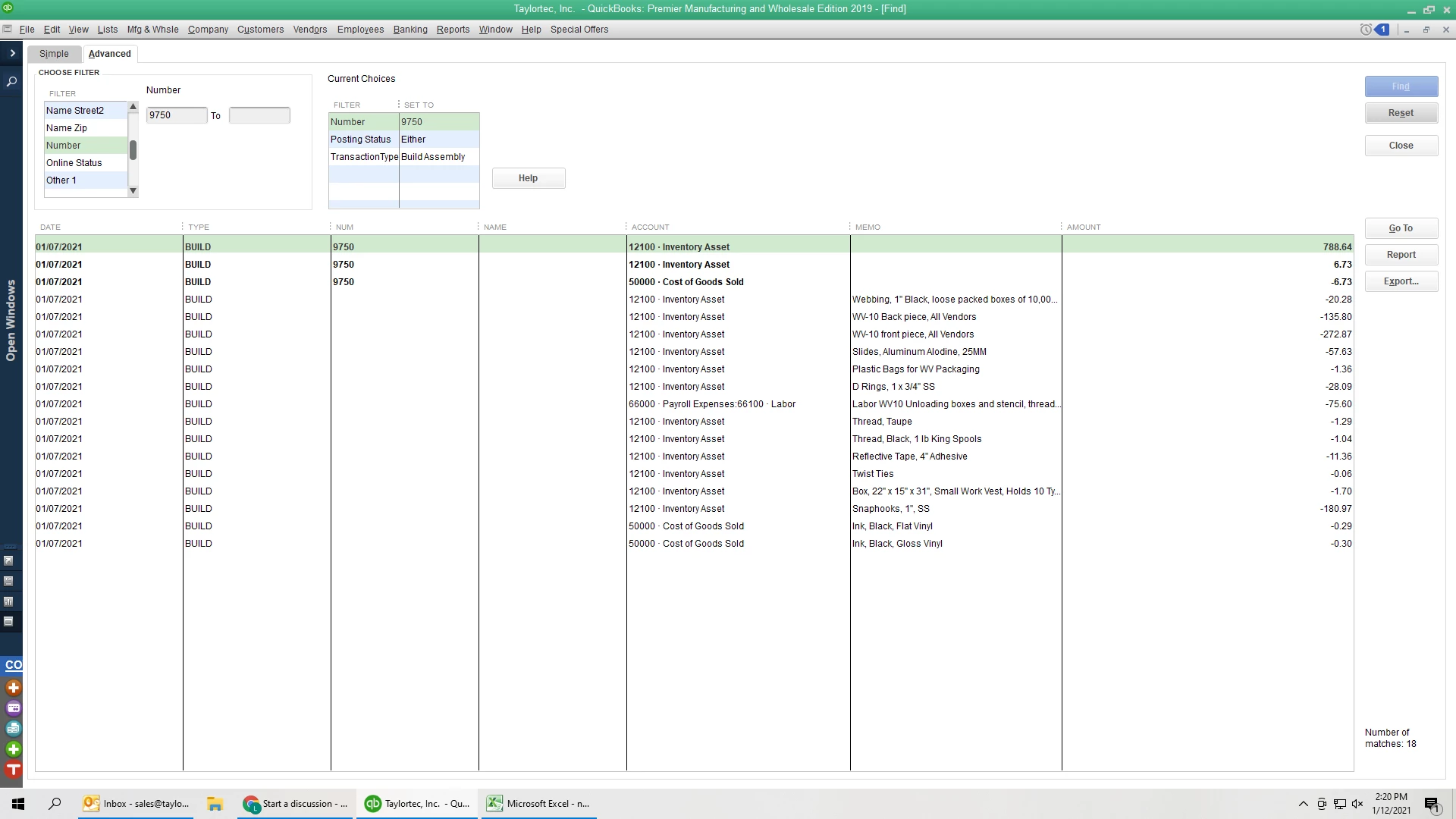
Hi, I notice that one of my Assembly Builds (2nd photo, build #9750), increases not only the Inventory Assets, but also the Cost of Goods Sold account. An almost identical Assembly build (1st photo, build # 9751), only increases Inventory Assets. I did not create the system so I don't know where to find where these accounts were set up? Plus I don't understand why the COGS account is being altered. Note that the quantities to build for each item are different. But I am just confused about the different accounts. Please let me know what other info I can provide!


5 replies

ljtaylorsales
January 12, 2021

To follow up, I looked into whether it was happening for other Assembly Builds and it is, so now I'm just confused why sometimes a Build will only credit the Inventory Asset account, but other times it credits that and debits from COGS account. What compels the system to do this? In this screenshot it's for one Assembly Build, showing the most recent Builds. You can see some Builds are single lines, while others list 3 lines showing the various debits and credits I'm speaking of. Can someone explain please? Thank you!

JenoP
January 12, 2021

Thanks for sharing a screenshot of your QuickBoks, ljtaylorsales.


The amount in the COGS account usually increases when an item is sold, and not when an assembly is build. The Inventory Asset account on the other hand is automatically created by QuickBooks and will increase once you purchase an inventory item. More details about these accounts are discussed here: Understand Inventory Assets And Cost Of Goods Sold Tracking.


A possible data issue might have also caused the the increase when an assembly is made. I'll share some steps with you that can resolve common data issues in QuckBooks Desktop. Here's how:


Run the Rebuild Utility

  1. Go to the Utilities menu, then select Rebuild Data.
  2. Select OK if you receive a prompt to back up your company file.
  3. Click OK when you get the message Rebuild has completed and proceed with the next step.

Run the Verify Utility

  1. Go back to the File menu, select Utilities, and then click Verify Data.
  2. Select OK when you see the message QuickBooks detected no problem with your data. You may continue using your company file.
  3. If Verify finds an issue with your data, you will be prompted to Rebuild Now or View Errors. Select Rebuild Now.

Once done, go back to your inventory report to check if the COGS account is no longer debited when creating an assembly. 


Just in case you're still getting the same issue, I would recommend reaching out to the Technical Support Team. They can take a closer look at this to determine why the CGOS account is affected when building an assembly. Follow the steps in this article on how to reach out to them: Contact QuickBooks Desktop Support.


Please don''t hesitate to reach out to us again if you need anything else. 

ljtaylorsales
January 12, 2021

Hi, Ok I will read the article. Problem with rebuilding/ verifying data is this debiting COGS when I build an assembly happens everyday and we've had this system for years. If I rebuild data, won't I alter everything in my system? I cannot mess up my balance sheets because of tax reasons. So won't verifying data not work for me in this case?


Actually unfortunately I have called the Quickbooks desktop support multiple times and no one has been able to help and actually their answers are much worse and less helpful. The two people I have talked to have very little understanding of what I'm asking :( which is confusing because I thought they were the top people to ask. Both just ended up trying to sell me an entire new QB system (that doesn't fix the problem). 


When I build assembly, the inventory increases $6.73 + an additional separate line item of $788.64. Meanwhile -$6.73 from COGS account. 

When I invoice for the items built, the inventory decreases $795.60 and COGS account is -$795.60. 

Doesn't seem balanced. 

Thanks

MaryLandT
May 14, 2021

I'm here to help associate the COGS account with the item, GrimmEricB.


Before building an assembly, you need to review the account used to track the inventory item. The Sales by Item Summary reports provides a recap of all item you've sold, over a period of time.


Please know that there are two additional fields when you create an item. Under the Purchase Information section, select the COGS account to track payments for the item. And, select an income account from the Sales Information area to  track the amount you earn from selling the item.


Then, choose an asset account in the Inventory Information. By default, QuickBooks automatically assign an account in this section. However, you can use a different one whenever you want.


Please refer to this link for additional information: Add, edit, and delete items. Then, click Create an item to learn how to associate accounts to an item.


Additionally, you need to select a COGS and Asset account when creating an inventory assembly to track bill of materials. You can refer to this article to learn how to products you manufacture: Set up your product’s bill of materials.


Upon sharing this, I still recommend consulting your account for specific instructions. Rest assured they can provide more details on which account to use when tracking your items.


I'm adding these articles to learn more about accounting side when you add an item in QuickBooks:

Keep me posted if you have follow-up questions about this. I'll be right here to provide the information that you need.

July 12, 2021

None of the answers in this stream actually answer the question of why a Build Assembly using all inventory parts would have an impact on COGS. The only actual answer is that it may be corrupt data. 

July 28, 2021

I was on the phone with Tech Support this week for two hours with the same problem.  After verifying and rebuilding numerous times, I was told it is not their problem.  They basically told me it is my problem with how I was building assemblies and to call my accountant.  When I explained it would stop and start crediting COGS they again said it is up to me to fix.

Toonces
August 6, 2021

The extra CoGS journal entries that occur sometimes when you do a build assembly are frustrating because it's not very clear on why QB would do that. You know that your GL accounts ( Asset, CoGS, Sales ) are correct for the Item, but why is QB adding an extra journal entry on the Build Assembly for CoGS. I wonder if the extra CoGS entry is a difference between the Cost of the BOM item and it's average cost? The extra CoGS entry on the Build Assembly seems like the result of QB reconciling some kind of fractional averaging issue by adding the extra CoGS journal entry. QB is deciding that not enough dollars have been accounted for in the current set of Build Assembly costs, thus QB adds the CoGS journal entry. 
The Transaction Journal report should simply be the result of the number of raw materials used times the average cost, but some times it seems like QB is adding that extra journal entry for CoGS. There should be NO CoGS entries in the Build Assembly function, but QB is reconciling automatically a fractional difference in averaging. I would like to see the algorhythm in QB for Build Assembly. 

October 13, 2021

I have a similar issue, and I read through all the comments (at least up to today) and none of those comments seem to solve the issue, however I gleamed pieces of helpful information and I believe I have solved the issue, let's find out. (Side note, I am using QB Desktop Enterprise (Silver-I think), Manufacturing and Wholesale. I have lots of Items that I use to build lots of Assembly items.)


I've received all the inventory required to Build my Item Assembly. All of the inventory was recorded to the appropriate Asset accounts for what I paid for them. In doing this, all of the Average Costs of the Items I received have also updated. Therefore, I have a difference between the cost of what I received, and the Average Cost of the Item. (For example, I received one of the items at $35.00 each, and the new average cost is now $35.27.) I also have a Service of $5.00 on my BOM for my Assembly Item.


I now Build my Assembly using the appropriate function in QB. It assigns a Number to the Assembly, 13099 and I pull a Transaction Detail by Account, filtered to Transaction Type "Build Assembly", and filtered to "Number" 13099. I can now see the JE booked for this build assembly. The asset accounts for the individual items are Credited for the Average Cost of $75.95, my Item that was built is debited for $80.95 into the appropriate asset account. That leaves a difference of $5.00, my Service Item. This is booked as a Credit to the COGS account set up with the Service Item. This JE is now in balance, but wait, the issue that we all complain about, I have another Debit in the COGS account of the New Item and a Credit in the COGS account of the New Item for $1.22. This is the difference between the Cost that I recorded the Inventory at when I purchased it (for example the $35.00 for the item I mentioned above), and the Average Cost (which is $35.27 for that same item) that QB calculated when I recorded the purchase. (Remember, my example amount of what I received in inventory was just for 1 of the many inventory items in my Assembly Item. So, my example of $35.00 is for just that item, and $1.22 is the total of the difference for all my items in the Assembly Item.)


So there it is, the annoying COGS entry that seems to inflate COGS values is moving actual cost from the asset account to average cost on the P&L. (Notice it does this for the Service account, even if it is not sold yet.)


The best way I've come up to "minimize" this crazy JE is to create a new Item each time I receive the same product from the same vendor but with a different price. I do this by defining an Item Number as "type-model-coating-vendor(2-digit abbreviation)-dollar(rounded up to whole dollar)". Then I use the "Where Used" function in the "Activities" section of the Item to update all of the Item Assemblies for my builds. I hope this helps.

March 27, 2025

I'm sorry but I don't agree that this solves the problem.

Candice C
March 27, 2025

Good evening, @dvisco


We appreciate you coming on this thread and letting us know some of these steps didn't work for you. 


Since my colleague's instructions didn't work for you, I recommend contacting our Customer Support Team for further assistance. 


Here's how: 


  1. Go to the Help menu. 
  2. Press the QuickBooks Desktop Help option. 
  3. Tap the Contact Us button. 
  4. Enter your question and hit Let's talk
  5. Scroll down and choose to Get a callback


Please keep us updated on how the call goes. We want to ensure that you get this taken care of as soon as possible. Have a great day! 

Toonces
May 6, 2025

Take a look at the average cost for the items in the build assembly. Look at the Item on the Item List and note the average cost. The build assembly journal entry attempts to balance to that cost amount. The small CoGS amounts you see when creating a Build Assembly might match that difference. Please let me know what you discover!